FabCon is coming to Atlanta
Join us at FabCon Atlanta from March 16 - 20, 2026, for the ultimate Fabric, Power BI, AI and SQL community-led event. Save $200 with code FABCOMM.
Register now!- Power BI forums
- Get Help with Power BI
- Desktop
- Service
- Report Server
- Power Query
- Mobile Apps
- Developer
- DAX Commands and Tips
- Custom Visuals Development Discussion
- Health and Life Sciences
- Power BI Spanish forums
- Translated Spanish Desktop
- Training and Consulting
- Instructor Led Training
- Dashboard in a Day for Women, by Women
- Galleries
- Data Stories Gallery
- Themes Gallery
- Contests Gallery
- Quick Measures Gallery
- Notebook Gallery
- Translytical Task Flow Gallery
- TMDL Gallery
- R Script Showcase
- Webinars and Video Gallery
- Ideas
- Custom Visuals Ideas (read-only)
- Issues
- Issues
- Events
- Upcoming Events
To celebrate FabCon Vienna, we are offering 50% off select exams. Ends October 3rd. Request your discount now.
- Power BI forums
- Forums
- Get Help with Power BI
- Desktop
- Re: Rankx is not working properly when filter is a...
- Subscribe to RSS Feed
- Mark Topic as New
- Mark Topic as Read
- Float this Topic for Current User
- Bookmark
- Subscribe
- Printer Friendly Page

- Mark as New
- Bookmark
- Subscribe
- Mute
- Subscribe to RSS Feed
- Permalink
- Report Inappropriate Content
Rankx is not working properly when filter is applied
Dear Power Bi experts,
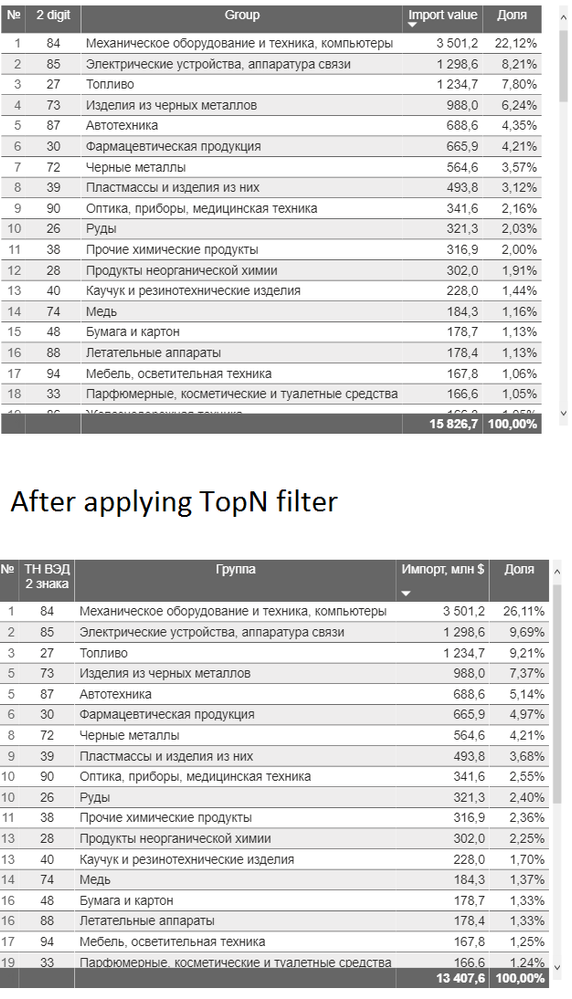
I am trying to put row numeration on my table visualization and to accomplish this task a came up with RANKX(I would be happy if there are simple ways to put just row numeration to the table, because RANKX is too complex). However, my Rankx is working fine if there is any filter until I apply any filter from the Filter section. Below I attached 2 versions of my table(№ column is important). The first table shows ranking correctly, but when I applied the Top 30 filters by import value, it is showing my not proper ranking order. What is the problem?
My measure is
Solved! Go to Solution.


- Mark as New
- Bookmark
- Subscribe
- Mute
- Subscribe to RSS Feed
- Permalink
- Report Inappropriate Content
@Anonymous
I am not sure about your model, try the following measure, if you could share a sample file I can check on it.
№ = VAR ProductRank =
    RANKX(
        ALLSELECTED(stat_kgd_2011_2020_monthly), CALCULATE(SUM(stat_kgd_2011_2020_monthly[Import value])),,DESC)
    RETURN
    ProductRank
________________________
Did I answer your question? Mark this post as a solution, this will help others!.
Click on the Thumbs-Up icon on the right if you like this reply 🙂
⭕ Subscribe and learn Power BI from these videos
⚪ Website ⚪ LinkedIn ⚪ PBI User Group


- Mark as New
- Bookmark
- Subscribe
- Mute
- Subscribe to RSS Feed
- Permalink
- Report Inappropriate Content
Hi @Anonymous ,
Just try the following measure:
№ =
VAR A =
    CALCULATETABLE (
        ALLSELECTED (
            stat_kgd_2011_2020_monthly[2 digit],
            stat_kgd_2011_2020_monthly[Group]
        ),
        ALLSELECTED ( stat_kgd_2011_2020_monthly )
    )
RETURN
    RANKX (
        A,
        CALCULATE ( SUM ( stat_kgd_2011_2020_monthly[Import value] ) ),
        ,
        DESC
    )
If it doesn't work, please show us some sample data by onedrive for business. Thanks for your understanding and support.
If this post helps, then please consider Accept it as the solution to help the other members find it more quickly.
Best Regards,
Dedmon Dai

- Mark as New
- Bookmark
- Subscribe
- Mute
- Subscribe to RSS Feed
- Permalink
- Report Inappropriate Content
@Anonymous , how are you using top N filter.
Top N visual level filter ?
or like
Top 10 City Rank = CALCULATE([Sales],TOPN(10,all(Geography[City]),[Sales],DESC),VALUES(Geography[City Id]))
or
sumx(filter(stat_kgd_2011_2020_monthly,[№ ]<=30),stat_kgd_2011_2020_monthly[Import value])
- Mark as New
- Bookmark
- Subscribe
- Mute
- Subscribe to RSS Feed
- Permalink
- Report Inappropriate Content
@amitchandak I am filtering from the right side table in the power Bi interface, so a I am not creating any measure for TopN
- Mark as New
- Bookmark
- Subscribe
- Mute
- Subscribe to RSS Feed
- Permalink
- Report Inappropriate Content
Hi @Anonymous ,
Just try the following measure:
№ =
VAR A =
    CALCULATETABLE (
        ALLSELECTED (
            stat_kgd_2011_2020_monthly[2 digit],
            stat_kgd_2011_2020_monthly[Group]
        ),
        ALLSELECTED ( stat_kgd_2011_2020_monthly )
    )
RETURN
    RANKX (
        A,
        CALCULATE ( SUM ( stat_kgd_2011_2020_monthly[Import value] ) ),
        ,
        DESC
    )
If it doesn't work, please show us some sample data by onedrive for business. Thanks for your understanding and support.
If this post helps, then please consider Accept it as the solution to help the other members find it more quickly.
Best Regards,
Dedmon Dai
- Mark as New
- Bookmark
- Subscribe
- Mute
- Subscribe to RSS Feed
- Permalink
- Report Inappropriate Content
@Anonymous
I am not sure about your model, try the following measure, if you could share a sample file I can check on it.
№ = VAR ProductRank =
    RANKX(
        ALLSELECTED(stat_kgd_2011_2020_monthly), CALCULATE(SUM(stat_kgd_2011_2020_monthly[Import value])),,DESC)
    RETURN
    ProductRank
________________________
Did I answer your question? Mark this post as a solution, this will help others!.
Click on the Thumbs-Up icon on the right if you like this reply 🙂
⭕ Subscribe and learn Power BI from these videos
⚪ Website ⚪ LinkedIn ⚪ PBI User Group
Helpful resources

Power BI Monthly Update - September 2025
Check out the September 2025 Power BI update to learn about new features.

Fabric Community Update - August 2025
Find out what's new and trending in the Fabric community.

| User | Count |
|---|---|
| 97 | |
| 76 | |
| 76 | |
| 48 | |
| 26 |


