Learn from the best! Meet the four finalists headed to the FINALS of the Power BI Dataviz World Championships! Register now
I Have two tables with columns
1) Office Latitude Longitude
2)Client Latitude Longitude
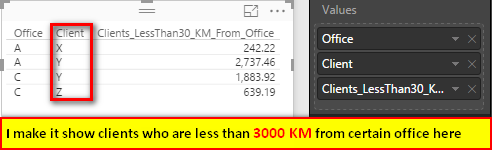
I need to know all clients who are less than 30 kilometers from certain office.
Can I calculate it?
Main problem is that I have two tables in power bi without exact relation except for same parameters - latitude, longitude.
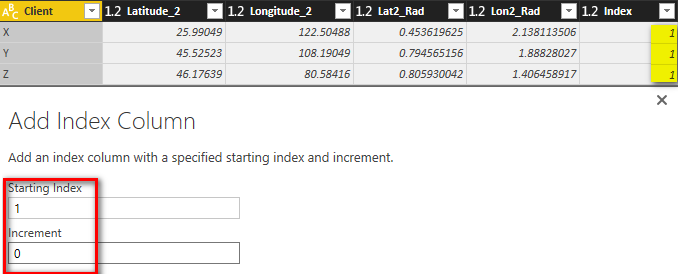
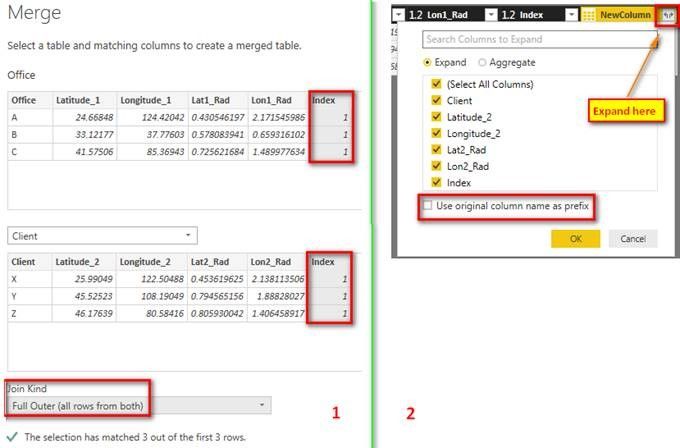
In this scenario, since you have two tables without any relationship, we can first merge these two tables and then do the distance calculation with M language in Query Editor. The link provided by @sdjensenis very useful.
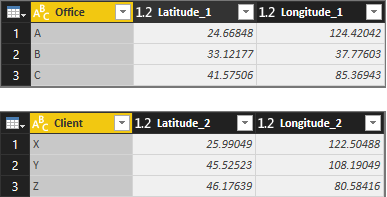
I assume the two tables are like below. Please refer to following steps.
Lat1_Rad = ([Latitude_1] / 180) * Number.PI Lon1_Rad = ([Longitude_1] / 180) * Number.PI Lat2_Rad = ([Latitude_2] / 180) * Number.PI Lon2_Rad = ([Longitude_2] / 180) * Number.PI
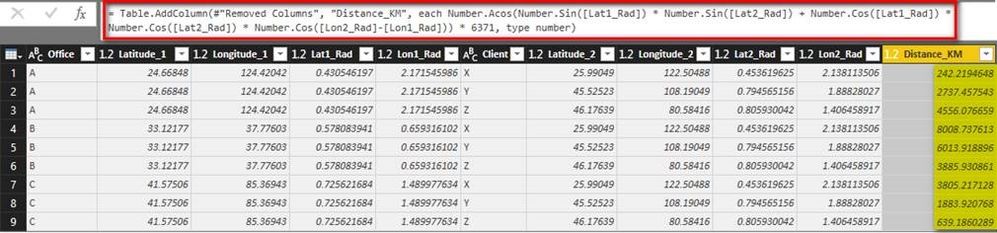
Distance_KM = Number.Acos(Number.Sin([Lat1_Rad]) * Number.Sin([Lat2_Rad]) + Number.Cos([Lat1_Rad]) * Number.Cos([Lat2_Rad]) * Number.Cos([Lon2_Rad]-[Lon1_Rad])) * 6371
Clients_LessThan30_KM_From_Office = IF ( Office[Distance_KM] < 30, Office[Distance_KM], BLANK () )
| User | Count |
|---|---|
| 60 | |
| 46 | |
| 32 | |
| 17 | |
| 16 |
| User | Count |
|---|---|
| 82 | |
| 68 | |
| 43 | |
| 26 | |
| 23 |