Join us at FabCon Atlanta from March 16 - 20, 2026, for the ultimate Fabric, Power BI, AI and SQL community-led event. Save $200 with code FABCOMM.
Register now!The Power BI Data Visualization World Championships is back! Get ahead of the game and start preparing now! Learn more
Hi there,
I wanted to see if it was possible to have a radial gauge display text instead of a value. I would like to have the text read as low, medium, or high based on a value. Can that be done accurately with a measure and still have the dial point? Thanks in advance!!
>=0 and <=1 low
>1 and <=2 medium
>2 and <=3 high
Solved! Go to Solution.
Hi @djoellet
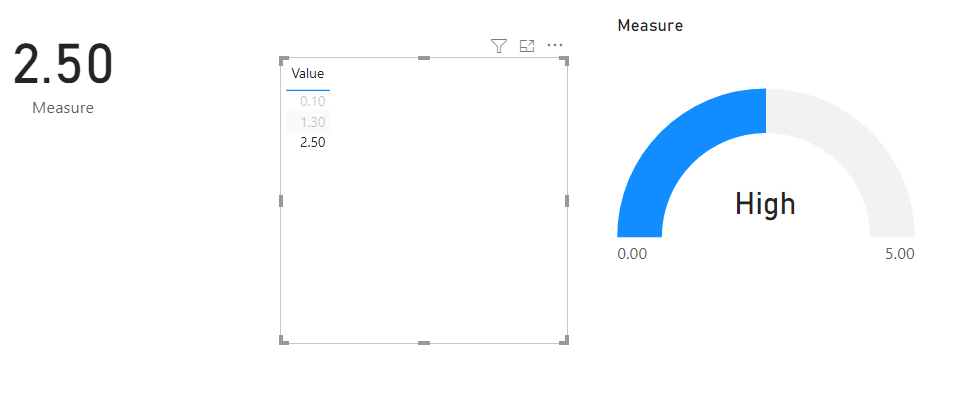
There might be another custom visual that does this, but you could turn off the Callout Value on the Gauge, then place a card over the Gauge.
This card displays a measure that either reads Low, Med of High.
You can then group the Card and Gauge.
Regards
Phil
Proud to be a Super User!
Perfect, this will work. Thank you!!
Hi @djoellet
There might be another custom visual that does this, but you could turn off the Callout Value on the Gauge, then place a card over the Gauge.
This card displays a measure that either reads Low, Med of High.
You can then group the Card and Gauge.
Regards
Phil
Proud to be a Super User!
Check out the November 2025 Power BI update to learn about new features.
Advance your Data & AI career with 50 days of live learning, contests, hands-on challenges, study groups & certifications and more!
| User | Count |
|---|---|
| 57 | |
| 44 | |
| 42 | |
| 21 | |
| 17 |
| User | Count |
|---|---|
| 183 | |
| 114 | |
| 93 | |
| 62 | |
| 45 |