Join us at FabCon Atlanta from March 16 - 20, 2026, for the ultimate Fabric, Power BI, AI and SQL community-led event. Save $200 with code FABCOMM.
Register now!Learn from the best! Meet the four finalists headed to the FINALS of the Power BI Dataviz World Championships! Register now
Hi there,
I wanted to see if it was possible to have a radial gauge display text instead of a value. I would like to have the text read as low, medium, or high based on a value. Can that be done accurately with a measure and still have the dial point? Thanks in advance!!
>=0 and <=1 low
>1 and <=2 medium
>2 and <=3 high
Solved! Go to Solution.
Hi @djoellet
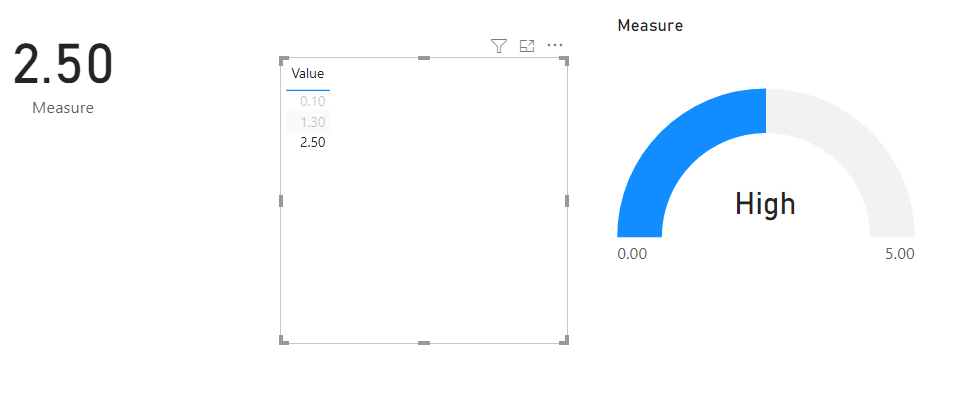
There might be another custom visual that does this, but you could turn off the Callout Value on the Gauge, then place a card over the Gauge.
This card displays a measure that either reads Low, Med of High.
You can then group the Card and Gauge.
Regards
Phil
Proud to be a Super User!
Perfect, this will work. Thank you!!
Hi @djoellet
There might be another custom visual that does this, but you could turn off the Callout Value on the Gauge, then place a card over the Gauge.
This card displays a measure that either reads Low, Med of High.
You can then group the Card and Gauge.
Regards
Phil
Proud to be a Super User!
Share feedback directly with Fabric product managers, participate in targeted research studies and influence the Fabric roadmap.
Check out the February 2026 Power BI update to learn about new features.
| User | Count |
|---|---|
| 53 | |
| 48 | |
| 31 | |
| 16 | |
| 14 |
| User | Count |
|---|---|
| 86 | |
| 72 | |
| 38 | |
| 28 | |
| 24 |