cancel
Showing results for 
Search instead for 
Did you mean: 

Get Fabric Certified for FREE during Fabric Data Days. Don't miss your chance! Request now

Reply
Anonymous
Not applicable

RLS based to userprincipalname value in Power BI desktop

Hello everyone,


1) This is my data model :

Aitjames_0-1636904310922.png

2)

Data of sheet 1

Aitjames_2-1636904447154.png

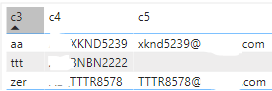
Data of sheet 2

Aitjames_3-1636904526169.png


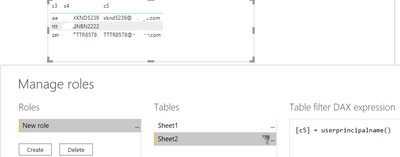
3) I created of role dedicated for filtring data based to the value of the field C5. Exp xknd5239@aaa.com

Aitjames_4-1636904638350.png

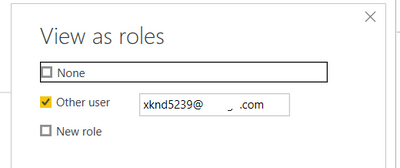
4) When I try "View as", I don't see any changes in my data.

Aitjames_6-1636904826893.png


Could you please help me to fix that ?


1 ACCEPTED SOLUTION
AlexisOlson
Super User
Super User

You can create roles in Power BI Desktop but assigning people to roles is done in the service. See here:
https://docs.microsoft.com/en-us/power-bi/admin/service-admin-rls#working-with-members


It's not filtering for xknd5239@aaa.com since it doesn't know that this user corresponds to the new role you've created.

View solution in original post

2 REPLIES 2
Anonymous
Not applicable

Thank you !

AlexisOlson
Super User
Super User

You can create roles in Power BI Desktop but assigning people to roles is done in the service. See here:
https://docs.microsoft.com/en-us/power-bi/admin/service-admin-rls#working-with-members


It's not filtering for xknd5239@aaa.com since it doesn't know that this user corresponds to the new role you've created.

Helpful resources

Announcements
November Power BI Update Carousel

Power BI Monthly Update - November 2025

Check out the November 2025 Power BI update to learn about new features.

Fabric Data Days Carousel

Fabric Data Days

Advance your Data & AI career with 50 days of live learning, contests, hands-on challenges, study groups & certifications and more!

FabCon Atlanta 2026 carousel

FabCon Atlanta 2026

Join us at FabCon Atlanta, March 16-20, for the ultimate Fabric, Power BI, AI and SQL community-led event. Save $200 with code FABCOMM.

Top Solution Authors
Top Kudoed Authors