Join us at FabCon Atlanta from March 16 - 20, 2026, for the ultimate Fabric, Power BI, AI and SQL community-led event. Save $200 with code FABCOMM.
Register now!The Power BI Data Visualization World Championships is back! Get ahead of the game and start preparing now! Learn more
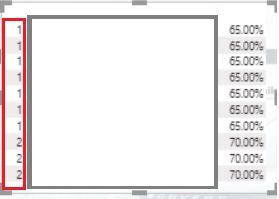
I have the below measure, however, as you can see in the screenshot, Dense is not working for some reason. Any ideas why?
Solved! Go to Solution.
The reason is that the ranking options have duplicate values, so you need to rank multiple columns.
Please refer to this blog:
https://www.sqlbi.com/articles/rankx-on-multiple-columns-with-dax-and-power-bi/
The reason is that the ranking options have duplicate values, so you need to rank multiple columns.
Please refer to this blog:
https://www.sqlbi.com/articles/rankx-on-multiple-columns-with-dax-and-power-bi/
@Redraidas1 , Measure rank is context sensitive , if you are any column outside MainMarketQuality table, then rank will inside that column
For Rank Refer these links
https://radacad.com/how-to-use-rankx-in-dax-part-2-of-3-calculated-measures
https://radacad.com/how-to-use-rankx-in-dax-part-1-of-3-calculated-columns
https://radacad.com/how-to-use-rankx-in-dax-part-3-of-3-the-finale
The Power BI Data Visualization World Championships is back! Get ahead of the game and start preparing now!
| User | Count |
|---|---|
| 41 | |
| 38 | |
| 36 | |
| 30 | |
| 28 |
| User | Count |
|---|---|
| 129 | |
| 88 | |
| 79 | |
| 68 | |
| 63 |