Join us at FabCon Atlanta from March 16 - 20, 2026, for the ultimate Fabric, Power BI, AI and SQL community-led event. Save $200 with code FABCOMM.
Register now!Get Fabric Certified for FREE during Fabric Data Days. Don't miss your chance! Request now
I've been struggling hard with RANKX for a few days now.
We are connected to a data model, so we're limited to only measures.
I'm trying to create a stack rank that just looks at a revenue total and ranks the entire group highest to lowest.
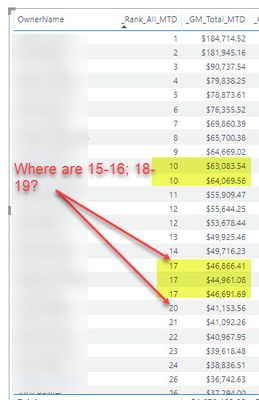
However, it keeps giving folks with similar totals the same rank. It also is skipping values, despite being set to use "Dense" when assigning rank.
I've tried troubleshooting it a few different ways, but nothing has worked.
Halp! This is easy to do in Excel and I'm really frustrated that it's so difficult in PBI.
Here's my Code:
_Rank_All_MTD =
IF( HASONEVALUE(DimBU[OwnerName]) ,RANKX( ALL(DimBU) ,CALCULATE([_GM_Total_MTD]) ,,,Dense ) )
Here's the Output:
Did you get the solution for this ?
I had the same problem. Including Dense at the end of the measure fixed it so it rank sequentially. I think it defaults to skip unless you specify. I'm a Power BI newb, but I hope this helps.
I found a resolution for RANKX assigning a different rank to the same value. I used Round for the [Station Factor] measure to ignore the decimals more than 2 places.
Thanks for that, I was banging my head against the wall!
Hi there,
I have excatly the same issue
did you found something ?
I really need to fix this !
Thanks a lot ^^
hi, @Anonymous
If there are some filters you have done in the report? what is [_GM_Total_MTD] formula?
Just from a screenshot and rankx formula, we could not find the reason.
If possible share a sample pbix file for us to have a test, or use virtual data to create a sample pbix.
Best Regards,
Lin
Check out the November 2025 Power BI update to learn about new features.
Advance your Data & AI career with 50 days of live learning, contests, hands-on challenges, study groups & certifications and more!