Forum Discussion

R Visuals in Web
 Anonymous9 years ago
HI 141507,
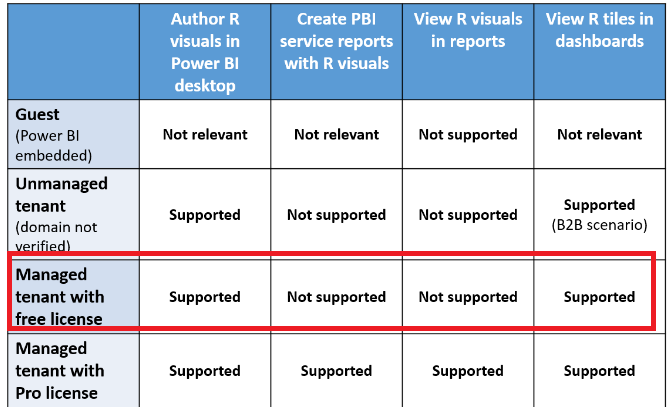
R visuals require a Power BI Pro license to render in reports, refresh, filter and cross-filter, please refer to the following document about R visuals capabilities based on licensing.
Reference link:
Regards,
Xiaoxin Sheng

Hi All,
Thank you for your response.
I am using packages of "forecast", "xts". I am plotting ARIMA visual using R code. Please let me know if there are any problems using these packages.
R Code:
library("xts")
library("forecast")
dates=as.Date(dataset$received_date,"%Y-%m-%d")
xs=xts(dataset$volume,dates)
plot(xs)
xi=ts(xs,start=c(2014,1),end=c(2016,12),frequency=12)
plot(xi)
fit <- auto.arima(xi,D=1)
plot(forecast(fit,h=12),xlab='Year', ylab = 'Volume')
Regards,
Senthil D
HI 141507,
Can you share some detailed information about these r visual? (For e.g. screenshots, error message...?
Regards,
Xiaoxin Sheng
- 1415079 years agoHelper I
Hi, I have attached the screenshot for your reference. After publishing to web, I could not able to see the R visuals. Please guide me further.
Regards,
Senthil D
- Anonymous9 years agoNot applicable
HI 141507,
R visuals require a Power BI Pro license to render in reports, refresh, filter and cross-filter, please refer to the following document about R visuals capabilities based on licensing.
Reference link:
Regards,
Xiaoxin Sheng
- 1415079 years agoHelper I
Hi,
Thanks for your guidance.
Regards,
Senthil D