Join us at FabCon Atlanta from March 16 - 20, 2026, for the ultimate Fabric, Power BI, AI and SQL community-led event. Save $200 with code FABCOMM.
Register now!View all the Fabric Data Days sessions on demand. View schedule
Hello.
I have 2 separate sales and margin reports from 2 separate companies. Is possible to have a third report that will show the 2 companies? Thanks.
For example:
COMPANY 1
| PRODUCT | SALES | PROFIT | YEAR |
| Apple | 100 | 10 | 2021 |
| Banna | 20 | 10 | 2022 |
COMPANY 2
| PRODUCT | SALES | PROFIT | YEAR |
| Orange | 50 | 5 | 2021 |
| Banna | 5 | 5 | 2022 |
RESULT GRID
| COMPANY 1 (2021) | COMPANY 2 (2021) | TOTAL (2021) | COMPANY 1 (2021) | COMPANY 2 (2022) | TOTAL (2022) | |
| SALES | 100 | 50 | 150 | 20 | 5 | 25 |
| PROFIT | 10 | 5 | 15 | 10 | 5 | 15 |
Solved! Go to Solution.
aha, if the table column headers are the same, it would be easy to stitch (called append in PQ) them in Power Query.
In your case, you may need
1) to add a Company column, say Company1 in table1 and Company2 in table2, both named "Company", check this:
https://learn.microsoft.com/en-us/power-query/add-custom-column
2) Append the two tables, check this:
https://learn.microsoft.com/en-us/power-query/append-queries
hi @Oros
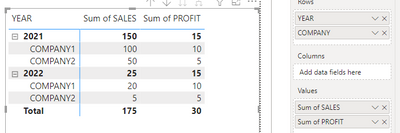
the most similar would be like this:
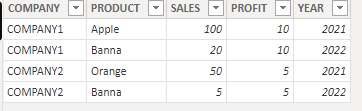
the dataset:
the point is: the value fields (profit/sales in your case) could be plotted in Matrix Visual like columns but not like rows.
HI @FreemanZ ,
Thank you very much for your reply. Sorry if my post is not clear. What I would like to achieve is to 'merge' the 2 separate companies tables. Let's say that each table has the same columns as date, sales, products, customers, salespersons. Please note that these 2 companies have the same salespersons but NOT the same products and customers. Thanks again
aha, if the table column headers are the same, it would be easy to stitch (called append in PQ) them in Power Query.
In your case, you may need
1) to add a Company column, say Company1 in table1 and Company2 in table2, both named "Company", check this:
https://learn.microsoft.com/en-us/power-query/add-custom-column
2) Append the two tables, check this:
https://learn.microsoft.com/en-us/power-query/append-queries
Check out the November 2025 Power BI update to learn about new features.
Advance your Data & AI career with 50 days of live learning, contests, hands-on challenges, study groups & certifications and more!