Fabric Data Days starts November 4th!
Advance your Data & AI career with 50 days of live learning, dataviz contests, hands-on challenges, study groups & certifications and more!
Get registered- Power BI forums
- Get Help with Power BI
- Desktop
- Service
- Report Server
- Power Query
- Mobile Apps
- Developer
- DAX Commands and Tips
- Custom Visuals Development Discussion
- Health and Life Sciences
- Power BI Spanish forums
- Translated Spanish Desktop
- Training and Consulting
- Instructor Led Training
- Dashboard in a Day for Women, by Women
- Galleries
- Data Stories Gallery
- Themes Gallery
- Contests Gallery
- Quick Measures Gallery
- Visual Calculations Gallery
- Notebook Gallery
- Translytical Task Flow Gallery
- TMDL Gallery
- R Script Showcase
- Webinars and Video Gallery
- Ideas
- Custom Visuals Ideas (read-only)
- Issues
- Issues
- Events
- Upcoming Events
Get Fabric Certified for FREE during Fabric Data Days. Don't miss your chance! Learn more
- Power BI forums
- Forums
- Get Help with Power BI
- Desktop
- Re: Programmatically set data colors by unzipping ...
- Subscribe to RSS Feed
- Mark Topic as New
- Mark Topic as Read
- Float this Topic for Current User
- Bookmark
- Subscribe
- Printer Friendly Page


- Mark as New
- Bookmark
- Subscribe
- Mute
- Subscribe to RSS Feed
- Permalink
- Report Inappropriate Content
Programmatically set data colors by unzipping .pbix and modifying Layout.file
Hi there, big thanks to everyone in the community for all the help so far.
At the moment I am trying to tackle the problem of setting visual fields of my reports for example data colors in visualizations programmatically.
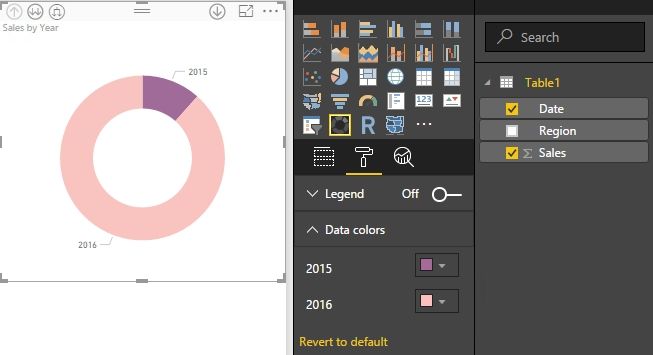
When creating 20 page reports with as many as 40+ visualisations that currently need every single data color of every visualisation defined manually by hex code (as seen below) it feels like I am wasting a lot of time.
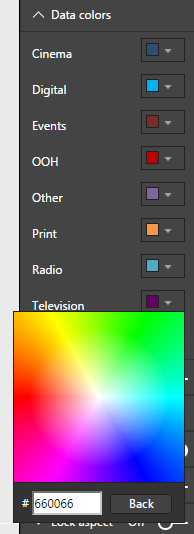
Manually this becomes a ridiculously arduous process. Setting it programmatically would take a few minutes for each report as each visualisation uses the same colors for the common fields (as seen below).

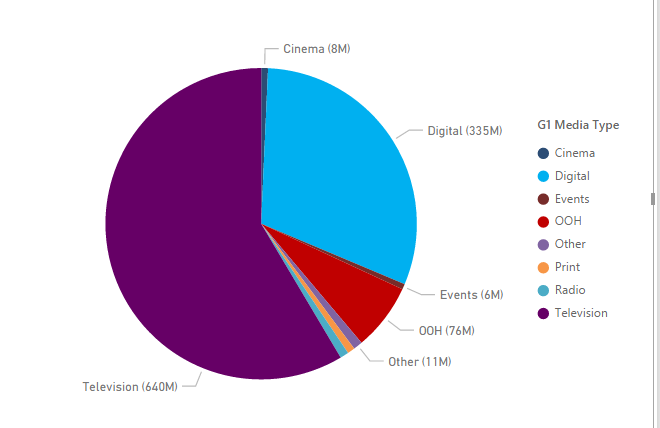
I have posted on this before and made a suggestion in the ideas forum. But I am now testing an alternative approach.
I have noticed that .pbix project files can be renamed to .zip extension and unzipped revealing the Layout file containing all the visual properties I have been looking for. From here I can easily set all of my data colors with a few 'Find & replace' queries found in any common text editor.
The only problem is when re-zipping the file back to its original structure and renaming the extension back to .pbix
When opening the modified file I am confronted by the following error message:
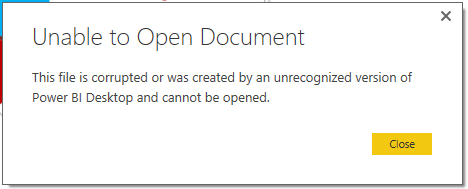
I understand the security concerns from microsoft on this sort of workaround but there really must be a way to do it safely.
Any responses are appreciated.
Solved! Go to Solution.

- Mark as New
- Bookmark
- Subscribe
- Mute
- Subscribe to RSS Feed
- Permalink
- Report Inappropriate Content
If I open the pbix file with 7-Zip, open the Layout file with Notepad++, change the color and save the Layout file to local drive then replace the original one in 7-Zip, I will got the same error message as you when open the changed pbix file.
But if I copy this changed pbix file to another machine which installs the same version of Power BI Desktop, the file can be opened properly and the color has changed properly.
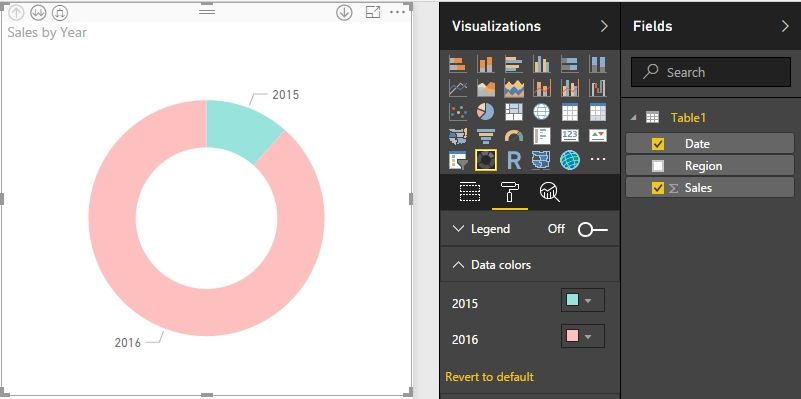
So you can try to modify the layout file in one machine, but do not open this file with the same machine. I’m not sure why but you can have a try. For how to use 7-Zip and Notepad++, please refer to this article.
Best Regards,
Herbert

- Mark as New
- Bookmark
- Subscribe
- Mute
- Subscribe to RSS Feed
- Permalink
- Report Inappropriate Content
If you are wanting to do this to keep consistency of legend colours between visuals then there is much easier, and quicker, process which can be followed here: https://community.powerbi.com/t5/Desktop/Color-Linking/td-p/221636

- Mark as New
- Bookmark
- Subscribe
- Mute
- Subscribe to RSS Feed
- Permalink
- Report Inappropriate Content
Has anyone recently managed to use this "workaround"? I've followed the instruction, but anyway get error message about corrupted report.
- Mark as New
- Bookmark
- Subscribe
- Mute
- Subscribe to RSS Feed
- Permalink
- Report Inappropriate Content
Has anyone found a solution to this ?

- Mark as New
- Bookmark
- Subscribe
- Mute
- Subscribe to RSS Feed
- Permalink
- Report Inappropriate Content
I got the same error message about corrupted report !
- Mark as New
- Bookmark
- Subscribe
- Mute
- Subscribe to RSS Feed
- Permalink
- Report Inappropriate Content
I have that same problem...no luck so far 😞
- Mark as New
- Bookmark
- Subscribe
- Mute
- Subscribe to RSS Feed
- Permalink
- Report Inappropriate Content
I have that same problem...no luck so far 😞
- Mark as New
- Bookmark
- Subscribe
- Mute
- Subscribe to RSS Feed
- Permalink
- Report Inappropriate Content
If I open the pbix file with 7-Zip, open the Layout file with Notepad++, change the color and save the Layout file to local drive then replace the original one in 7-Zip, I will got the same error message as you when open the changed pbix file.
But if I copy this changed pbix file to another machine which installs the same version of Power BI Desktop, the file can be opened properly and the color has changed properly.
So you can try to modify the layout file in one machine, but do not open this file with the same machine. I’m not sure why but you can have a try. For how to use 7-Zip and Notepad++, please refer to this article.
Best Regards,
Herbert

- Mark as New
- Bookmark
- Subscribe
- Mute
- Subscribe to RSS Feed
- Permalink
- Report Inappropriate Content
With regard to copying the file to another machine to work arond the corrupted file message, another way to get around the message is to open the file in 7-zip and delete the SecurityBindings file. There must be a checksum associated with the current machine in the security bindings file. After deleting the file, Power BI opens it without complaining, and then modifying in Power BI will restore the bindings.
Also be sure to use Notepad++ as your editor for 7-zip...or at least be sure NOT to use Windows Notepad. Windows Notepad adds an invisible byte order marker at the start of the document (0xfffe for little endian text files) which also triggers a corruption message in Power BI.


- Mark as New
- Bookmark
- Subscribe
- Mute
- Subscribe to RSS Feed
- Permalink
- Report Inappropriate Content
Thank you! It worked for me. Definitely you need to use 7zip, notepad++ and delete the security binding file.


- Mark as New
- Bookmark
- Subscribe
- Mute
- Subscribe to RSS Feed
- Permalink
- Report Inappropriate Content
Has anyone been able to go in and modify the datamashup file? I was wanting to replicate all the fomulas in the DataMashup\Formulas\Section1.m into a new pbix file, but keep getting the corrupt message
- Mark as New
- Bookmark
- Subscribe
- Mute
- Subscribe to RSS Feed
- Permalink
- Report Inappropriate Content
@srduval Any luck with editing the DataMashup file, I am trying to do the same but keep getting corrupt error.
- Mark as New
- Bookmark
- Subscribe
- Mute
- Subscribe to RSS Feed
- Permalink
- Report Inappropriate Content
Make sure to zip the contents of the unzipped directory not the directory itself.
Helpful resources

Fabric Data Days
Advance your Data & AI career with 50 days of live learning, contests, hands-on challenges, study groups & certifications and more!

Power BI Monthly Update - October 2025
Check out the October 2025 Power BI update to learn about new features.

FabCon Atlanta 2026
Join us at FabCon Atlanta, March 16-20, for the ultimate Fabric, Power BI, AI and SQL community-led event. Save $200 with code FABCOMM.


