- Power BI forums
- Updates
- News & Announcements
- Get Help with Power BI
- Desktop
- Service
- Report Server
- Power Query
- Mobile Apps
- Developer
- DAX Commands and Tips
- Custom Visuals Development Discussion
- Health and Life Sciences
- Power BI Spanish forums
- Translated Spanish Desktop
- Power Platform Integration - Better Together!
- Power Platform Integrations (Read-only)
- Power Platform and Dynamics 365 Integrations (Read-only)
- Training and Consulting
- Instructor Led Training
- Dashboard in a Day for Women, by Women
- Galleries
- Community Connections & How-To Videos
- COVID-19 Data Stories Gallery
- Themes Gallery
- Data Stories Gallery
- R Script Showcase
- Webinars and Video Gallery
- Quick Measures Gallery
- 2021 MSBizAppsSummit Gallery
- 2020 MSBizAppsSummit Gallery
- 2019 MSBizAppsSummit Gallery
- Events
- Ideas
- Custom Visuals Ideas
- Issues
- Issues
- Events
- Upcoming Events
- Community Blog
- Power BI Community Blog
- Custom Visuals Community Blog
- Community Support
- Community Accounts & Registration
- Using the Community
- Community Feedback
Register now to learn Fabric in free live sessions led by the best Microsoft experts. From Apr 16 to May 9, in English and Spanish.
- Power BI forums
- Forums
- Get Help with Power BI
- Desktop
- Re: Problema: No puedo Conectar Power Bi a una Lis...
- Subscribe to RSS Feed
- Mark Topic as New
- Mark Topic as Read
- Float this Topic for Current User
- Bookmark
- Subscribe
- Printer Friendly Page

- Mark as New
- Bookmark
- Subscribe
- Mute
- Subscribe to RSS Feed
- Permalink
- Report Inappropriate Content
Problema: No puedo Conectar Power Bi a una Lista de SharePoint
Saludos.
Intento conectarme a una lista de Sharepoint 365 de la compañia, me encuentro registrado con mi usuario de red y al intentar conectar a la list indica que existe un error:
No se puede conectar
Se encontro un error al intentar conectarse
Detalles: "El acceso al recurso se prohíbe."
y no me permite ingresar credenciales.
Estoy utilizando power Bi Desktop
Solved! Go to Solution.


- Mark as New
- Bookmark
- Subscribe
- Mute
- Subscribe to RSS Feed
- Permalink
- Report Inappropriate Content
Prueba esto:
En Power BI:
Ir a "Data Source Settings" y elegir a eliminar permisos.

Entonces, ir otra vez a conectar al Sharepoint List:
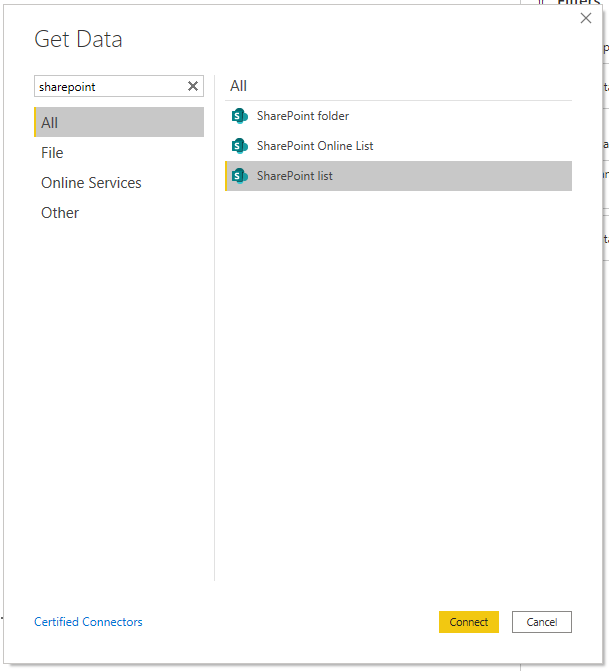
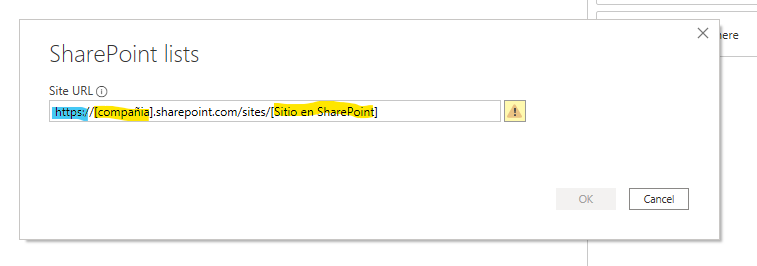
Y al final:

- Mark as New
- Bookmark
- Subscribe
- Mute
- Subscribe to RSS Feed
- Permalink
- Report Inappropriate Content
¡Perfecto! Por favor marque mi contribucion la solución para ayudar a otros
- Mark as New
- Bookmark
- Subscribe
- Mute
- Subscribe to RSS Feed
- Permalink
- Report Inappropriate Content
Prueba esto:
En Power BI:
Ir a "Data Source Settings" y elegir a eliminar permisos.
Entonces, ir otra vez a conectar al Sharepoint List:
Y al final:


- Mark as New
- Bookmark
- Subscribe
- Mute
- Subscribe to RSS Feed
- Permalink
- Report Inappropriate Content
Buenos días, está solución no me funcionó, sigo teniendo el mismo error no importa el método de autenticación que escoja sea Anonymus, Windows o Microsoft Account, hice todos los pasos que comentan en la solución pero a mi no me funcionó, alguna otra idea?
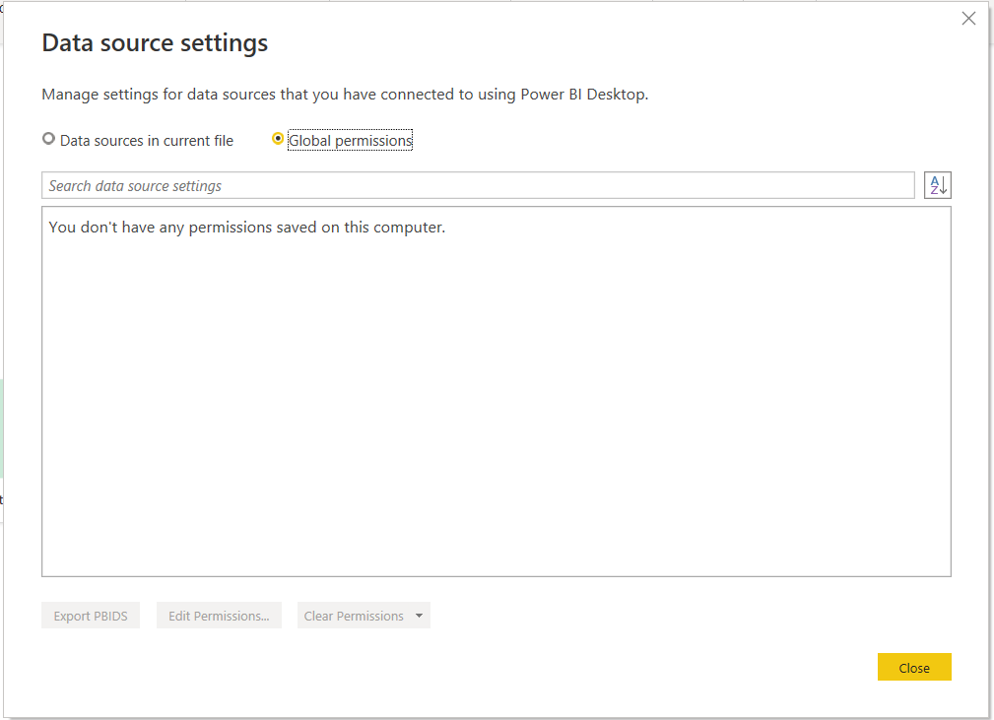
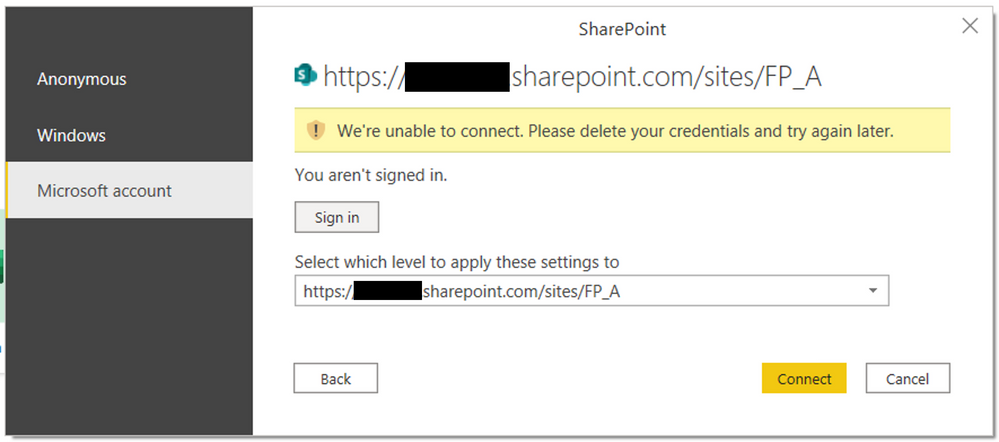
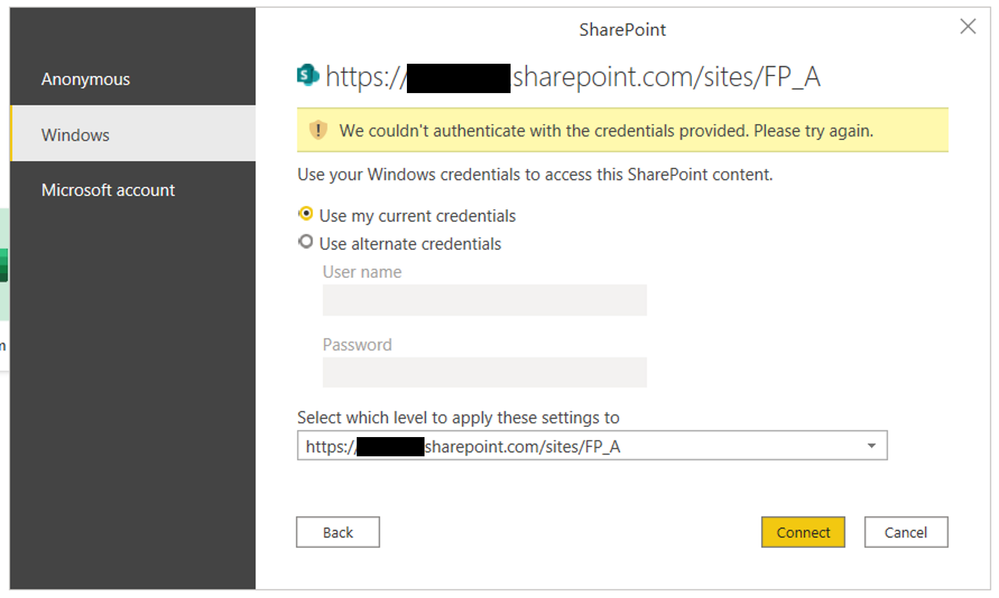

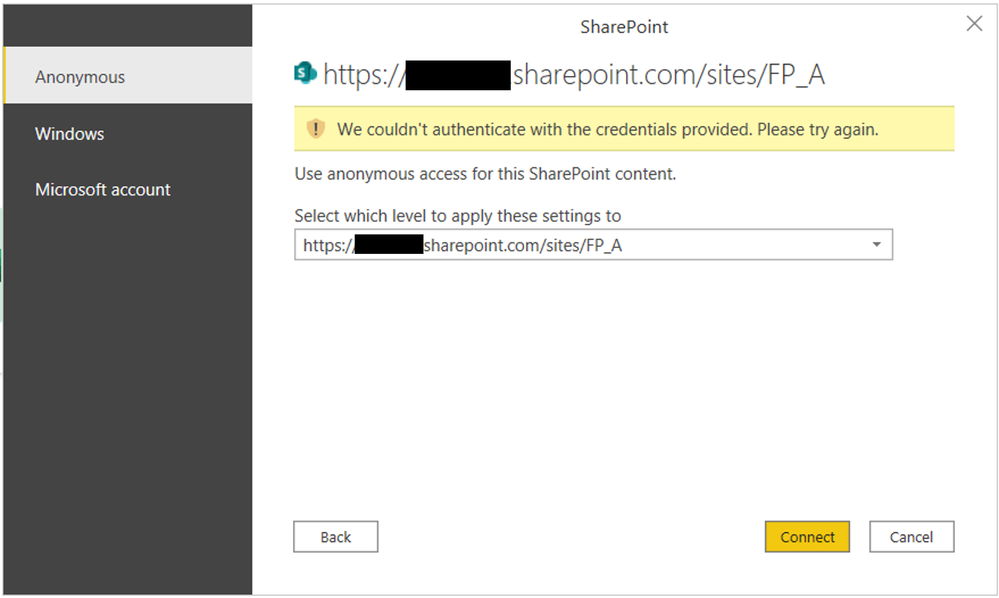
Agradezco toda la ayuda que me puedan brindar.
- Mark as New
- Bookmark
- Subscribe
- Mute
- Subscribe to RSS Feed
- Permalink
- Report Inappropriate Content
Muchisimas Gracias efectivamente asi si funciono la conexion a Sharepoint. Gracias.
- Mark as New
- Bookmark
- Subscribe
- Mute
- Subscribe to RSS Feed
- Permalink
- Report Inappropriate Content
¡Perfecto! Por favor marque mi contribucion la solución para ayudar a otros

- Mark as New
- Bookmark
- Subscribe
- Mute
- Subscribe to RSS Feed
- Permalink
- Report Inappropriate Content
English please.
- Mark as New
- Bookmark
- Subscribe
- Mute
- Subscribe to RSS Feed
- Permalink
- Report Inappropriate Content
Greetings.

I try to connect to a Sharepoint 365 list of the company, I am registered with my network user and when trying to connect to the list it indicates that there is an error:

It can not be connected
An error was encountered while trying to connect
Details: "Access to the resource is prohibited."

and does not allow me to enter credentials.
I am using power Bi Desktop
- Mark as New
- Bookmark
- Subscribe
- Mute
- Subscribe to RSS Feed
- Permalink
- Report Inappropriate Content
If you are in an AD domain, powerbi will connect to sharepoint with the same credentials you're using for PBI and probably that user is not authorized to access sharepoint.
Helpful resources

Microsoft Fabric Learn Together
Covering the world! 9:00-10:30 AM Sydney, 4:00-5:30 PM CET (Paris/Berlin), 7:00-8:30 PM Mexico City

Power BI Monthly Update - April 2024
Check out the April 2024 Power BI update to learn about new features.

Fabric Community Update - April 2024
Find out what's new and trending in the Fabric Community.

| User | Count |
|---|---|
| 109 | |
| 98 | |
| 77 | |
| 66 | |
| 54 |


| User | Count |
|---|---|
| 144 | |
| 104 | |
| 101 | |
| 86 | |
| 64 |


