Forum Discussion

PowerBI desktop column type icon missing in Query tab
Hello people
Quite new to PowerBI as I had basic training just in the tool. Once I installed the latest update Microsoft had in November and even before, I noticed that the Query tab had missing column data type icons. In the snip below you can see how my query tab looks like in PowerBI.
In this snip below you can see, how my query tab looked like in the training, once I had it.
I have double checked, that I have the latest version, but somehow those buttons are missing.
This is the version number I'm on -> 2.64.5285.741 64-bit (november 2018).
Can anyone help please to figure out what might be wrong :).
hi, Anonymous
These are two different areas for power bi
first picture is Data View area, where you could modeling your data.
the second picture is Power Query area, which is like to Excel, is for clean and shape data.

when you open power bi desktop, you are in Data View.
You could click HOME->Edit Queries to get into Query Editor.
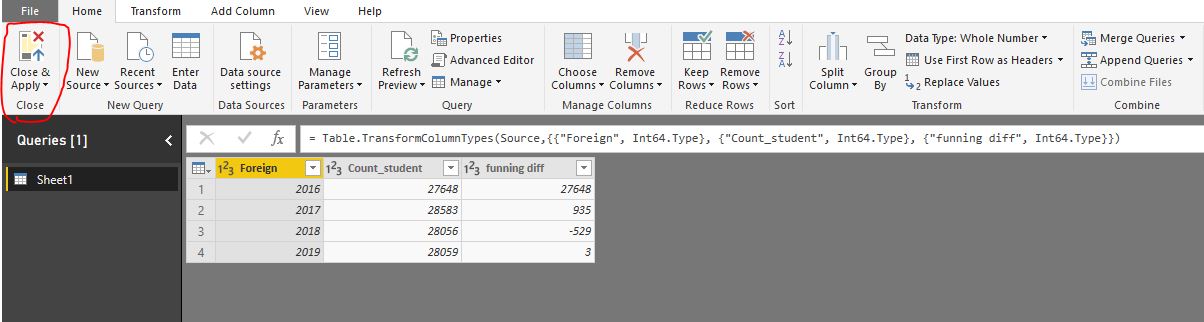
Also, you could click HOME-> Close&Apply to get to the Data View from the Query Editor.
By the way, Here are the official documents for you learn
https://docs.microsoft.com/en-us/power-bi/desktop-what-is-desktop
Best Regards,
Lin
3 Replies
- HotChilliCommunity Champion
There's nothing wrong. You're looking at two different areas of powerbi. The Query Editor and Data View in powerbi
- AnonymousNot applicable
Okay, how would one get to the Data View from the Query Editor I'm on now?
 v-lili6-msftCommunity Support
hi, Anonymous
These are two different areas for power bi
first picture is Data View area, where you could modeling your data.
the second picture is Power Query area, which is like to Excel, is for clean and shape data.
when you open power bi desktop, you are in Data View.
You could click HOME->Edit Queries to get into Query Editor.
Also, you could click HOME-> Close&Apply to get to the Data View from the Query Editor.
By the way, Here are the official documents for you learn
https://docs.microsoft.com/en-us/power-bi/desktop-what-is-desktop
Best Regards,
Lin
