Don't miss your chance to take the Fabric Data Engineer (DP-600) exam for FREE! Find out how by watching the DP-600 session on-demand now through April 28th.
Learn moreJoin the FabCon + SQLCon recap series. Up next: Power BI, Real-Time Intelligence, IQ and AI, and Data Factory take center stage. All sessions are available on-demand after the live show. Register now
I have a query that pulls CurrentDay, PrevDay, PrevMonth, PrevMonthEnd, CurrentValue,PrevDayValue and PrevMonthValue. And i am trying to create a measure called valuechange where the value = CurrentValue-PrevDayValue if date selected in the slicer is in CurrentDay column, or value=CurrentValue-PrevMonthEnd if date is in PrevMonth column. Is there a way to do this in powerbi? I am new and still learning... i appreciate all your help. Thank you
Solved! Go to Solution.
Hi @Anonymous ,
Could you please share your sample data and excepted result to me if you don't have any Confidential Information. Please upload your files to One Drive and share the link here.
Hi @Anonymous ,
One sample for your reference.
1. Unpivot the table in power query. M code for your reference.
let
Source = Table.FromRows(Json.Document(Binary.Decompress(Binary.FromText("i45WSipKzEvOUDBU0lEyMjC0NDA1soAxTYwNgExDAxBpCiKA/FgduBYjnFqMwFrMTcG6lWJjAQ==", BinaryEncoding.Base64), Compression.Deflate)), let _t = ((type text) meta [Serialized.Text = true]) in type table [branch = _t, currentday = _t, PremontEnd = _t, Currecntvalue = _t, PrevDayValue = _t, PremnthValue = _t]),
#"Changed Type" = Table.TransformColumnTypes(Source,{{"branch", type text}, {"currentday", Int64.Type}, {"PremontEnd", Int64.Type}, {"Currecntvalue", Int64.Type}, {"PrevDayValue", Int64.Type}, {"PremnthValue", Int64.Type}}),
#"Unpivoted Other Columns" = Table.UnpivotOtherColumns(#"Changed Type", {"PrevDayValue", "PremnthValue", "Currecntvalue", "branch"}, "Attribute", "Value")
in
#"Unpivoted Other Columns"
2. Close and apply, after that, create a measure as below.
Measure =
VAR a =
FILTER ( Table1, Table1[Attribute] = "currentday" )
VAR b =
FILTER ( 'Table1', Table1[Attribute] = "PremontEnd" )
RETURN
IF (
MAX ( Table1[Attribute] ) = "currentday",
CALCULATE (
SUM ( Table1[Currecntvalue] ) - SUM ( 'Table1'[PrevDayValue] ),
KEEPFILTERS ( a )
),
CALCULATE (
SUM ( Table1[Currecntvalue] ) - SUM ( Table1[PremnthValue] ),
KEEPFILTERS ( b )
)
)
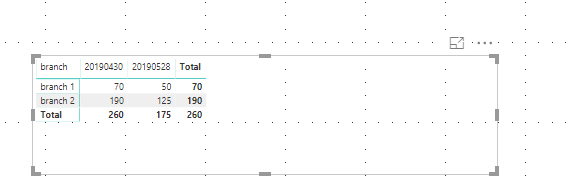
Hi @Anonymous ,
Could you please share your sample data and excepted result to me if you don't have any Confidential Information. Please upload your files to One Drive and share the link here.
Hello v-frfei-msft,
Thank you for the reply. I have uploaded a PIBX file with my sample data. I converted it to an excel file, but my data would be either a direct query or import from a SQL table.
https://1drv.ms/u/s!AgMNBTdCmoy4jY1xpjrDBUV3PfGkzw?e=jEG8Lg
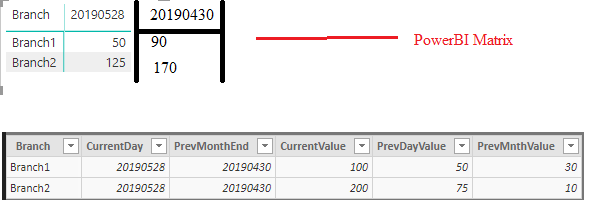
In the test report, i have a matrix, and i was trying to make it look like the screenshot below.
With Change measure calculated as CurrentValue-PrevDayValue if Date is CurrentDay and CurrentValue-PrevMnthValue if Date is PrevMonthEnd.
Thank you again
Hi @Anonymous ,
One sample for your reference.
1. Unpivot the table in power query. M code for your reference.
let
Source = Table.FromRows(Json.Document(Binary.Decompress(Binary.FromText("i45WSipKzEvOUDBU0lEyMjC0NDA1soAxTYwNgExDAxBpCiKA/FgduBYjnFqMwFrMTcG6lWJjAQ==", BinaryEncoding.Base64), Compression.Deflate)), let _t = ((type text) meta [Serialized.Text = true]) in type table [branch = _t, currentday = _t, PremontEnd = _t, Currecntvalue = _t, PrevDayValue = _t, PremnthValue = _t]),
#"Changed Type" = Table.TransformColumnTypes(Source,{{"branch", type text}, {"currentday", Int64.Type}, {"PremontEnd", Int64.Type}, {"Currecntvalue", Int64.Type}, {"PrevDayValue", Int64.Type}, {"PremnthValue", Int64.Type}}),
#"Unpivoted Other Columns" = Table.UnpivotOtherColumns(#"Changed Type", {"PrevDayValue", "PremnthValue", "Currecntvalue", "branch"}, "Attribute", "Value")
in
#"Unpivoted Other Columns"
2. Close and apply, after that, create a measure as below.
Measure =
VAR a =
FILTER ( Table1, Table1[Attribute] = "currentday" )
VAR b =
FILTER ( 'Table1', Table1[Attribute] = "PremontEnd" )
RETURN
IF (
MAX ( Table1[Attribute] ) = "currentday",
CALCULATE (
SUM ( Table1[Currecntvalue] ) - SUM ( 'Table1'[PrevDayValue] ),
KEEPFILTERS ( a )
),
CALCULATE (
SUM ( Table1[Currecntvalue] ) - SUM ( Table1[PremnthValue] ),
KEEPFILTERS ( b )
)
)
I really appreciate your help. I am currently out of the office this week. But i will try your suggestion when i get back to the office and let you know.
Thank you again.
Glen
Check out the April 2026 Power BI update to learn about new features.
If you have recently started exploring Fabric, we'd love to hear how it's going. Your feedback can help with product improvements.
A new Power BI DataViz World Championship is coming this June! Don't miss out on submitting your entry.
| User | Count |
|---|---|
| 45 | |
| 38 | |
| 34 | |
| 21 | |
| 17 |
| User | Count |
|---|---|
| 65 | |
| 62 | |
| 31 | |
| 26 | |
| 25 |