Forum Discussion

 Helper II
PowerBI Desktop to DB2 on SSL
HI,
I need some guidance on How to configure POwerBI desktop and Gateway to connect to DB2 from Winddows machine which has PowerBI desktop and Datagatway.I have the certificates provided by DB2 Admin and the Port number provided. I am trying with IP Address: Port(SSL Port) but it is not working. I am not sure what steps we need to take to install Certs on this Windows Machine so It can conect to DB2. My connection works on Non-Secure port.
Regards
Rajaniesh
6 Replies
 rajaniesh
Microsoft we need URGENT help on this issue
 v-frfei-msft
Community Support
Hi rajaniesh ,
In Power BI desktop, you get data from IBM DB2. When you choose IBM driver, please ensure that you have IBM DB2 Data Server Driver installed on your computer (minimum requirement is the IBM Data Server Driver Package (DS Driver)). Minimum provider version is 10.1, Minimum data source version is 9.x+, please check data source Prerequisites here. If you choose Microsoft Driver, the DB2 Server Driver is not necessary.
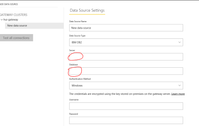
When you publish the report created from DB2 to service, if you want to refresh data in service, you have to configure gateway. And you add datasource under your gateway. You just type the credentials of your database. Type the server name, database name, username and password. The progress of adding datasource doesn't need a database driver.
Then just use the right Server name and Database in the following highlighted in red line box, which likes in Power BI desktop.Regards,
Frank