Join us at FabCon Atlanta from March 16 - 20, 2026, for the ultimate Fabric, Power BI, AI and SQL community-led event. Save $200 with code FABCOMM.
Register now!The Power BI Data Visualization World Championships is back! Get ahead of the game and start preparing now! Learn more
Hi everyone,
I have applied a filter to show the top 5 categories in Power bi Desktop chart, i get below output, its seems that the 5th category has three equal numbers which power bi considers as 5th category and showing all,
i need to show only one category for the 5th bar, how i can do this,
please support thanks
Solved! Go to Solution.
Hi, @vat2do
Could you please tell me whether your problem has been solved?
If yes, you could accept the helpful answer as solution to close this thread.
If you still need help, please share a sample file for further research.
Best Regards,
Community Support Team _ Eason
Hi, @vat2do
Could you please tell me whether your problem has been solved?
If yes, you could accept the helpful answer as solution to close this thread.
If you still need help, please share a sample file for further research.
Best Regards,
Community Support Team _ Eason
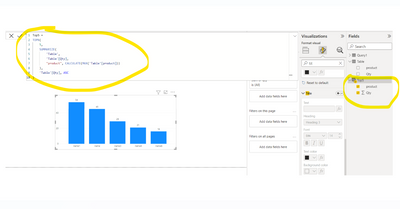
@vat2do Hi, one of the possible solutions for this is to create a new table with the TOPN function.
Below for your reference. Hope it helps.
The Power BI Data Visualization World Championships is back! Get ahead of the game and start preparing now!
| User | Count |
|---|---|
| 38 | |
| 38 | |
| 37 | |
| 28 | |
| 28 |
| User | Count |
|---|---|
| 124 | |
| 89 | |
| 73 | |
| 66 | |
| 65 |