FabCon is coming to Atlanta
Join us at FabCon Atlanta from March 16 - 20, 2026, for the ultimate Fabric, Power BI, AI and SQL community-led event. Save $200 with code FABCOMM.
Register now!- Power BI forums
- Get Help with Power BI
- Desktop
- Service
- Report Server
- Power Query
- Mobile Apps
- Developer
- DAX Commands and Tips
- Custom Visuals Development Discussion
- Health and Life Sciences
- Power BI Spanish forums
- Translated Spanish Desktop
- Training and Consulting
- Instructor Led Training
- Dashboard in a Day for Women, by Women
- Galleries
- Data Stories Gallery
- Themes Gallery
- Contests Gallery
- Quick Measures Gallery
- Visual Calculations Gallery
- Notebook Gallery
- Translytical Task Flow Gallery
- TMDL Gallery
- R Script Showcase
- Webinars and Video Gallery
- Ideas
- Custom Visuals Ideas (read-only)
- Issues
- Issues
- Events
- Upcoming Events
Calling all Data Engineers! Fabric Data Engineer (Exam DP-700) live sessions are back! Starting October 16th. Sign up.
- Power BI forums
- Forums
- Get Help with Power BI
- Desktop
- Re: Power Query (M) priority function
- Subscribe to RSS Feed
- Mark Topic as New
- Mark Topic as Read
- Float this Topic for Current User
- Bookmark
- Subscribe
- Printer Friendly Page

- Mark as New
- Bookmark
- Subscribe
- Mute
- Subscribe to RSS Feed
- Permalink
- Report Inappropriate Content
Power Query (M) help with creation of priority function
Hello,
I have created a query function which I use to add a new column with a custom function to set a value of a text from different data sources (columns, manualy or entered text). this works fairly well and you may see the function below. What I want to do now is to see which value has been selected by the column name.
Input Priority Function= (prio1 as any, prio2 as any) =>
if prio1 <>"" and prio1 <> null and prio1 <>" " then prio1
else
if prio2 <>"" and prio2 <> null and prio2 <>" " then prio2
else
"N/A"
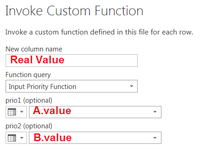
So now I want to make another function (see below) that tells me that A or B has been used for value. My idea is to make an identical function e.g., Input Source Function and change the return type but I don't know what to add in ???. Any idea?
Input Source Function= (prio1 as any, prio2 as any) =>
if prio1 <>"" and prio1 <> null and prio1 <>" " then ???
else
if prio2 <>"" and prio2 <> null and prio2 <>" " then ???
else
"N/A"
Solved! Go to Solution.


- Mark as New
- Bookmark
- Subscribe
- Mute
- Subscribe to RSS Feed
- Permalink
- Report Inappropriate Content
It is rather confusing that you post your code with the name of the function as if it is part of the code.
Edit: also confusing is the title of this topic, Power Query has no priority function.
Having said that, if I understand you correctly, you want to get the name of the column that was provided when invoking the function.
One solution is to search the value in the values of your table row and return the first column name where the value is found.
Example query and function:
let
    Source = #table(2,{{1,2},{3,4}}),
    #"Invoked Custom Function" = Table.AddColumn(Source, "ColumnName", each ColumnName(_, [Column1]))
in
    #"Invoked Custom Function"
let
Source = (TableRow as record, FieldValue as any) as text => Record.FieldNames(TableRow){List.PositionOf(Record.FieldValues(TableRow),FieldValue,Occurrence.First)}
in
Source
The only way to be absolutely certain (also with duplicate values) is to add the column name as metadata to your table values.
Example query and function:
let
    Source = #table(2,{{1,2},{3,4}}),
    MetaData = List.Accumulate(Table.ColumnNames(Source),Source, (t,c) => Table.TransformColumns(t, {{c, each _ meta [Column = c]}})),
    #"Invoked Custom Function" = Table.AddColumn(MetaData, "GetColumn", each GetColumn([Column2]))
in
    #"Invoked Custom Function"
let
Source = (ValueWithMeta as any) => Value.Metadata(ValueWithMeta)[Column]
in
Source

- Mark as New
- Bookmark
- Subscribe
- Mute
- Subscribe to RSS Feed
- Permalink
- Report Inappropriate Content
?
Input Priority Function= (prio1 as any, prio2 as any) =>
if prio1 <>"" and prio1 <> null and prio1 <>" " then "A"
else
if prio2 <>"" and prio2 <> null and prio2 <>" " then "B"
else
"N/A"
Follow on LinkedIn
@ me in replies or I'll lose your thread!!!
Instead of a Kudo, please vote for this idea
Become an expert!: Enterprise DNA
External Tools: MSHGQM
YouTube Channel!: Microsoft Hates Greg
Latest book!: DAX For Humans
DAX is easy, CALCULATE makes DAX hard...
- Mark as New
- Bookmark
- Subscribe
- Mute
- Subscribe to RSS Feed
- Permalink
- Report Inappropriate Content
I use the same priority function for more than 10 pairs and I don't want to have 10 different functions to find which column has been selected.
- Mark as New
- Bookmark
- Subscribe
- Mute
- Subscribe to RSS Feed
- Permalink
- Report Inappropriate Content
https://msdn.microsoft.com/en-us/library/mt253585.aspx
Follow on LinkedIn
@ me in replies or I'll lose your thread!!!
Instead of a Kudo, please vote for this idea
Become an expert!: Enterprise DNA
External Tools: MSHGQM
YouTube Channel!: Microsoft Hates Greg
Latest book!: DAX For Humans
DAX is easy, CALCULATE makes DAX hard...
- Mark as New
- Bookmark
- Subscribe
- Mute
- Subscribe to RSS Feed
- Permalink
- Report Inappropriate Content
The Record.FieldNames didnt work. The error returing was:
Expression.Error: We cannot convert the value "1234" to type Record.
Details:
    Value=1234
    Type=Type
- Mark as New
- Bookmark
- Subscribe
- Mute
- Subscribe to RSS Feed
- Permalink
- Report Inappropriate Content
It is rather confusing that you post your code with the name of the function as if it is part of the code.
Edit: also confusing is the title of this topic, Power Query has no priority function.
Having said that, if I understand you correctly, you want to get the name of the column that was provided when invoking the function.
One solution is to search the value in the values of your table row and return the first column name where the value is found.
Example query and function:
let
    Source = #table(2,{{1,2},{3,4}}),
    #"Invoked Custom Function" = Table.AddColumn(Source, "ColumnName", each ColumnName(_, [Column1]))
in
    #"Invoked Custom Function"
let
Source = (TableRow as record, FieldValue as any) as text => Record.FieldNames(TableRow){List.PositionOf(Record.FieldValues(TableRow),FieldValue,Occurrence.First)}
in
Source
The only way to be absolutely certain (also with duplicate values) is to add the column name as metadata to your table values.
Example query and function:
let
    Source = #table(2,{{1,2},{3,4}}),
    MetaData = List.Accumulate(Table.ColumnNames(Source),Source, (t,c) => Table.TransformColumns(t, {{c, each _ meta [Column = c]}})),
    #"Invoked Custom Function" = Table.AddColumn(MetaData, "GetColumn", each GetColumn([Column2]))
in
    #"Invoked Custom Function"
let
Source = (ValueWithMeta as any) => Value.Metadata(ValueWithMeta)[Column]
in
Source
- Mark as New
- Bookmark
- Subscribe
- Mute
- Subscribe to RSS Feed
- Permalink
- Report Inappropriate Content
Thanks. I was not aware that you can add metadata. That did the job.
Helpful resources

FabCon Global Hackathon
Join the Fabric FabCon Global Hackathon—running virtually through Nov 3. Open to all skill levels. $10,000 in prizes!

Power BI Monthly Update - October 2025
Check out the October 2025 Power BI update to learn about new features.

FabCon Atlanta 2026
Join us at FabCon Atlanta, March 16-20, for the ultimate Fabric, Power BI, AI and SQL community-led event. Save $200 with code FABCOMM.


