FabCon is coming to Atlanta
Join us at FabCon Atlanta from March 16 - 20, 2026, for the ultimate Fabric, Power BI, AI and SQL community-led event. Save $200 with code FABCOMM.
Register now!- Power BI forums
- Get Help with Power BI
- Desktop
- Service
- Report Server
- Power Query
- Mobile Apps
- Developer
- DAX Commands and Tips
- Custom Visuals Development Discussion
- Health and Life Sciences
- Power BI Spanish forums
- Translated Spanish Desktop
- Training and Consulting
- Instructor Led Training
- Dashboard in a Day for Women, by Women
- Galleries
- Data Stories Gallery
- Themes Gallery
- Contests Gallery
- Quick Measures Gallery
- Notebook Gallery
- Translytical Task Flow Gallery
- TMDL Gallery
- R Script Showcase
- Webinars and Video Gallery
- Ideas
- Custom Visuals Ideas (read-only)
- Issues
- Issues
- Events
- Upcoming Events
Calling all Data Engineers! Fabric Data Engineer (Exam DP-700) live sessions are back! Starting October 16th. Sign up.
- Power BI forums
- Forums
- Get Help with Power BI
- Desktop
- Re: Power Query Editor: add increment step for eac...
- Subscribe to RSS Feed
- Mark Topic as New
- Mark Topic as Read
- Float this Topic for Current User
- Bookmark
- Subscribe
- Printer Friendly Page

- Mark as New
- Bookmark
- Subscribe
- Mute
- Subscribe to RSS Feed
- Permalink
- Report Inappropriate Content
Power Query Editor: add increment step for each entry with the same ID
I'm trying to add an incremental number column in PowerBI fior each ID number.
I've mocked up a before and after below with expected results:
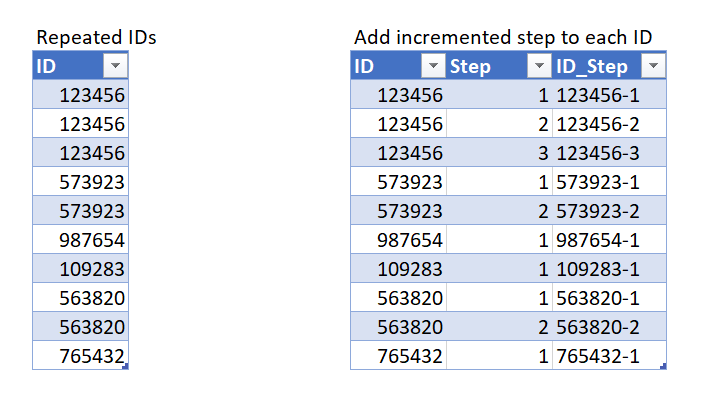
This needs to be in Power Query and not custom DAX column as it will be used to build relationships to other tables.
I've tried a few things but not been able to get it exactly in Power-BI Power Query Editor. Much appreciate any pointers.
Solved! Go to Solution.


- Mark as New
- Bookmark
- Subscribe
- Mute
- Subscribe to RSS Feed
- Permalink
- Report Inappropriate Content
@Anonymous
It's a minor variation on the previous version:
let
    Source = Table.FromRows(Json.Document(Binary.Decompress(Binary.FromText("i45WMjQyVtJRCkkszlYwBDKCS1ILFPISc1MVEpOSlWJ18ChITUvHr6CisgqswNQcrsAIRUFyUiJ+BSmpaWAFlhbmMAXGKAoyMrMgbjCwhCkwQVGQk5sHscIMboUpioK8/AL8CgqLisEKzM1MYQrMUBSUlJYpxcYCAA==", BinaryEncoding.Base64), Compression.Deflate)), let _t = ((type nullable text) meta [Serialized.Text = true]) in type table [ID = _t, #"Task Name" = _t, #"Step Name" = _t]),
    #"Changed Type" = Table.TransformColumnTypes(Source,{{"ID", Int64.Type}}),

    #"Grouped Rows" = Table.Group(#"Changed Type", {"ID"}, {{"Step", each Table.AddIndexColumn(_, "Step", 1, 1, Int64.Type)}}),
    #"Expanded Step" = Table.ExpandTableColumn(#"Grouped Rows", "Step", {"Task Name", "Step Name", "Step"}, {"Task Name", "Step Name", "Step"}),
    #"Changed Type1" = Table.TransformColumnTypes(#"Expanded Step",{{"Task Name", type text}, {"Step Name", type text}, {"Step", Int64.Type}}),
    #"Added Custom" = Table.AddColumn(#"Changed Type1", "ID_Step", each Text.From([ID]) & "-" & Text.From([Step]), type text),
    #"Reordered Columns" = Table.ReorderColumns(#"Added Custom",{"ID", "Step", "ID_Step", "Task Name", "Step Name"})
in
    #"Reordered Columns"
Please mark the question solved when done and consider giving a thumbs up if posts are helpful.
Contact me privately for support with any larger-scale BI needs, tutoring, etc.
Cheers

- Mark as New
- Bookmark
- Subscribe
- Mute
- Subscribe to RSS Feed
- Permalink
- Report Inappropriate Content
@Anonymous
You can create two calculated columns:
Step =
CALCULATE (
    COUNT ( Table1[Step Name] ),
    Table1[Step Name] <= EARLIER ( Table1[Step Name] ),
    ALLEXCEPT ( Table1, Table1[ID] )
)
ID_Step = Table1[ID] & "-" & Table1[Step] Do note though that you, as it is now, you do not have a column to establish order in the table in DAX. You would either have to add an index at the source (like you'd do it in PQ) or a possible alternative would be to use Step Name to establish that order (alphabetically), which is what I have done here.
Please mark the question solved when done and consider giving a thumbs up if posts are helpful.
Contact me privately for support with any larger-scale BI needs, tutoring, etc.
Cheers
- Mark as New
- Bookmark
- Subscribe
- Mute
- Subscribe to RSS Feed
- Permalink
- Report Inappropriate Content
@Anonymous
You can create two calculated columns:
Step =
CALCULATE (
    COUNT ( Table1[Step Name] ),
    Table1[Step Name] <= EARLIER ( Table1[Step Name] ),
    ALLEXCEPT ( Table1, Table1[ID] )
)
ID_Step = Table1[ID] & "-" & Table1[Step] Do note though that you, as it is now, you do not have a column to establish order in the table in DAX. You would either have to add an index at the source (like you'd do it in PQ) or a possible alternative would be to use Step Name to establish that order (alphabetically), which is what I have done here.
Please mark the question solved when done and consider giving a thumbs up if posts are helpful.
Contact me privately for support with any larger-scale BI needs, tutoring, etc.
Cheers
- Mark as New
- Bookmark
- Subscribe
- Mute
- Subscribe to RSS Feed
- Permalink
- Report Inappropriate Content
@Anonymous
It's a minor variation on the previous version:
let
    Source = Table.FromRows(Json.Document(Binary.Decompress(Binary.FromText("i45WMjQyVtJRCkkszlYwBDKCS1ILFPISc1MVEpOSlWJ18ChITUvHr6CisgqswNQcrsAIRUFyUiJ+BSmpaWAFlhbmMAXGKAoyMrMgbjCwhCkwQVGQk5sHscIMboUpioK8/AL8CgqLisEKzM1MYQrMUBSUlJYpxcYCAA==", BinaryEncoding.Base64), Compression.Deflate)), let _t = ((type nullable text) meta [Serialized.Text = true]) in type table [ID = _t, #"Task Name" = _t, #"Step Name" = _t]),
    #"Changed Type" = Table.TransformColumnTypes(Source,{{"ID", Int64.Type}}),

    #"Grouped Rows" = Table.Group(#"Changed Type", {"ID"}, {{"Step", each Table.AddIndexColumn(_, "Step", 1, 1, Int64.Type)}}),
    #"Expanded Step" = Table.ExpandTableColumn(#"Grouped Rows", "Step", {"Task Name", "Step Name", "Step"}, {"Task Name", "Step Name", "Step"}),
    #"Changed Type1" = Table.TransformColumnTypes(#"Expanded Step",{{"Task Name", type text}, {"Step Name", type text}, {"Step", Int64.Type}}),
    #"Added Custom" = Table.AddColumn(#"Changed Type1", "ID_Step", each Text.From([ID]) & "-" & Text.From([Step]), type text),
    #"Reordered Columns" = Table.ReorderColumns(#"Added Custom",{"ID", "Step", "ID_Step", "Task Name", "Step Name"})
in
    #"Reordered Columns"
Please mark the question solved when done and consider giving a thumbs up if posts are helpful.
Contact me privately for support with any larger-scale BI needs, tutoring, etc.
Cheers
- Mark as New
- Bookmark
- Subscribe
- Mute
- Subscribe to RSS Feed
- Permalink
- Report Inappropriate Content
This is great, thanks! Work Perfectly.
Is there a way to achieve the same result but by using a calculate column in DAX?
I have a DirectQuery data connection, with the same sample data where I also need to get the same result (but as its DirectQuery I cannot add columns using M in the editor - hope I have understood that right?)
Thank you for baring with me, I much appreciate your assistance.
- Mark as New
- Bookmark
- Subscribe
- Mute
- Subscribe to RSS Feed
- Permalink
- Report Inappropriate Content
@Anonymous
That's weird. I just typed in the below table in Excel, copied it and pasted it here. No problems:
| Col1 | Col2 |
| 1 | 3 |
| 2 | 4 |
| 3 | 5 |
Try not formatting the data as table in Excel. Although it should work as well. Otherwise share the Excel file with the data (or the pbix). You have to share the URL to the file hosted elsewhere: Dropbox, Onedrive... or just upload the file to a site like tinyupload.com (no sign-up required).
Please mark the question solved when done and consider giving a thumbs up if posts are helpful.
Contact me privately for support with any larger-scale BI needs, tutoring, etc.
Cheers
- Mark as New
- Bookmark
- Subscribe
- Mute
- Subscribe to RSS Feed
- Permalink
- Report Inappropriate Content
No matter what I try it just won't accept any kind of table - be it copied in from excel or just creating a table and filling it out.
I uploaded the sample file to DropBox but it won't even let me post the link. I just get the same error:
"Your post has been changed because invalid HTML was found in the message body. The invalid HTML has been removed. Please review the message and submit the message when you are satisfied."
- Mark as New
- Bookmark
- Subscribe
- Mute
- Subscribe to RSS Feed
- Permalink
- Report Inappropriate Content
@Anonymous
I have no idea what is going on. Perhaps log out, restart the browser and log in again. It must have gotten stuck somewhere.
Or send me the Dropbox link by private message
Please mark the question solved when done and consider giving a thumbs up if posts are helpful.
Contact me privately for support with any larger-scale BI needs, tutoring, etc.
Cheers
- Mark as New
- Bookmark
- Subscribe
- Mute
- Subscribe to RSS Feed
- Permalink
- Report Inappropriate Content
I have signed out/back in and cleared all tempory file and the error persists. I cannot post any links or tables or any kind of HTML. Is there a way to raise a ticket as there is clearly an issue.
I will try and DM you the dropbox file.
- Mark as New
- Bookmark
- Subscribe
- Mute
- Subscribe to RSS Feed
- Permalink
- Report Inappropriate Content
@Anonymous
I don't understand what column goes where in the initial table or the expected result. All the data is in one sole column. Copy the tables in excel and then paste them here. You should see the data in table format. Make sure that, once you post, if you copy the table the table from the post and paste it in Excel, you'll see the correct table as result. That is the table I will see when I do the same
Please mark the question solved when done and consider giving a thumbs up if posts are helpful.
Contact me privately for support with any larger-scale BI needs, tutoring, etc.
Cheers
- Mark as New
- Bookmark
- Subscribe
- Mute
- Subscribe to RSS Feed
- Permalink
- Report Inappropriate Content
I cannot post the data in tabular format. I have tried copy and pasting directly from excel and also creating a table using the editor and filling it out.
I just get this error when I try to post:
"Your post has been changed because invalid HTML was found in the message body. The invalid HTML has been removed. Please review the message and submit the message when you are satisfied."
- Mark as New
- Bookmark
- Subscribe
- Mute
- Subscribe to RSS Feed
- Permalink
- Report Inappropriate Content
Hi @Anonymous
Great that you show the expected result but please always show your sample data in text-tabular format in addition to (or instead of) the screen captures. A screen cap doesn't allow people to readily copy the data and run a quick test and thus decreases the likelihood of your question being answered. Just use 'Copy table' in Power BI and paste it here. Or, ideally, share the pbix (beware of confidential data).
Place the following M code in a blank query to see the steps:
let
    Source = Table.FromRows(Json.Document(Binary.Decompress(Binary.FromText("i45WMjQyVorVwaRNzVFpSwtziLyBJUTczBiFNjczVYqNBQA=", BinaryEncoding.Base64), Compression.Deflate)), let _t = ((type nullable text) meta [Serialized.Text = true]) in type table [ID = _t]),
    #"Changed Type" = Table.TransformColumnTypes(Source,{{"ID", Int64.Type}}),

    #"Added Index" = Table.AddIndexColumn(#"Changed Type", "Index", 0, 1, Int64.Type),
    #"Grouped Rows" = Table.Group(#"Changed Type", {"ID"}, {{"Step", each Table.AddIndexColumn(_, "Index", 1, 1, Int64.Type)[Index]}}),
    #"Expanded Step" = Table.ExpandListColumn(#"Grouped Rows", "Step"),
    #"Changed Type1" = Table.TransformColumnTypes(#"Expanded Step",{{"Step", Int64.Type}}),
    #"Added Custom" = Table.AddColumn(#"Changed Type1", "Custom", each Text.From([ID]) & "-" & Text.From([Step]), type text)
in
    #"Added Custom"
Please mark the question solved when done and consider giving a thumbs up if posts are helpful.
Contact me privately for support with any larger-scale BI needs, tutoring, etc.
Cheers
- Mark as New
- Bookmark
- Subscribe
- Mute
- Subscribe to RSS Feed
- Permalink
- Report Inappropriate Content
Thanks for the quick reply.
Is it possible to retain data from other columns that are also present?
So for example, as well as an ID number, there is also a Task Name and Step name.
I managed to create the increments against each of the IDs using your solution but I seem to have lost the Task Names and Step names and can't see how to add them back into the data.
Apologies these were not in my initial sample data as I didn't realise they would disappear.
Sample data:
ID Task Name Step Name
123 Task 1 Step name abc
123 Task 1 Step name efg
123 Task 1 Step name xyz
573 Task 2 Step name cba
573 Task 2 Step name def
987 Task 3 Step name hij
109 Task 4 Step name lmn
563 Task 5 Step name nop
563 Task 5 Step name qrs
765 Task 6 Step name tuv
Desired Result:
ID Step Custom Task Name Step Name
123 1 123-1 Task 1 Step name abc
123 2 123-2 Task 1 Step name efg
123 3 123-3 Task 1 Step name xyz
573 1 573-1 Task 2 Step name cba
573 2 573-2 Task 2 Step name def
987 1 987-1 Task 3 Step name hij
109 1 109-1 Task 4 Step name lmn
563 1 563-1 Task 5 Step name nop
563 2 563-2 Task 5 Step name qrs
765 1 765-1 Task 6 Step name tuv
Is it it possible to retain the task and step name columns?
PS thank you for the post guideance also, the sample is now in selectable format and not an image.
PPS I tried laying the data in a table but kept this error: "Your post has been changed because invalid HTML was found in the message body. The invalid HTML has been removed. Please review the message and submit the message when you are satisfied."
Helpful resources

FabCon Global Hackathon
Join the Fabric FabCon Global Hackathon—running virtually through Nov 3. Open to all skill levels. $10,000 in prizes!

Power BI Monthly Update - October 2025
Check out the October 2025 Power BI update to learn about new features.

FabCon Atlanta 2026
Join us at FabCon Atlanta, March 16-20, for the ultimate Fabric, Power BI, AI and SQL community-led event. Save $200 with code FABCOMM.


