
Join us at FabCon Atlanta from March 16 - 20, 2026, for the ultimate Fabric, Power BI, AI and SQL community-led event. Save $200 with code FABCOMM.
Register now!View all the Fabric Data Days sessions on demand. View schedule
Hi guys,
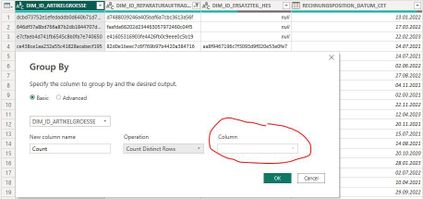
i want to group a table in power query by the column "DIM_ID_ARTIKELGROESSE". I want to summarize the other columns with "Count Rows" or "Count distinct rows".
My problem is that i can not select any of the columns i want to summarize in the drop down next to Opertion.
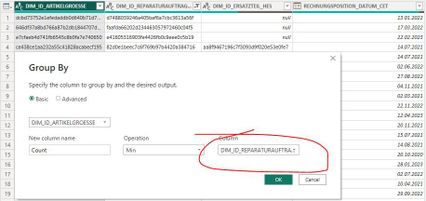
However if select a different Operation such as "Min" i can select the other columns:
Thanks for any tips!
Solved! Go to Solution.
Hi @Anonymous ,
As far as I know, "Count Rows" or "Count distinct rows" should distinct count all other rows grouped by "DIM_ID_ARTIKELGROESSE".
So when the Group by function selects Count-related operations, Column will not display columns, but will directly affect all rows. When operations such as SUM, AVG, etc. are selected, they will be displayed.
For reference: Grouping or summarizing rows
Best Regards,
Rico Zhou
If this post helps, then please consider Accept it as the solution to help the other members find it more quickly.
Hi @Anonymous ,
As far as I know, "Count Rows" or "Count distinct rows" should distinct count all other rows grouped by "DIM_ID_ARTIKELGROESSE".
So when the Group by function selects Count-related operations, Column will not display columns, but will directly affect all rows. When operations such as SUM, AVG, etc. are selected, they will be displayed.
For reference: Grouping or summarizing rows
Best Regards,
Rico Zhou
If this post helps, then please consider Accept it as the solution to help the other members find it more quickly.
Check out the November 2025 Power BI update to learn about new features.
Advance your Data & AI career with 50 days of live learning, contests, hands-on challenges, study groups & certifications and more!