Forum Discussion

Power Bi Table number formatting
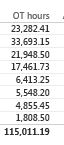
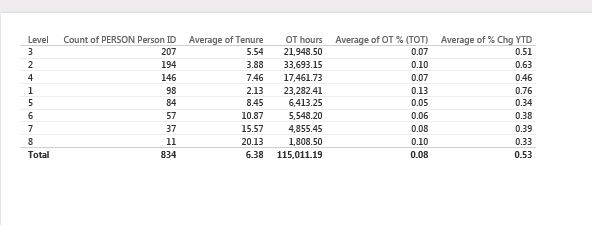
I am creating a simple Table in Power BI and trying to get rid of decmials but cant seem to find an option fo number formating anywhere, i can Edit Query and change the format but it rounds off numbers incorrectly and even after that Table visual will not remove 2 decimal places. I dont think Microsoft can oversee this very very basic feature.
Also how do i sort a table in the table (1st column in the screen shot).
12 Replies
- Greg_DecklerCommunity Champion
In Data view, choose your table, choose your column and on the Modeling tab where it says "Auto", (Formatting section) edit this to be 0.
In report, select table, click on the column you want to sort, if it is sorted the wrong way, click again. You can also set a "Sort By" column if you need a special type of sorting.
 smittystxRegular Visitor
Found this solution while trying to figure out the decimal places. One thing I'm perplexed about though. I am wondering how this can be done on a column that you are showing as a percent of the total such as below. How do I adjust this to a single decimal place?
Total % Total 9 0.86% 3 0.29% 4 0.38% 6 0.58% 9 0.86% 11 1.06% 6 0.58% 2 0.19% 12 1.15% 14 1.34%  abelladFrequent Visitor
See Display units and precision control for table & matrix columns in Power BI Desktop March Feature Summary.
 vshruti06Advocate IV
Hello Greg_Deckler
I have updated my model and set the decimal to 0. After doing that my model is getting currepted.
Is there any way to overcome this?
Thanks in Advance
Shruti Vyas
 RanaRegular Visitor
thanks for the reply, sorting worked out fine.
Table is still not formating properly, screen shots below:
1st screen shot is the table and 2nd screen shot is formatted column from the data tab.
- RanaRegular Visitor
formatting worked too, i had to drop and include the Measure again on the table,
thanks for your help
- fbluemkeAdvocate IClick into the data table view to update formatting.