cancel
Showing results for 
Search instead for 
Did you mean: 

View all the Fabric Data Days sessions on demand. View schedule

Reply
Anonymous
Not applicable

Power BI not showing data in table, but shows it filter

Hi,

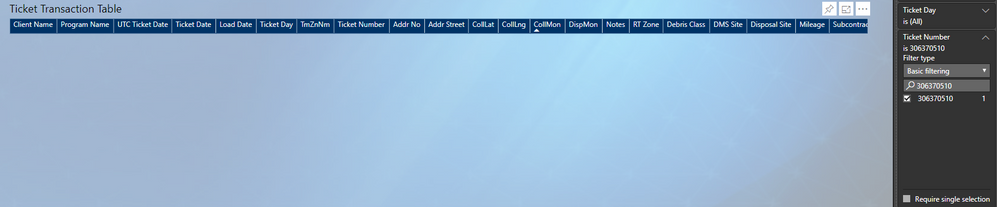
I have a report I created that uses tickets numbers.  The ticket number shows up in the filter like it exists with a 1, but does not show up in the table at all. 


I have tried to disable and reenable the preview features, and refreshed the dataset & the dataflow.  This is happening with a lot of different tickets.  There are NO filters applied to this table in the queries, and the only filter applied is the ticket search number. 


I have tried looking in the data export to find the tickets and they do not exist in the export.

Not sure what to try next so any help is appreciated.ticketnotshowing.PNG

1 ACCEPTED SOLUTION
Anonymous
Not applicable

The issue turned out to be an unknown error.  Putting the data in a new table fixed the issue.

View solution in original post

3 REPLIES 3
Anonymous
Not applicable

The issue turned out to be an unknown error.  Putting the data in a new table fixed the issue.

Anonymous
Not applicable

Bump

It may seem silly to ask, but does that ticket have values for the fields?


You may want to try the dropdowns for your values and select the option to "Show items with no data".

Helpful resources

Announcements
November Power BI Update Carousel

Power BI Monthly Update - November 2025

Check out the November 2025 Power BI update to learn about new features.

Fabric Data Days Carousel

Fabric Data Days

Advance your Data & AI career with 50 days of live learning, contests, hands-on challenges, study groups & certifications and more!

FabCon Atlanta 2026 carousel

FabCon Atlanta 2026

Join us at FabCon Atlanta, March 16-20, for the ultimate Fabric, Power BI, AI and SQL community-led event. Save $200 with code FABCOMM.

Top Solution Authors
Top Kudoed Authors