Join us at FabCon Atlanta from March 16 - 20, 2026, for the ultimate Fabric, Power BI, AI and SQL community-led event. Save $200 with code FABCOMM.
Register now!The Power BI Data Visualization World Championships is back! Get ahead of the game and start preparing now! Learn more
Hi,
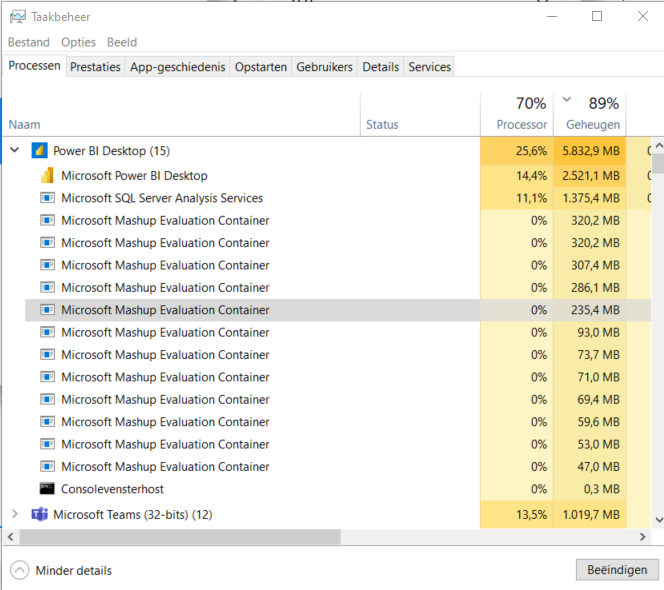
Power BI desktop is using an insane amount of RAM. The report in the screenshot is not very large, with only about 400K rows in total. There are no pending query changes or anything. Does anyone have a clue as to why Power BI is using this much RAM?
Solved! Go to Solution.
Hi @Anonymous ,
Power BI uses an in-memory engine so high RAM use in the desktop can happen.
The ram consumption depends on the model complexity, I would suggest you refer to the optimization guidance below to improve the data model:
Optimization guide for Power BI - Power BI | Microsoft Learn
It's also recommend that you try the DirectQuery connection mode.
Use DirectQuery in Power BI Desktop - Power BI | Microsoft Learn
Best Regards,
Stephen Tao
If this post helps, then please consider Accept it as the solution to help the other members find it more quickly.
Hi @Anonymous ,
Power BI uses an in-memory engine so high RAM use in the desktop can happen.
The ram consumption depends on the model complexity, I would suggest you refer to the optimization guidance below to improve the data model:
Optimization guide for Power BI - Power BI | Microsoft Learn
It's also recommend that you try the DirectQuery connection mode.
Use DirectQuery in Power BI Desktop - Power BI | Microsoft Learn
Best Regards,
Stephen Tao
If this post helps, then please consider Accept it as the solution to help the other members find it more quickly.
Check out the November 2025 Power BI update to learn about new features.
Advance your Data & AI career with 50 days of live learning, contests, hands-on challenges, study groups & certifications and more!