Join us at FabCon Atlanta from March 16 - 20, 2026, for the ultimate Fabric, Power BI, AI and SQL community-led event. Save $200 with code FABCOMM.
Register now!Get Fabric Certified for FREE during Fabric Data Days. Don't miss your chance! Request now
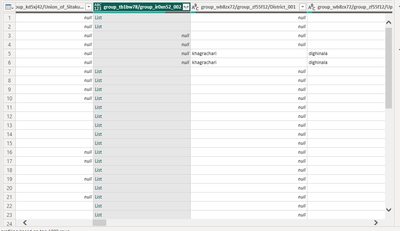
Hello all, greetings from Bangladesh. I felt in this problem and tried to solve it. Unfortunately, the dropdown column of the Set of Activities (123_ABC) does not appear. So how I will fix the problem? Seeking urgent assistance. Would someone help me at the soonest time? Thanks in advance
#PowerBI #DataTransformationPanelDropdownIssue
Solved! Go to Solution.
Hi @MamunUrRashid
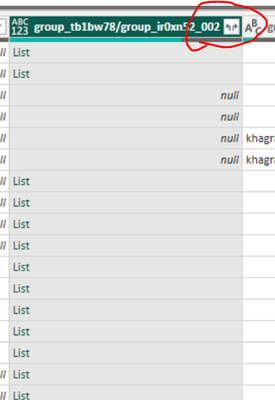
Click on this arrow for expansion. you column values are incomplete.
I hope It resolves your issue.
hi @MamunUrRashid
provide some sample screenshot for better understanding your problem.
what issue you are facing?
Hi @MamunUrRashid
Click on this arrow for expansion. you column values are incomplete.
I hope It resolves your issue.
Can you please provide a screeshot ?
Hello, dear AmiraBedh, Greetings, and thanks for your support. However, I connected my data source through the web (KOBO ToolBox). So what will I do next to my activities lists to appearing in the report view?
Check out the November 2025 Power BI update to learn about new features.
Advance your Data & AI career with 50 days of live learning, contests, hands-on challenges, study groups & certifications and more!