FabCon is coming to Atlanta
Join us at FabCon Atlanta from March 16 - 20, 2026, for the ultimate Fabric, Power BI, AI and SQL community-led event. Save $200 with code FABCOMM.
Register now!- Power BI forums
- Get Help with Power BI
- Desktop
- Service
- Report Server
- Power Query
- Mobile Apps
- Developer
- DAX Commands and Tips
- Custom Visuals Development Discussion
- Health and Life Sciences
- Power BI Spanish forums
- Translated Spanish Desktop
- Training and Consulting
- Instructor Led Training
- Dashboard in a Day for Women, by Women
- Galleries
- Data Stories Gallery
- Themes Gallery
- Contests Gallery
- QuickViz Gallery
- Quick Measures Gallery
- Visual Calculations Gallery
- Notebook Gallery
- Translytical Task Flow Gallery
- TMDL Gallery
- R Script Showcase
- Webinars and Video Gallery
- Ideas
- Custom Visuals Ideas (read-only)
- Issues
- Issues
- Events
- Upcoming Events
The Power BI Data Visualization World Championships is back! Get ahead of the game and start preparing now! Learn more
- Power BI forums
- Forums
- Get Help with Power BI
- Desktop
- Power BI : UNICHAR is a dax function or not?
- Subscribe to RSS Feed
- Mark Topic as New
- Mark Topic as Read
- Float this Topic for Current User
- Bookmark
- Subscribe
- Printer Friendly Page

- Mark as New
- Bookmark
- Subscribe
- Mute
- Subscribe to RSS Feed
- Permalink
- Report Inappropriate Content
Power BI : UNICHAR is a dax function or not?
Hi,
Im analysing the use of UNICHAR for displaying arrows on Power BI reports.
If UNICHAR works in Power BI (see https://community.powerbi.com/t5/Community-Blog/Power-BI-Desktop-DAX-Using-Unicode-Arrows-as-Measure...), why do i get an error in a measure like Measurec = UNICHAR(9733) :
"Failed to resolve name 'Unichar'. It is not a valid variable, table, or function name."
I would like to place all the logic on the tabular model, but the same error appears on Data Tools.
Why is this error happening?
Regards


- Mark as New
- Bookmark
- Subscribe
- Mute
- Subscribe to RSS Feed
- Permalink
- Report Inappropriate Content
Hi @Anonymous,
The UNICHAR is a DAX function, you could refer to this link: https://msdn.microsoft.com/en-us/query-bi/dax/unichar-function-dax
And based on my test, the measure could work on my side like the picture below. Could you tell me what database you are connected to and how to connect?
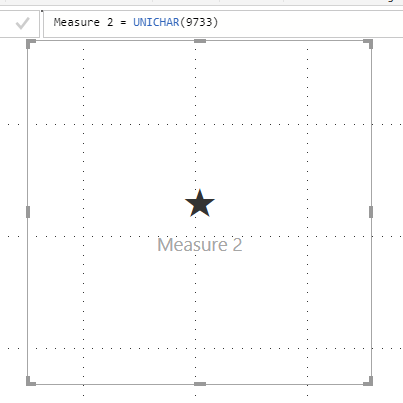
Regards,
Daniel He
If this post helps, then please consider Accept it as the solution to help the other members find it more quickly.
- Mark as New
- Bookmark
- Subscribe
- Mute
- Subscribe to RSS Feed
- Permalink
- Report Inappropriate Content
Hi @v-danhe-msft , i'm connected to a tabular model v.1200 (sql server 2016), but in this case i think it doesn't mather, because i can't create a simple measure as you have done. Note the unrecognized UNICHAR and the error respectively on card, kpi, table and matrix.
This happens in English Power BI Version: 2.60.5169.3201 64-bit (juillet 2018), working under a VM Windows 10.

I have now tested In my personal laptop, and it works perfectly in the English Power BI version 2.58.5103.501 (May 2018).
2 things can be happening: my VM is from a french organization and there is somekind of problem with windows settings, or the Juillet / July? version as an error.
Thanks, would really like to solve this, to finish report.
Regards
- Mark as New
- Bookmark
- Subscribe
- Mute
- Subscribe to RSS Feed
- Permalink
- Report Inappropriate Content
New test, find the problem.
This is unbelievable, i tryed on the organization VM to use UNICHAR in a new PBIX, and it works, so my conclusion is that my report isn't working because i'm connected to an SSAS Tabular 1200 from SQL Server 2016.
- Mark as New
- Bookmark
- Subscribe
- Mute
- Subscribe to RSS Feed
- Permalink
- Report Inappropriate Content
I converted printscreens of the arrows in Base64, and tried something like this on Tabular
="data:image/jpeg;base64, " & IF ( [Moving Average 3M]>1; "iVBORw0KGgoAAAANSUhEUgAAABwAAAAeCAYAAAA/xX6fAAAAAXNSR0IArs4c6QAAAARnQU1BAACxjwv8YQUAAAAJcEhZcwAADsMAAA7DAcdvqGQAAACbSURBVEhL7dFRCoAgEIThjlT3P5wxkGE66q7tKkQ/DPSgfg9tYXI/WO3Yj+tL1xAIbAk4gqrBFFsCalEVyDBMkwmISRODDEknzQzEJIlA9jibJFMQ69UF2aOt9TIHsVZNkD0mWSsXEKtVBdkjmtVyAzEWBdnlkbFcQSyvANmlN8tzB7G0B8gOWyxtCojFbpAdslys+IfefR0M4QQbPD4TaV+BpAAAAABJRU5ErkJggg==";
"iVBORw0KGgoAAAANSUhEUgAAAB4AAAAeCAYAAAA7MK6iAAAAAXNSR0IArs4c6QAAAARnQU1BAACxjwv8YQUAAAAJcEhZcwAADsMAAA7DAcdvqGQAAACTSURBVEhL7dFBDoAgDERRjyT3PxxmFiaIA7SFUhe+ZJb0x3jkIH94m0c4ncl1pdcXswerVtoWrtF/zB7OrrYlzNAwsAPWMe7hlmYY2CHtWlzDPd0wsIPS9biFR4ZhYIdHG3EJS4jCwAKtSSwPS4nDwEL1pJaGNVRhYMF7GsvCWuowfCZsYQpDeNjKHIaw8IygcM4XLBctMmT0kYQAAAAASUVORK5CYII=")
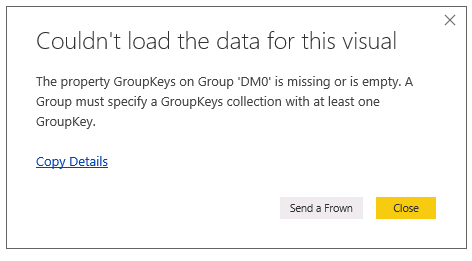
In Data category placed as image,. It isn't working on Power BI, i get an error:
Helpful resources

Power BI Dataviz World Championships
The Power BI Data Visualization World Championships is back! Get ahead of the game and start preparing now!

Power BI Monthly Update - December 2025
Check out the December 2025 Power BI Holiday Recap!

FabCon Atlanta 2026
Join us at FabCon Atlanta, March 16-20, for the ultimate Fabric, Power BI, AI and SQL community-led event. Save $200 with code FABCOMM.

| User | Count |
|---|---|
| 41 | |
| 38 | |
| 36 | |
| 30 | |
| 28 |


| User | Count |
|---|---|
| 129 | |
| 88 | |
| 79 | |
| 68 | |
| 63 |


