cancel
Showing results for 
Search instead for 
Did you mean: 

We've captured the moments from FabCon & SQLCon that everyone is talking about, and we are bringing them to the community, live and on-demand. Starts on April 14th. Register now

Reply
Mike_Westley
Regular Visitor

Power BI Desktop Update option ASSUMES 64 bit operating system

Tried August update/install and failed. Help.


Power BI Desktop advises that there is an update available - however, when links followed and the installation file is downloaded, it is PBIDesktop_x64, and when double-click to install, I get Windows Installer popup saying "This installation package is not supported by this processor type.  Contact your product vendor.  and OK button.


Is Power BI not providing 32 bit and 64 bit version updates/installs?  or is the download process not testing for 32/64 bit processor on receiving system?  (my laptop 'System' clearly says it is 32-bit Operating System.

1 ACCEPTED SOLUTION
BhaveshPatel
Super User
Super User

Hi There,


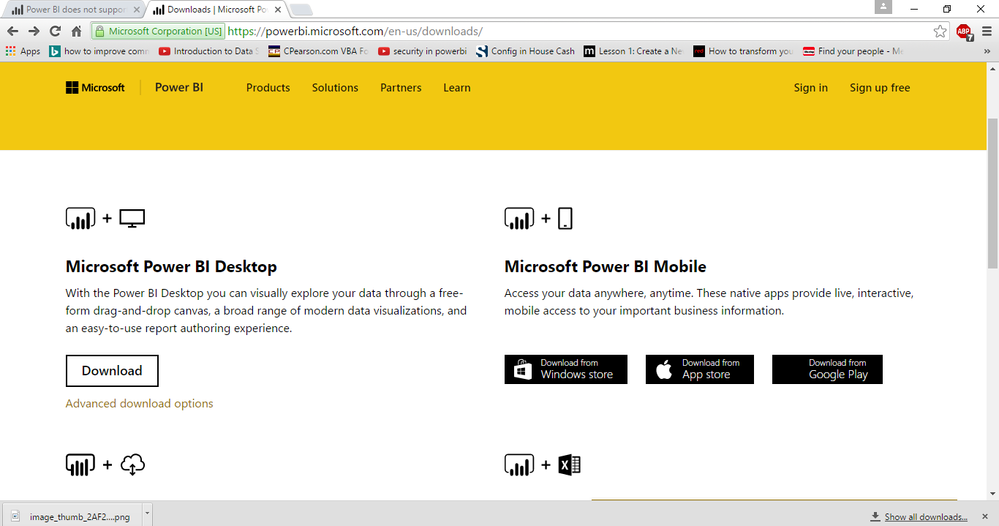
Under the Advanced Downloading options, You can actually select 32 bit or 64 bit version of PowerBI. PowerBI 32 bit will support your 32 bit access database. 


Regards,

Bhavesh


Capture123.PNG


Thanks & Regards,
Bhavesh

Love the Self Service BI.
Please use the 'Mark as answer' link to mark a post that answers your question. If you find a reply helpful, please remember to give Kudos.

View solution in original post

4 REPLIES 4
Mike_Westley
Regular Visitor

Self-solved, but Microsoft could and should improve its Power BI Desktop update routine - ie the link in bottom-right of PBI DT that appears when an update is available, SHOULD either test system being downloaded to, to identify if 32 bit or 64 bit, or should take users to the 'Advanced Download Options' to enable users to choose the version to be downloaded.


I had to search the community / forum to find this.


The update link referred to above, appears NOT to offer choice of 32 / 64 bit and does not test receiving operating system before downloading the 'zip' file takes place.


Come on Microsoft - standard/best practice?

Yes you are right sir.


Thanks & Regards,
Bhavesh

Love the Self Service BI.
Please use the 'Mark as answer' link to mark a post that answers your question. If you find a reply helpful, please remember to give Kudos.
BhaveshPatel
Super User
Super User

Hi There,


Under the Advanced Downloading options, You can actually select 32 bit or 64 bit version of PowerBI. PowerBI 32 bit will support your 32 bit access database. 


Regards,

Bhavesh


Capture123.PNG


Thanks & Regards,
Bhavesh

Love the Self Service BI.
Please use the 'Mark as answer' link to mark a post that answers your question. If you find a reply helpful, please remember to give Kudos.

Thanks Bhavesh Patel - found the Advanced Download option eventually - shame that the Update link bottom right of Power BI Desktop doesnt take you there, or test your operating system to identify which is needed, instead it just downloads the 64 bit version 😞 


Thanks for the prompt reply.

Mike

Helpful resources

Announcements
New to Fabric survey Carousel

New to Fabric Survey

If you have recently started exploring Fabric, we'd love to hear how it's going. Your feedback can help with product improvements.

Power BI DataViz World Championships carousel

Power BI DataViz World Championships - June 2026

A new Power BI DataViz World Championship is coming this June! Don't miss out on submitting your entry.

Join our Fabric User Panel

Join our Fabric User Panel

Share feedback directly with Fabric product managers, participate in targeted research studies and influence the Fabric roadmap.

March Power BI Update Carousel

Power BI Community Update - March 2026

Check out the March 2026 Power BI update to learn about new features.