Join us at FabCon Atlanta from March 16 - 20, 2026, for the ultimate Fabric, Power BI, AI and SQL community-led event. Save $200 with code FABCOMM.
Register now!Get Fabric Certified for FREE during Fabric Data Days. Don't miss your chance! Request now
Hi,
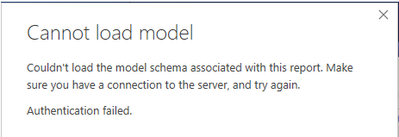
If I open a report in Power BI Desktop that connects to a dataset in the Power BI Service I'm able to work with that report without any issues. However, after about an hour I eventually get the following error:
Cannot load model - authentication failed
The following docs seem to suggest why but don't explicitly mention Power BI Desktop
Has anyone else experienced this issue, please?
Thanks
Karl
Hi @karlk ,
Could you tell me if your problem has been solved by @amitchandak 's suggestion? If it is, kindly Accept it as the solution to make the thread closed. More people will benefit from it.
Hope to hear from you😀
Best Regards,
Eyelyn Qin
Hi,
Unfortunately it doesn't. The issue occurs where the report live connects to a dataset in the Power BI service so there is no Power Query to edit.
Edit:
Actually the problem is more specific than I originally described:
Thanks
Karl
@karlk , Try to increase the timeout and check
https://community.powerbi.com/t5/Desktop/Query-Timeout-on-update/td-p/53459
Check out the November 2025 Power BI update to learn about new features.
Advance your Data & AI career with 50 days of live learning, contests, hands-on challenges, study groups & certifications and more!