Hi Team,
We have 2 tables in the system as below :
Table 1 : Master table for ‘Purpose’
Table 2 : Data containing different purpose applicable for a worker for each fiscal and quarter
| Purpose | CreatingWorker | Fiscal | Quarter |
| P1 | W1 | 2021 | Q1 |
| P2 | W1 | 2021 | Q1 |
| P3 | W1 | 2021 | Q1 |
| P1 | W1 | 2021 | Q2 |
| P2 | W1 | 2021 | Q2 |
| P3 | W1 | 2021 | Q2 |
| P1 | W2 | 2021 | Q1 |
| P2 | W2 | 2021 | Q1 |
| P3 | W2 | 2021 | Q1 |
| P4 | W2 | 2021 | Q1 |
| P2 | W3 | 2021 | Q1 |
| P3 | W3 | 2021 | Q1 |
| P4 | W3 | 2021 | Q1 |
We have a requirement where we need to show the count of each purpose for the worker, fiscal year, quarter combination.
| CreatingWorker | Fiscal | Quarter | P1 | P2 | P3 | P4 |
| W1 | 2021 | Q1 | 1 | 1 | 1 | |
| W1 | 2021 | Q2 | 1 | 1 | 1 | |
| W2 | 2021 | Q1 | 1 | 1 | 1 | 1 |
| W3 | 2021 | Q1 | | 1 | 1 | 1 |
The above needs to be done alongside other calculated measures for the combination – worker, fiscal year, quarter. Our end result needs to look like below. The columns Blue are calculated measures, the columns Red are the various Purpose in the system and the count for this can grow.
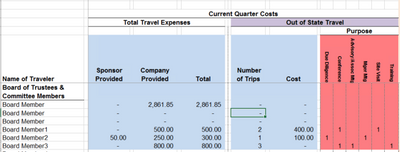
ASK-
- We are looking for suggestions on using the correct visualisation that helps us achieve the above result.
- Is there a way where we can dynamically add columns to the table based on the number of records in Table 1 (Purpose master) above? How can we achieve it?
- Any other suggestions.


