cancel
Showing results for 
Search instead for 
Did you mean: 

Get Fabric Certified for FREE during Fabric Data Days. Don't miss your chance! Request now

Reply
donnarenia
Frequent Visitor

Power BI Dashboard

I have created a Power BI report and published it as a dashboard.  There is a section on the report called notes that I want people to be able to enter notes on the report published.  


Is this possible?

1 ACCEPTED SOLUTION
v-frfei-msft
Community Support
Community Support

Hi @donnarenia ,


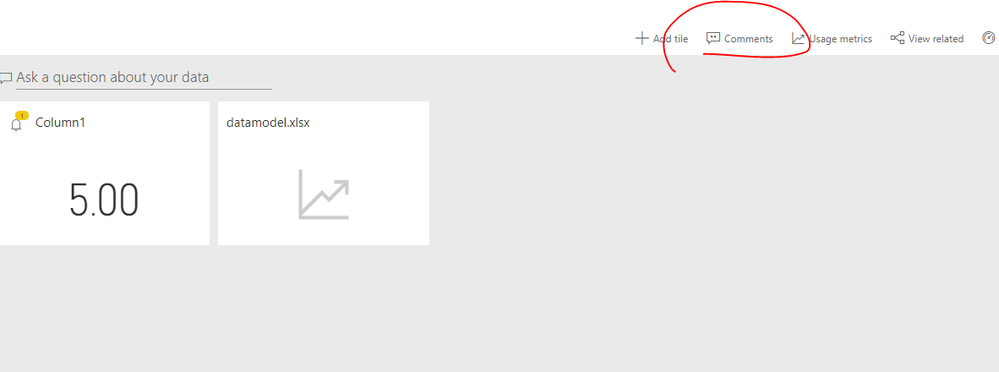
We can add comments in both report and dashboard. For more details, please check the online document.

https://docs.microsoft.com/en-us/power-bi/consumer/end-user-comment


Capture.PNG

Community Support Team _ Frank
If this post helps, then please consider Accept it as the solution to help the others find it more quickly.

View solution in original post

1 REPLY 1
v-frfei-msft
Community Support
Community Support

Hi @donnarenia ,


We can add comments in both report and dashboard. For more details, please check the online document.

https://docs.microsoft.com/en-us/power-bi/consumer/end-user-comment


Capture.PNG

Community Support Team _ Frank
If this post helps, then please consider Accept it as the solution to help the others find it more quickly.

Helpful resources

Announcements
Fabric Data Days Carousel

Fabric Data Days

Advance your Data & AI career with 50 days of live learning, contests, hands-on challenges, study groups & certifications and more!

October Power BI Update Carousel

Power BI Monthly Update - October 2025

Check out the October 2025 Power BI update to learn about new features.

FabCon Atlanta 2026 carousel

FabCon Atlanta 2026

Join us at FabCon Atlanta, March 16-20, for the ultimate Fabric, Power BI, AI and SQL community-led event. Save $200 with code FABCOMM.

Top Solution Authors