Become a Certified Power BI Data Analyst!
Join us for an expert-led overview of the tools and concepts you'll need to pass exam PL-300. The first session starts on June 11th. See you there!
Get registered- Power BI forums
- Get Help with Power BI
- Desktop
- Service
- Report Server
- Power Query
- Mobile Apps
- Developer
- DAX Commands and Tips
- Custom Visuals Development Discussion
- Health and Life Sciences
- Power BI Spanish forums
- Translated Spanish Desktop
- Training and Consulting
- Instructor Led Training
- Dashboard in a Day for Women, by Women
- Galleries
- Webinars and Video Gallery
- Data Stories Gallery
- Themes Gallery
- Contests Gallery
- Quick Measures Gallery
- Notebook Gallery
- Translytical Task Flow Gallery
- R Script Showcase
- Ideas
- Custom Visuals Ideas (read-only)
- Issues
- Issues
- Events
- Upcoming Events
Power BI is turning 10! Let’s celebrate together with dataviz contests, interactive sessions, and giveaways. Register now.
- Power BI forums
- Forums
- Get Help with Power BI
- Desktop
- Re: Pivoting date field issue
- Subscribe to RSS Feed
- Mark Topic as New
- Mark Topic as Read
- Float this Topic for Current User
- Bookmark
- Subscribe
- Printer Friendly Page


- Mark as New
- Bookmark
- Subscribe
- Mute
- Subscribe to RSS Feed
- Permalink
- Report Inappropriate Content
Pivoting date field issue
Hi everyone! I'm pretty sure that my problem could be solved through pivot or unpivot feature, but I encountered a problem that I wasn't able to fix.
My dataset looks like:
| installs | signups |
| players | sesions |
30/5/2020 | 10 | 20 |
| 30 | 40 |
29/5/2020 | 20 | 33 |
| 44 | 22 |
28/5/2020 | 20 | 11 |
| 33 | 5 |
27/5/2020 | 15 | 10 |
| 22 | 6 |
26/5/2020 | 16 | 6 |
| 8 | 7 |
I need to show it transposed, like:
| 30/5/2020 | 29/5/2020 | 28/5/2020 | 27/5/2020 |
installs | 10 | 20 | 20 | 15 |
signups | 20 | 33 | .. | . |
players | … | .. | . | . |
sesions | .. | .. | .. | 6 |
Using pivot feature, seems to be ok.
But the problem, as the date columns now (due to pivot action) are metrics, I need to select one by one to include it in the table. But as my query datasource every day will return new days ( it recover last 4 days metrcs ) , the "new date" included every day, appears not checked ( as you can see 30/05/2020), so doesn't appear in the table.
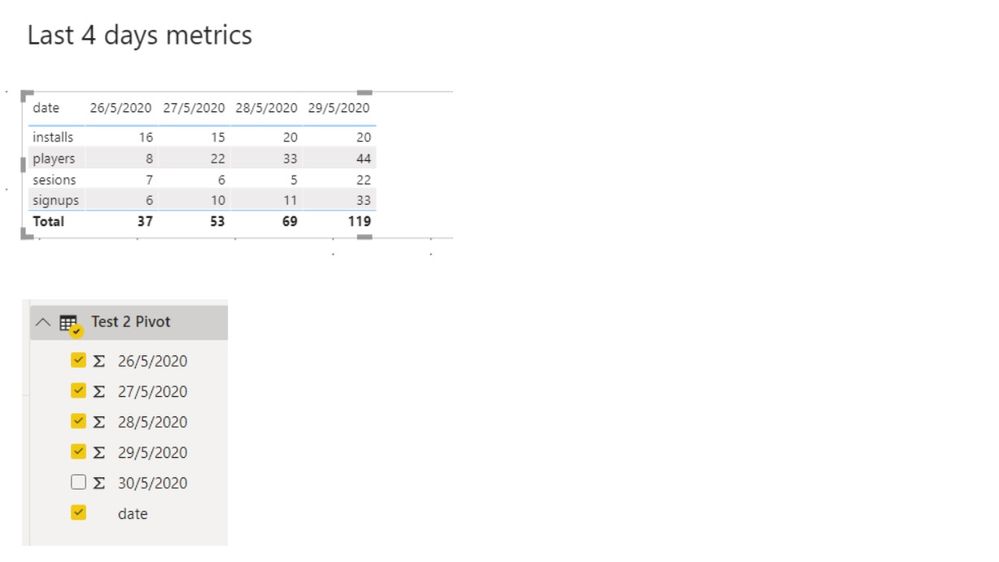
Is there any solution to do it ? I mean, I need to show always the days returned into my datasource, with no manually intervention.
My .pbix attached, with the original table ( a sample ) and the pivoted table as other
source: https://drive.google.com/file/d/19VX0qKjk25MgowRCIxjBf6MWZ9na_v6Z/view?usp=sharing
Thanks in advance,
Regards!
Solved! Go to Solution.


- Mark as New
- Bookmark
- Subscribe
- Mute
- Subscribe to RSS Feed
- Permalink
- Report Inappropriate Content
@gustavo80 see attached, you just unpivot and then view in a matrix, it is the easiest and most scalable solution and follows the best practice from a data modeling perspective.
I would ❤ Kudos if my solution helped. 👉 If you can spend time posting the question, you can also make efforts to give Kudos whoever helped to solve your problem. It is a token of appreciation!
Subscribe to the @PowerBIHowTo YT channel for an upcoming video on List and Record functions in Power Query!!
Learn Power BI and Fabric - subscribe to our YT channel - Click here: @PowerBIHowTo
If my solution proved useful, I'd be delighted to receive Kudos. When you put effort into asking a question, it's equally thoughtful to acknowledge and give Kudos to the individual who helped you solve the problem. It's a small gesture that shows appreciation and encouragement! ❤
Did I answer your question? Mark my post as a solution. Proud to be a Super User! Appreciate your Kudos 🙂
Feel free to email me with any of your BI needs.


- Mark as New
- Bookmark
- Subscribe
- Mute
- Subscribe to RSS Feed
- Permalink
- Report Inappropriate Content
Why are you pivoting out the dates? In almost all cases, that makes your model harder to analyze/visualize. If you really need to do it, you can likely use Table.ColumnNames() to dynamically generate a list of your date column names to use in whatever function currently has a list of static column names.
But you should have a really good reason for doing the pivot. Your starting table structure is good (you could even consider unpivotting it further), and you can make your desired visual showing 4 dates from that kind of structure.
If this works for you, please mark it as solution. Kudos are appreciated too. Please let me know if not.
Regards,
Pat
Did I answer your question? Mark my post as a solution! Kudos are also appreciated!
To learn more about Power BI, follow me on Twitter or subscribe on YouTube.
@mahoneypa HoosierBI on YouTube
- Mark as New
- Bookmark
- Subscribe
- Mute
- Subscribe to RSS Feed
- Permalink
- Report Inappropriate Content
Thanks for the quick response! I obviusly prefer not to pivot, it was just a try that I made to show the information as I need ( dates in columns, measures in rows ).
How should I do ? I tried with a table and with a matrix but I coudn't show the data as I need :S
- Mark as New
- Bookmark
- Subscribe
- Mute
- Subscribe to RSS Feed
- Permalink
- Report Inappropriate Content
@gustavo80 see attached, you just unpivot and then view in a matrix, it is the easiest and most scalable solution and follows the best practice from a data modeling perspective.
I would ❤ Kudos if my solution helped. 👉 If you can spend time posting the question, you can also make efforts to give Kudos whoever helped to solve your problem. It is a token of appreciation!
Subscribe to the @PowerBIHowTo YT channel for an upcoming video on List and Record functions in Power Query!!
Learn Power BI and Fabric - subscribe to our YT channel - Click here: @PowerBIHowTo
If my solution proved useful, I'd be delighted to receive Kudos. When you put effort into asking a question, it's equally thoughtful to acknowledge and give Kudos to the individual who helped you solve the problem. It's a small gesture that shows appreciation and encouragement! ❤
Did I answer your question? Mark my post as a solution. Proud to be a Super User! Appreciate your Kudos 🙂
Feel free to email me with any of your BI needs.
- Mark as New
- Bookmark
- Subscribe
- Mute
- Subscribe to RSS Feed
- Permalink
- Report Inappropriate Content
Thanks! I was not awared of that unpivot option, it works perfect,thank u very much!
Regards from Argentina 😉
- Mark as New
- Bookmark
- Subscribe
- Mute
- Subscribe to RSS Feed
- Permalink
- Report Inappropriate Content
@gustavo80 My Pleasure!!
From Canada 🍁🍁
Subscribe to the @PowerBIHowTo YT channel for an upcoming video on List and Record functions in Power Query!!
Learn Power BI and Fabric - subscribe to our YT channel - Click here: @PowerBIHowTo
If my solution proved useful, I'd be delighted to receive Kudos. When you put effort into asking a question, it's equally thoughtful to acknowledge and give Kudos to the individual who helped you solve the problem. It's a small gesture that shows appreciation and encouragement! ❤
Did I answer your question? Mark my post as a solution. Proud to be a Super User! Appreciate your Kudos 🙂
Feel free to email me with any of your BI needs.

Helpful resources

Power BI Monthly Update - June 2025
Check out the June 2025 Power BI update to learn about new features.

Fabric Community Update - June 2025
Find out what's new and trending in the Fabric community.

| User | Count |
|---|---|
| 84 | |
| 77 | |
| 75 | |
| 43 | |
| 36 |


| User | Count |
|---|---|
| 109 | |
| 56 | |
| 52 | |
| 45 | |
| 43 |


