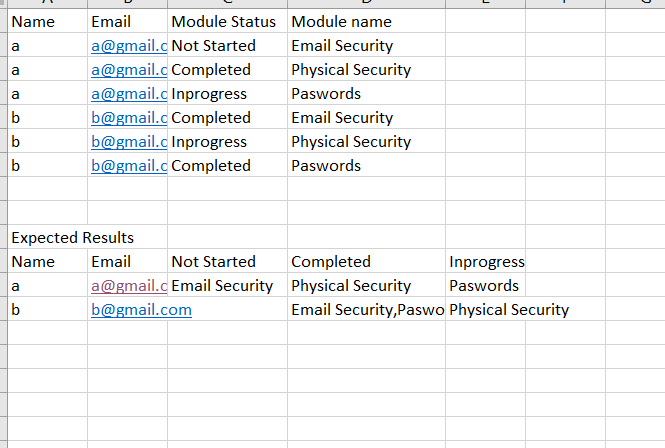
Hi @harish_hpe ,
You can try to use the following m-query:
let
    Source = Table.FromRows(Json.Document(Binary.Decompress(Binary.FromText("i45WclTSUTJUitWJVnICsozALGcgyxjMAsmawGVN4bJmSrGxAA==", BinaryEncoding.Base64), Compression.Deflate)), let _t = ((type nullable text) meta [Serialized.Text = true]) in type table [Team = _t, Value = _t]),
    #"Grouped Rows" = Table.Group(Source, {"Team"}, {{"Count", each _, type table [Team=nullable text, Value=nullable text]}}),
    #"Added Custom" = Table.AddColumn(#"Grouped Rows", "Custom", each Table.AddIndexColumn([Count],"index",1)),
    #"Removed Columns" = Table.RemoveColumns(#"Added Custom",{"Team", "Count"}),
    #"Expanded Custom" = Table.ExpandTableColumn(#"Removed Columns", "Custom", {"Team", "Value", "index"}, {"Custom.Team", "Custom.Value", "Custom.index"}),
    #"Renamed Columns" = Table.RenameColumns(#"Expanded Custom",{{"Custom.Team", "Team"}, {"Custom.Value", "Value"}, {"Custom.index", "index"}}),
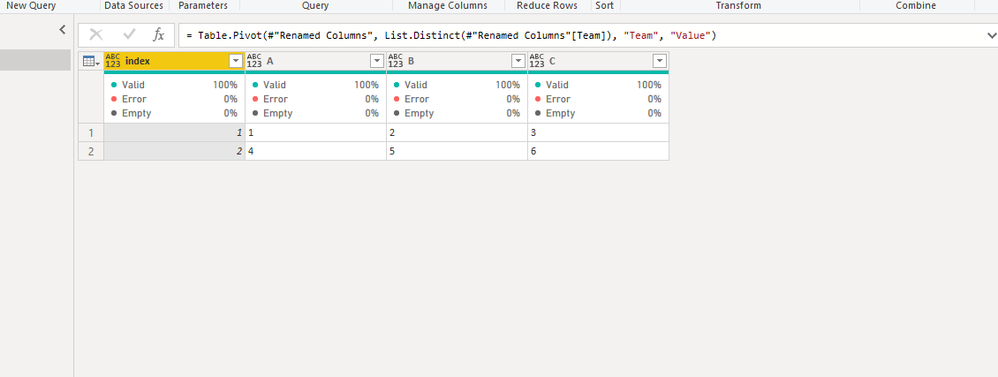
    #"Pivoted Column" = Table.Pivot(#"Renamed Columns", List.Distinct(#"Renamed Columns"[Team]), "Team", "Value")
in
    #"Pivoted Column"
If this post helps, then please consider Accept it as the solution to help the other members find it more quickly.
Best Regards,
Dedmon Dai