FabCon is coming to Atlanta
Join us at FabCon Atlanta from March 16 - 20, 2026, for the ultimate Fabric, Power BI, AI and SQL community-led event. Save $200 with code FABCOMM.
Register now!- Power BI forums
- Get Help with Power BI
- Desktop
- Service
- Report Server
- Power Query
- Mobile Apps
- Developer
- DAX Commands and Tips
- Custom Visuals Development Discussion
- Health and Life Sciences
- Power BI Spanish forums
- Translated Spanish Desktop
- Training and Consulting
- Instructor Led Training
- Dashboard in a Day for Women, by Women
- Galleries
- Data Stories Gallery
- Themes Gallery
- Contests Gallery
- QuickViz Gallery
- Quick Measures Gallery
- Visual Calculations Gallery
- Notebook Gallery
- Translytical Task Flow Gallery
- TMDL Gallery
- R Script Showcase
- Webinars and Video Gallery
- Ideas
- Custom Visuals Ideas (read-only)
- Issues
- Issues
- Events
- Upcoming Events
View all the Fabric Data Days sessions on demand. View schedule
- Power BI forums
- Forums
- Get Help with Power BI
- Desktop
- Pie Graph not interacting with card
- Subscribe to RSS Feed
- Mark Topic as New
- Mark Topic as Read
- Float this Topic for Current User
- Bookmark
- Subscribe
- Printer Friendly Page

- Mark as New
- Bookmark
- Subscribe
- Mute
- Subscribe to RSS Feed
- Permalink
- Report Inappropriate Content
Pie Graph not interacting with card
Hi everyone,
I received an already worked powerbi Model, I'm not that comfortable with the data base that it's using but i'm trying to make it work, I've searched other posts with no luck since I've seen problems like this one rely more on interactions between graphs or filters, I believe my problem unfortunately might be data configuration.
Problem is that when I select one piece of my pie chart my card doesn't interact
Data base example
| Month | General Aviation Passengers | Comercial Passengers |
| January | 100 | 500 |
| February | 200 | 300 |
| ... | ... | ... |
| .... | .... | ... |
I've tried my pie graph with:
a) dragging both columns
b) creating 2 measures
I've tried my card with:
a) A measure by adding the 2 measures
b) A measure by using SUMX with both columns
Still haven't found a way to make it work with this combinations.
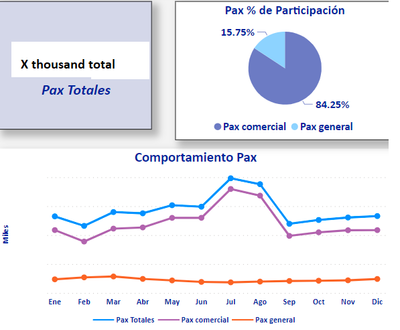
Interactions are working properly since I can choose a month and it interacts perfectly problem relies only between pie chart and card.
If you have any ideas i would appreciate it, thank you!


- Mark as New
- Bookmark
- Subscribe
- Mute
- Subscribe to RSS Feed
- Permalink
- Report Inappropriate Content
Hi @Cr1s88
There can be a few reasons for this but if you received the model as is, then just check that:
1. Your pie graph data is from the same table as the KPI card. If this doesn't work, go to 2.
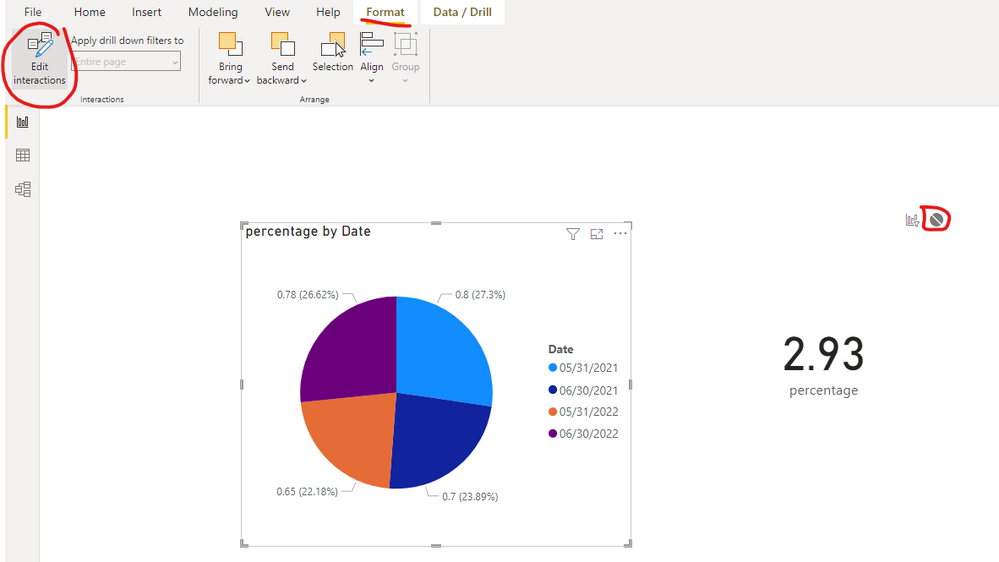
2. Click on your pie graph, then go into the ribbon and go to Format tab. The first button on the left in the Format tab is the "Edit Interactions" button. Please click this. Once clicked, look at the Cark visual to see whether there is a no filter sign. If it is on no filter (the blue circled one), then click the "filter" icon on the card visual (one of the others) so that there is an interaction between the two.

Hope this helps!
Theo
If I have posted a response that resolves your question, please accept it as a solution to formally close the post.
Also, if you are as passionate about Power BI, DAX and data as I am, please feel free to reach out if you have any questions, queries, or if you simply want to connect and talk to another data geek!
Want to connect?www.linkedin.com/in/theoconias
- Mark as New
- Bookmark
- Subscribe
- Mute
- Subscribe to RSS Feed
- Permalink
- Report Inappropriate Content
Thanks for the support TheoC,
Yup I only have one data table, and I created one for time functions.
I tried interactions proposal with no luck, unfortunately I believe I'll have to live with no interaction or modify data base to have only one column with both passenger types.

- Mark as New
- Bookmark
- Subscribe
- Mute
- Subscribe to RSS Feed
- Permalink
- Report Inappropriate Content
Hi @Cr1s88 did you click on the KPI card to see if edit interaction was reversed?
If I have posted a response that resolves your question, please accept it as a solution to formally close the post.
Also, if you are as passionate about Power BI, DAX and data as I am, please feel free to reach out if you have any questions, queries, or if you simply want to connect and talk to another data geek!
Want to connect?www.linkedin.com/in/theoconias
- Mark as New
- Bookmark
- Subscribe
- Mute
- Subscribe to RSS Feed
- Permalink
- Report Inappropriate Content
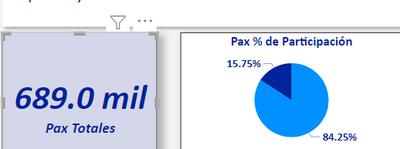
Yes, well actually there seems to be no interaction "from the card" I think this is beacuse there is nothing to filter from here since it is only a number. It only shows the filter icon that it can be affected by a year slicer.
- Mark as New
- Bookmark
- Subscribe
- Mute
- Subscribe to RSS Feed
- Permalink
- Report Inappropriate Content
Hi @Cr1s88 ,
As @TheoC suggested, please check if the pie chart have no impact on card visual by changing the interaction behaviour just as below screenshot... So the data on the card visual not effected by the pie chart selection....
Change how visuals interact in a Power BI report
Best Regard
- Mark as New
- Bookmark
- Subscribe
- Mute
- Subscribe to RSS Feed
- Permalink
- Report Inappropriate Content
Morning Ying!
Yes, I checked it but it does have interaction. For example when I select my pie graph or a line graph I got it shows the same interaction icons.

When I select a part of my pie chart it doesn't interact, but when i select a month of my line graph it does filter the month on the card. Only difference I can think of is the data base configuration. The month is a register in every log, whereas passengers are different columns.
Thanks for the suggestion!
- Mark as New
- Bookmark
- Subscribe
- Mute
- Subscribe to RSS Feed
- Permalink
- Report Inappropriate Content
Hi @Cr1s88 ,
In order to make troubleshooting and give you a suitable solution, could you please share a simplified pbix file with card visual and pie chart? You can refer the following link to upload the file to the community. Thank you.
How to upload PBI in Community
Best Regards

- Mark as New
- Bookmark
- Subscribe
- Mute
- Subscribe to RSS Feed
- Permalink
- Report Inappropriate Content

- Mark as New
- Bookmark
- Subscribe
- Mute
- Subscribe to RSS Feed
- Permalink
- Report Inappropriate Content
Hi Vahid!
Measures I've tried different options for the measures of the card:
Opt 1. SUM X of the 2 columns
"Pax Totales = SUMX('Indicadores AIT','Indicadores AIT'[PAX AV COMERCIAL] + 'Indicadores AIT'[PAX AV GENERAL])"
Opt. 2 the sum of two measures (which are the ones that I use for the PIE GRAPH)
Pie Graph Measure 1 (Sum of column 1) =

Helpful resources

Power BI Monthly Update - November 2025
Check out the November 2025 Power BI update to learn about new features.

Fabric Data Days
Advance your Data & AI career with 50 days of live learning, contests, hands-on challenges, study groups & certifications and more!

FabCon Atlanta 2026
Join us at FabCon Atlanta, March 16-20, for the ultimate Fabric, Power BI, AI and SQL community-led event. Save $200 with code FABCOMM.


