
cancel
Showing results for 
Search instead for 
Did you mean: 

Get Fabric Certified for FREE during Fabric Data Days. Don't miss your chance! Request now

Reply
PedroGomesANCD
Regular Visitor

Performance difference between on-demand update and scheduled update

Hi,

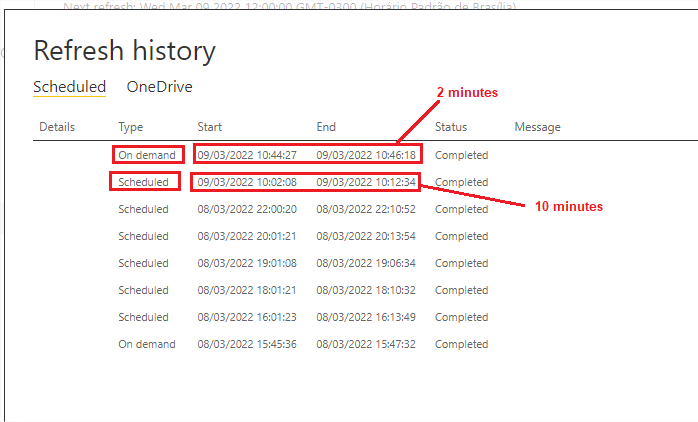
My dataset has a scheduled update and taking 10-15 minutes to finish.
When I run on-demand update, it only takes 2-3 minutes.
Both updates go through the gateway.
Can someone help me?

Thanks,

PedroGomesANCD_0-1646834882270.png


6 REPLIES 6
YinchTan
Frequent Visitor

Hi have similar observation on the API triggered refresh, this is from Power Automate script, the refresh time is 15 seconds as opposed to ~5 miniutes in the scheduled refresh, and it's very consistent every time.

v-chenwuz-msft
Community Support
Community Support

Hi @PedroGomesANCD ,


Whether they are manually refreshed or scheduled to be refreshed, their process is the same. Only, the start time and the actual time of the scheduled refresh are not the same. And the power bi service ensures user interaction first when there is not enough memory, and starts refreshing data only when there is enough memory. And the network factor will also affect the refresh process.


For more details, you can refer this official article.

Optimize Microsoft Power BI Premium capacities - Power BI | Microsoft Docs


Best Regards

Community Support Team _ chenwu zhu


If this post helps, then please consider Accept it as the solution to help the other members find it more quickly.

Hi @v-chenwuz-msft ,

I understand, but our network does not show any instability during the update process.
The only difference really is that on demand process it is faster.

Do you think any configuration changes in the gateway file would make any difference?

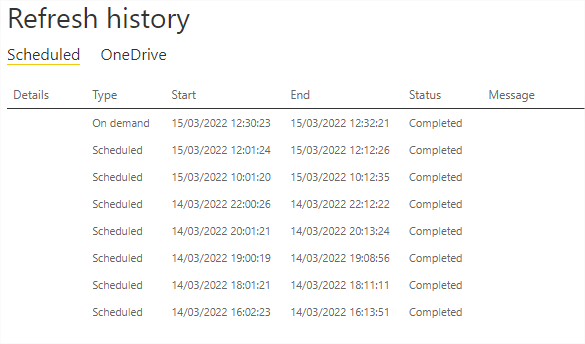
I just did a new manual update and the time difference is very big.

Thank you for your help!


PedroGomesANCD_0-1647359185432.png


Hi @PedroGomesANCD ,


For scheduled refresh, it has a certain delay. You can refer to specific official documents:

vchenwuzmsft_0-1647396211880.png

Data refresh in Power BI - Power BI | Microsoft Docs


You can find out the actual time it refreshed, by checking the gateway logs.
As far as I know there is no special setting for scheduled refreshes.


Best Regards

Community Support Team _ chenwu zhu


If this post helps, then please consider Accept it as the solution to help the other members find it more quickly.

amitchandak
Super User
Super User

@PedroGomesANCD , You have done it just after the last load has finished, so I doubt not much data for a refresh, depending on the setting.

can you check a manual one before the scheduled one and check

Share with Power BI Enthusiasts: Full Power BI Video (20 Hours) YouTube
Microsoft Fabric Series 60+ Videos YouTube
Microsoft Fabric Hindi End to End YouTube

Hi!
I don't use incremental update.
The entire dataset is completely updated ever.

If I run on-demand update now, the time to complete is the same (2 minutes)

Helpful resources

Announcements
November Power BI Update Carousel

Power BI Monthly Update - November 2025

Check out the November 2025 Power BI update to learn about new features.

Fabric Data Days Carousel

Fabric Data Days

Advance your Data & AI career with 50 days of live learning, contests, hands-on challenges, study groups & certifications and more!

FabCon Atlanta 2026 carousel

FabCon Atlanta 2026

Join us at FabCon Atlanta, March 16-20, for the ultimate Fabric, Power BI, AI and SQL community-led event. Save $200 with code FABCOMM.

Top Solution Authors
Top Kudoed Authors