- Power BI forums
- Updates
- News & Announcements
- Get Help with Power BI
- Desktop
- Service
- Report Server
- Power Query
- Mobile Apps
- Developer
- DAX Commands and Tips
- Custom Visuals Development Discussion
- Health and Life Sciences
- Power BI Spanish forums
- Translated Spanish Desktop
- Power Platform Integration - Better Together!
- Power Platform Integrations (Read-only)
- Power Platform and Dynamics 365 Integrations (Read-only)
- Training and Consulting
- Instructor Led Training
- Dashboard in a Day for Women, by Women
- Galleries
- Community Connections & How-To Videos
- COVID-19 Data Stories Gallery
- Themes Gallery
- Data Stories Gallery
- R Script Showcase
- Webinars and Video Gallery
- Quick Measures Gallery
- 2021 MSBizAppsSummit Gallery
- 2020 MSBizAppsSummit Gallery
- 2019 MSBizAppsSummit Gallery
- Events
- Ideas
- Custom Visuals Ideas
- Issues
- Issues
- Events
- Upcoming Events
- Community Blog
- Power BI Community Blog
- Custom Visuals Community Blog
- Community Support
- Community Accounts & Registration
- Using the Community
- Community Feedback
Earn a 50% discount on the DP-600 certification exam by completing the Fabric 30 Days to Learn It challenge.
- Power BI forums
- Forums
- Get Help with Power BI
- Desktop
- Re: Performance : calculating Moving average, perc...
- Subscribe to RSS Feed
- Mark Topic as New
- Mark Topic as Read
- Float this Topic for Current User
- Bookmark
- Subscribe
- Printer Friendly Page

- Mark as New
- Bookmark
- Subscribe
- Mute
- Subscribe to RSS Feed
- Permalink
- Report Inappropriate Content
Performance : calculating Moving average, percentile
Good morning, everyone,
I would like to present to you a case where performance is poor.
The context is this: a date dimension table (this one includes all dates with hh:mm:ss) + a fact table ("PDJ") that contains two columns, one datetime column + one measure "M1".
Date M1
01/11/2018 04:10:01 4
01/11/2018 04:10:04 1
01/11/2018 04:10:05 1
01/11/2018 04:10:07 3
01/11/2018 04:10:08 8
01/11/2018 04:10:09 1
I have to calculate the moving averages (1s, 2s, 5s, 10s, 30s, 60s). We see in the example that the seconds do not follow one another. First of all, I had to feed the non-existent lines by putting 0 in the "M1" measure (Power query) to perform the moving averages.
Date M1
01/11/2018 04:10:01 4
01/11/2018 04:10:02 0
01/11/2018 04:10:03 0
01/11/2018 04:10:04 1
01/11/2018 04:10:05 1
01/11/2018 04:10:06 0
01/11/2018 04:10:07 3
01/11/2018 04:10:08 8
01/11/2018 04:10:09 1
For the calculation of the moving average, I have added an index.
Date M1 Index
01/11/2018 04:10:01 4 1
01/11/2018 04:10:02 0 2
01/11/2018 04:10:03 0 3
01/11/2018 04:10:04 1 4
01/11/2018 04:10:05 1 5
01/11/2018 04:10:06 0 6
01/11/2018 04:10:07 3 7
01/11/2018 04:10:08 8 8
01/11/2018 04:10:09 1 9
The following formula for example for 10s:
AverageMoving10s = CALCULATE(
AVERAGEX(VALUES(PDJ[Index]); PDJ[Total M1])
PDJ[Index] < VALUES(PDJ[Index]) +10 && PDJ[Index] >= VALUES(PDJ[Index])
)
The request was to display the maximum value on the different moving averages with the following formula:
Max10s =
MAXX(
values(PDJ[Index]);
[MoyMob10s]
)
I have encountered many performance problems.
First of all, feed a Date dimension table with all the seconds. I took an interval over 1 month but the customer wants 1 year: -(
The fact table with injection of non-existent lines (merge between the fact table and the dimension table in Power Query).
Adding an index.
Then, the calculated measures are long to display. I'm limited to one minute because beyond that, it crashes.
The customer has Power BI Pro. Storage: import data
Do you have any advice on how to make the analysis more efficient?
Thank you very much for your suggestions.
Jacky.
Solved! Go to Solution.


- Mark as New
- Bookmark
- Subscribe
- Mute
- Subscribe to RSS Feed
- Permalink
- Report Inappropriate Content
Can you try changing the last 2 bits:
'Fact'[TimeID] >= MovingWindowStart
&& 'Fact'[TimeID] <= MovingWindowEnd
to
'DimTime'[TimeKey] >= MovingWindowStart
&& 'DimTime'[TimeKey] <= MovingWindowEnd
In addition, make sure TimeKey should be an integer.
- Mark as New
- Bookmark
- Subscribe
- Mute
- Subscribe to RSS Feed
- Permalink
- Report Inappropriate Content
Try splitting the Date column into 2 columns: Date & Time
Then have 2 seperate dimension tables for Date and Time.
That should reduce the model size and improve performance. Since Date & Time dimension table are Contiguous, you may not need an Index column.
- Mark as New
- Bookmark
- Subscribe
- Mute
- Subscribe to RSS Feed
- Permalink
- Report Inappropriate Content
Thank you. It's a great idea about two seperate dimension tables for Date and Time.
I could reduce the performance.
But how do you fill the lines without measures ? To calculate average moving, you have to find all the seconds into the fact table.
And from my source, i have holes because i don't have all the seconds. i have to load the other lines with a measure to 0 with a outer join in Power Query (Merge between dimension date&time and the fact table)
Without index, it means that you use time for the calculation, isn't it ?
May be with this calculated measure :
MovingAverage = CALCULATE(AVERAGE([Value]),FILTER(MovingAverage, EARLIER([Time])>=[Time]))
Thank you.
- Mark as New
- Bookmark
- Subscribe
- Mute
- Subscribe to RSS Feed
- Permalink
- Report Inappropriate Content
You should have a Date dimension (365 rows for 1 year) & a time dimension (86400 rows for one day), and link it to your fact table.
Afterwards, you can derive your moving Average based on the Time dimension table which has all the time.
AverageMoving2s =
VAR MovingWindowEnd =
    MAX ( 'Time'[TimeID] )
VAR MovingWindowStart = MovingWindowEnd - 2
VAR MaxTimeinFact =
    CALCULATE ( MAX ( 'Fact'[TimeID] ), ALLSELECTED ( 'Time' ) )
VAR MinTimeinFact =
    CALCULATE ( MIN ( 'Fact'[TimeID] ), ALLSELECTED ( 'Time' ) )
RETURN
    IF (
        MovingWindowEnd <= MaxTimeinFact
            && MovingWindowEnd >= MinTimeinFact,
        CALCULATE (
            AVERAGEX (
                VALUES ( 'Time'[TimeID] ),
                VAR Total = [M1 Total] RETURN IF ( ISBLANK ( Total ), 0, Total )
            ),
            ALL ( 'Time' ),
            'Time'[TimeID] >= MovingWindowStart
                && 'Time'[TimeID] <= MovingWindowEnd
        )
    )
- Mark as New
- Bookmark
- Subscribe
- Mute
- Subscribe to RSS Feed
- Permalink
- Report Inappropriate Content
Thank you @AkhilAshok !
It looked good! But the average doesn't work.
You can see below.
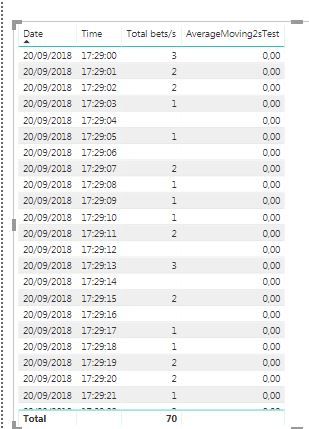
AverageMoving2sTest =
VAR MovingWindowEnd =
    MAX ( 'DimTime'[TimeKey] )
VAR MovingWindowStart = MovingWindowEnd - 2
VAR MaxTimeinFact =
    CALCULATE ( MAX ( 'Fact'[TimeID] ); ALLSELECTED ( 'DimTime' ) )
VAR MinTimeinFact =
    CALCULATE ( MIN ( 'Fact'[TimeID] ); ALLSELECTED ( 'DimTime' ) )
RETURN
    IF (
        MovingWindowEnd <= MaxTimeinFact
            && MovingWindowEnd >= MinTimeinFact;
        CALCULATE (
            AVERAGEX (
                VALUES ( 'DimTime'[TimeKey] );
                VAR Total = [Total bets/s] RETURN IF ( ISBLANK ( Total ); 0; Total )
                     );
            ALL ('DimTime');
            'Fact'[TimeID] >= MovingWindowStart
                && 'Fact'[TimeID] <= MovingWindowEnd
                  )
    )
Regards,
- Mark as New
- Bookmark
- Subscribe
- Mute
- Subscribe to RSS Feed
- Permalink
- Report Inappropriate Content
Can you try changing the last 2 bits:
'Fact'[TimeID] >= MovingWindowStart
&& 'Fact'[TimeID] <= MovingWindowEnd
to
'DimTime'[TimeKey] >= MovingWindowStart
&& 'DimTime'[TimeKey] <= MovingWindowEnd
In addition, make sure TimeKey should be an integer.


- Mark as New
- Bookmark
- Subscribe
- Mute
- Subscribe to RSS Feed
- Permalink
- Report Inappropriate Content
Hi @Anonymous,
Does that make sense? Kindly mark the answer to close the case. Thanks in advance.
Regards,
Frank
If this post helps, then please consider Accept it as the solution to help the others find it more quickly.
Helpful resources


Power BI Monthly Update - April 2024
Check out the April 2024 Power BI update to learn about new features.

Fabric Community Update - April 2024
Find out what's new and trending in the Fabric Community.

| User | Count |
|---|---|
| 98 | |
| 90 | |
| 77 | |
| 71 | |
| 64 |


| User | Count |
|---|---|
| 115 | |
| 102 | |
| 98 | |
| 71 | |
| 67 |


