Forum Discussion

NickProp28's avatar
NickProp28
Icon for Post Partisan rankPost Partisan
5 years ago
Solved

Perform target month data from excel

Dear  Community,


I have data pull from database to perform monthly revenue.
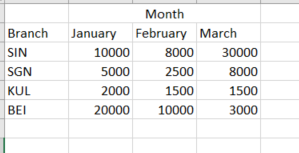
Problem is we have a montly target revenue that does not appear in DB, so its needed manually key in Excel and import to BI.

Isit possible to put under the same graph (Line 1 for DB revenue and Line 2 for Excel target revenue)? Moreover, each branch have different monthly target revenue.

This is target revenue assign to each branch.


Attached with the pbix file: https://ufile.io/e3g9ecfr


Appreciate and thanks for any help.


2 Replies

  • NickProp28 , The data you are showing, You should unpivot that in pover bi. So import data from excel , Unpivot

    and join it with common date/month and branch dimesnion

    https://radacad.com/pivot-and-unpivot-with-power-bi

    You can create like this from date

    Date = "01-" & [Month] & "-2020" // 2020 as i do not see year , you can use correct year

    Change data type to date and join with date table.


    First few min of this video can help:https://youtu.be/yPQ9UV37LOU


    Please provide your feedback comments and advice for new videos
    Tutorial Series Dax Vs SQL Direct Query PBI Tips
    Appreciate your Kudos.


    • NickProp28's avatar
      NickProp28
      Icon for Post Partisan rankPost Partisan

      Dear amitchandak ,


      Thanks for your guide.

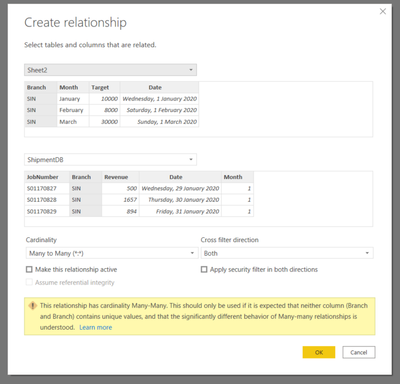
      I have unpivot month and target. Added date on it. And have relationship between excel table with calendar table.

      The problem that i having now is i cant link the excel table branch to DB table branch.

      Can you kindly advice ?


      Here the pbix: https://ufile.io/oa19ft16


      Thanks for your time again.