cancel
Showing results for 
Search instead for 
Did you mean: 

View all the Fabric Data Days sessions on demand. View schedule

Reply
alanhanssen
Frequent Visitor

Percentage one value appears in another table

Hello,


I'm new in PowerBI, I'm taking the PowerBI Course in EdX to avoid silly questions but I can't get this solution done.

I have a table Blogs and the Table Photos, I want to show the percentage of Blogs that has photos attached. Blogs Table has no indicator about it. You can only see in Photos table the blog ID which that photo is attached if is attached to a blog.

Any suggestion to display the percentage of blogs that has 1 or more photos?


I know the number already by making a distinct count of blog_id in the photo table but I cannot make the Pie chart with the total. 

2 ACCEPTED SOLUTIONS
Vvelarde
Community Champion
Community Champion

Hello,

@alanhanssen


Use these measures: 


Count_BlogwithPhotos = CALCULATE(DISTINCTCOUNT(Blogs[BlogiD]),RELATEDTABLE(Photos))


Count_NoBlogwithPhotos = DISTINCTCOUNT(Blogs[BlogiD])-[Count_BlogwithPhotos]


Finally, Put both measure in chart values.


Lima - Peru

View solution in original post

v-yulgu-msft
Microsoft Employee
Microsoft Employee

Hi, @alanhanssen


Create a measure:

Count_BlogwithPhotos  = CALCULATE(DISTINCTCOUNT(Blog[Blog_ID]),RELATEDTABLE(Photo))


Add a calculated column in Blog table:

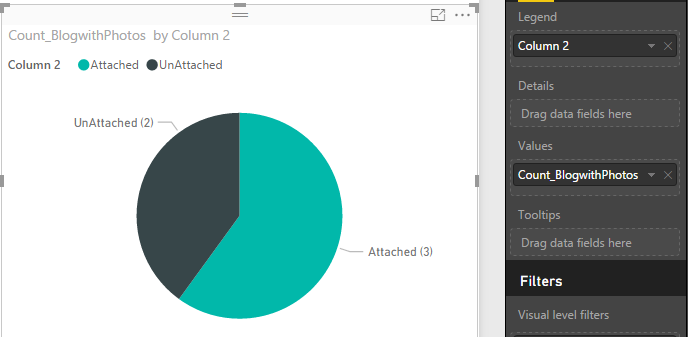
Column 2 = IF(LOOKUPVALUE(Photo[Blog_ID],Photo[Blog_ID],Blog[Blog_ID])=Blog[Blog_ID],"Attached","UnAttached")

Then, thepie chart should be like:


1.PNG


Best regards,
Yuliana Gu


Community Support Team _ Yuliana Gu
If this post helps, then please consider Accept it as the solution to help the other members find it more quickly.

View solution in original post

2 REPLIES 2
v-yulgu-msft
Microsoft Employee
Microsoft Employee

Hi, @alanhanssen


Create a measure:

Count_BlogwithPhotos  = CALCULATE(DISTINCTCOUNT(Blog[Blog_ID]),RELATEDTABLE(Photo))


Add a calculated column in Blog table:

Column 2 = IF(LOOKUPVALUE(Photo[Blog_ID],Photo[Blog_ID],Blog[Blog_ID])=Blog[Blog_ID],"Attached","UnAttached")

Then, thepie chart should be like:


1.PNG


Best regards,
Yuliana Gu


Community Support Team _ Yuliana Gu
If this post helps, then please consider Accept it as the solution to help the other members find it more quickly.
Vvelarde
Community Champion
Community Champion

Hello,

@alanhanssen


Use these measures: 


Count_BlogwithPhotos = CALCULATE(DISTINCTCOUNT(Blogs[BlogiD]),RELATEDTABLE(Photos))


Count_NoBlogwithPhotos = DISTINCTCOUNT(Blogs[BlogiD])-[Count_BlogwithPhotos]


Finally, Put both measure in chart values.


Lima - Peru

Helpful resources

Announcements
November Power BI Update Carousel

Power BI Monthly Update - November 2025

Check out the November 2025 Power BI update to learn about new features.

Fabric Data Days Carousel

Fabric Data Days

Advance your Data & AI career with 50 days of live learning, contests, hands-on challenges, study groups & certifications and more!

FabCon Atlanta 2026 carousel

FabCon Atlanta 2026

Join us at FabCon Atlanta, March 16-20, for the ultimate Fabric, Power BI, AI and SQL community-led event. Save $200 with code FABCOMM.

Top Solution Authors
Top Kudoed Authors