Forum Discussion

PRODUCTX for filter groups in BOM
Hello,
I am trying to find the product of the 'Exploded BOM'[Backflush Qty] of an exploded BOM. I have the following formula BW_Test1 which is able to calculate a BOM correctly which has a single parent-child relationship.
BW_Test1 =
CALCULATE (
    PRODUCTX (
        SUMMARIZE (
            'Exploded BOM',
            'Exploded BOM'[TopParentProduct],
            'Exploded BOM'[Level],
            'Exploded BOM'[Backflush Qty]
        ),
        'Exploded BOM'[Backflush Qty]
    ),
    FILTER (
        ALLEXCEPT ( 'Exploded BOM', 'Exploded BOM'[TopParentProduct] ),
        'Exploded BOM'[Level] <= EARLIER ( 'Exploded BOM'[Level] )
    )
)
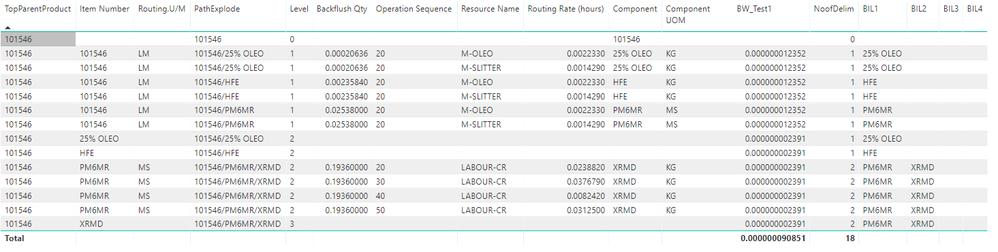
However I'm running into the following problem in the example below, where there are multiple child components at the level 1 (Multiple branches of the BOM tree). The PRODUCTX function is not correctly calculating for the grouping in TopParentProduct and Level.
Item #101546 has 3 level 1 children - 25% OLEO, PM6MR, and HFE. HFE and 25% OLEO have no children of their own so the calculation would stop there; however, PM6MR has one more child at level 3, XRMD.
The formula is shown in BW_Test1 as a calculated column. The answer showing for BW_Test1 for Item Number HFE should be 0.00235840 and 0.02538 for 25% OLEO, while the answer for PM6MR should be 0.004913568 (0.02538 multiplied by 0.19360).
I created columns of each item in the BOM heirarchy as a way to further group the items (BIL1-BIL4), and by doing this with modification to the ALLEXCEPT filter, it seems to work for this example by this modification.
BW_Test1 =
CALCULATE (
    PRODUCTX (
        SUMMARIZE (
            'Exploded BOM',
            'Exploded BOM'[TopParentProduct],
            'Exploded BOM'[Level],
            'Exploded BOM'[Backflush Qty]
        ),
        'Exploded BOM'[Backflush Qty]
    ),
    FILTER (
        ALLEXCEPT (
            'Exploded BOM',
            'Exploded BOM'[TopParentProduct],
            'Exploded BOM'[BIL1]
        ),
        'Exploded BOM'[Level] <= EARLIER ( 'Exploded BOM'[Level] )
    )
)
This then generates the correct results:
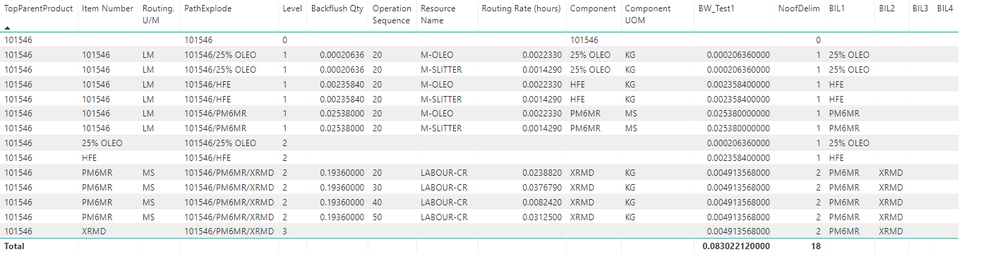
However, now I run up against another issue with the parent split on an item like the following where there is a multiple child split at level 2 in the BOM:

Adding BIL2, BIL3, BIL4 etc to the filter does not achieve the results I'm looking for. Do you have any ideas on how I can use the BIL1/2/3/4 groupings to apply the PRODUCTX function to account for these multiple child situations?
Thank you!
v-jiascu-msft tagged for prior assistance (thank you)
Blake
Hi Anonymous,
Another approach is as follows. Please give it try. I hope you didn't share anything confidential. The link here is public to all.
BW_Test2 =
CALCULATE (
    PRODUCTX (
        SUMMARIZE (
            'Exploded BOM',
            'Exploded BOM'[TopParentProduct],
            'Exploded BOM'[Level],
            'Exploded BOM'[Backflush Qty]
        ),
        'Exploded BOM'[Backflush Qty]
    ),
    FILTER (
        ALLEXCEPT ( 'Exploded BOM', 'Exploded BOM'[TopParentProduct] ),
        'Exploded BOM'[Level] <= EARLIER ( 'Exploded BOM'[Level] )
            && SEARCH ( [Component], EARLIER ( [PathExplode] ), 1, 0 ) > 0
    )
)
The last row isn't 0.1936. Is that OK?
Best Regards,
6 Replies
 v-jiascu-msft
Microsoft Employee
Hi Blake,
I'm afraid I can't follow what you are looking for. Especially the last part. Can you also share a simple that we can copy with or download, please?
Best Regards,
Dale- ImkeF
Community Champion
Hi Anonymous,
have you checked this article?: https://www.thebiccountant.com/2017/06/13/bill-of-material-bom-explosion-part2-costing-in-excel-and-powerbi/
- AnonymousNot applicable
Hi ImkeF,
The solution shown in the article is actually very close to what I want to achieve. Because the UOM does not always equate to EA, I have to aggregate based on a product of the Backflush Qty at each level of the BOM. Your BOM explosion method should look familiar in some of my columns, as it was incredibly helpful to explode the BOM. I am having difficulty taking the new table and adapting it to your M code for the bridge table.
Firstly, there doesn't exist a ComponentID, just the Component and Backflush Qty. This, combined with the PathExplodeCode causes errors when I try and run the query to create the bridge table.I am really looking for more of a DAX solution, as I really am new to M code; however, I believe your solution is very close to what I'm hoping to achieve.
Any suggestions?
Thanks.Blake
- AnonymousNot applicable
Hi Dale,
My apologies on the confusion. I can't attach the PBIX file directly, so I've linked it here:https://drive.google.com/open?id=1YgNIVSIqgt1TI425J4riQjBunm80j3G2
The ultimate goal here is for PRODUCTX to calculate the product of the [Backflush Qty] at each level of the BOM for each BOM branch. By creating BIL1,BIL2,BIL3,BIL4, I was hoping to develop a grouping mechanism by which this would be solvable with smaller manipulation of the existing BW_Test1 formula. My hope was that by modifying the BW_Test1 formula to the following, that it would correctly aggregate; however it does not.
BW_Test1 =
CALCULATE (
    PRODUCTX (
        SUMMARIZE (
            'Exploded BOM',
            'Exploded BOM'[TopParentProduct],
            'Exploded BOM'[Level],
            'Exploded BOM'[Backflush Qty]
        ),
        'Exploded BOM'[Backflush Qty]
    ),
    FILTER (
        ALLEXCEPT (
            'Exploded BOM',
            'Exploded BOM'[TopParentProduct],
            'Exploded BOM'[BIL1],
            'Exploded BOM'[BIL2],
            'Exploded BOM'[BIL3],
            'Exploded BOM'[BIL4]
        ),
        'Exploded BOM'[Level] <= EARLIER ( 'Exploded BOM'[Level] )
    )
)
In the example of 101566, the current structure is the following:
The formula is currently calculating the following results, and needs to instead be producing the desired results attached. Can this be calculated with the current structure?
Thanks,
Blake- v-jiascu-msft
Hi Anonymous,
Another approach is as follows. Please give it try. I hope you didn't share anything confidential. The link here is public to all.
BW_Test2 =
CALCULATE (
    PRODUCTX (
        SUMMARIZE (
            'Exploded BOM',
            'Exploded BOM'[TopParentProduct],
            'Exploded BOM'[Level],
            'Exploded BOM'[Backflush Qty]
        ),
        'Exploded BOM'[Backflush Qty]
    ),
    FILTER (
        ALLEXCEPT ( 'Exploded BOM', 'Exploded BOM'[TopParentProduct] ),
        'Exploded BOM'[Level] <= EARLIER ( 'Exploded BOM'[Level] )
            && SEARCH ( [Component], EARLIER ( [PathExplode] ), 1, 0 ) > 0
    )
)
The last row isn't 0.1936. Is that OK?
Best Regards,
