Hello
So, I am building a PBIX to bring in a lot of data files from SharePoint. As the Data files, once collated, then have a lot of transformation, I have separated the "Source" into a query, so that if needed that location can be updated and then all subsequent queries will be corrected too. (So subsequent queries start with Source = #'File List')
The added bonus of this route is that I plan to be able to include a table of when certain files were last refreshed - a useful indicator of data quality.
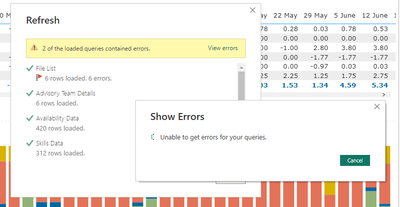
However, the Refresh does not like this little Query:
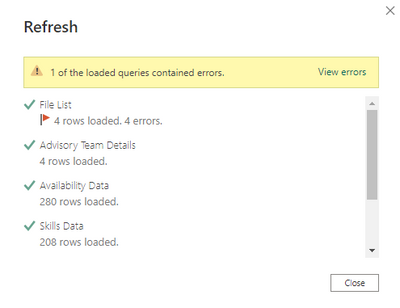
But the automated Query Errors query gives me no errors:

The File List Query is a relatively simple one:
let
Source = SharePoint.Files("https://SP SITE ADDRESS", [ApiVersion = 15]),
#"Filtered Rows" = Table.SelectRows(Source, each Text.EndsWith([Folder Path], "Resource Plans NE/")),
#"Filtered Rows1" = Table.SelectRows(#"Filtered Rows", each not Text.Contains([Name], "TEMPLATE")),
#"Removed Other Columns" = Table.SelectColumns(#"Filtered Rows1",{"Content", "Name", "Date modified"}),
#"Reordered Columns" = Table.ReorderColumns(#"Removed Other Columns",{"Name", "Date modified", "Content"})
in
#"Reordered Columns"
I am asking it to keep the Binary Column, as i need that to get tha actual data out on the subsequent queries:
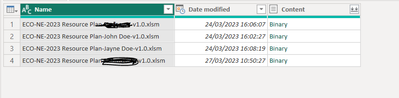
Can anyone tell me why this is upsetting the status Quo? (And yet it is succeeding in pulling in updated data into the subsequent queries?)