Don't miss your chance to take the Fabric Data Engineer (DP-600) exam for FREE! Find out how by attending the DP-600 session on April 23rd (pacific time), live or on-demand.
Learn moreJoin the FabCon + SQLCon recap series. Up next: Power BI, Real-Time Intelligence, IQ and AI, and Data Factory take center stage. All sessions are available on-demand after the live show. Register now
Hi guyz,
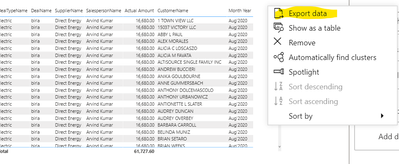
Just wanted to know if we have any option to disable the Export option in the box next to any visual.
Regards,
Himanshu
Solved! Go to Solution.
@Anonymous , you can hide the visual header, that will hide all the options in power bi service.
@Anonymous only the power bi admin has the access to control this....
Hope it resolves your issue? Please consider accepting it as the solution to help the other members find it more quickly.
Appreciate your Kudos, Press the thumbs up button!!👍
@Anonymous
As far as i am aware there is no option to activate and deactivate predefined functions/actions in PowerBI
@amitchandak Thanks but that is not 100% what I wanted.
I want to show the export feature to some of my users and hide it for some users but i guess its not possible in Power BI yet.
Regards,
Himanshu
Check out the April 2026 Power BI update to learn about new features.
If you have recently started exploring Fabric, we'd love to hear how it's going. Your feedback can help with product improvements.
A new Power BI DataViz World Championship is coming this June! Don't miss out on submitting your entry.
| User | Count |
|---|---|
| 48 | |
| 40 | |
| 37 | |
| 20 | |
| 16 |
| User | Count |
|---|---|
| 68 | |
| 67 | |
| 30 | |
| 26 | |
| 26 |