FabCon is coming to Atlanta
Join us at FabCon Atlanta from March 16 - 20, 2026, for the ultimate Fabric, Power BI, AI and SQL community-led event. Save $200 with code FABCOMM.
Register now!- Power BI forums
- Get Help with Power BI
- Desktop
- Service
- Report Server
- Power Query
- Mobile Apps
- Developer
- DAX Commands and Tips
- Custom Visuals Development Discussion
- Health and Life Sciences
- Power BI Spanish forums
- Translated Spanish Desktop
- Training and Consulting
- Instructor Led Training
- Dashboard in a Day for Women, by Women
- Galleries
- Data Stories Gallery
- Themes Gallery
- Contests Gallery
- QuickViz Gallery
- Quick Measures Gallery
- Visual Calculations Gallery
- Notebook Gallery
- Translytical Task Flow Gallery
- TMDL Gallery
- R Script Showcase
- Webinars and Video Gallery
- Ideas
- Custom Visuals Ideas (read-only)
- Issues
- Issues
- Events
- Upcoming Events
Get Fabric Certified for FREE during Fabric Data Days. Don't miss your chance! Request now
- Power BI forums
- Forums
- Get Help with Power BI
- Desktop
- Re: Occupany, Culmulative total help
- Subscribe to RSS Feed
- Mark Topic as New
- Mark Topic as Read
- Float this Topic for Current User
- Bookmark
- Subscribe
- Printer Friendly Page


- Mark as New
- Bookmark
- Subscribe
- Mute
- Subscribe to RSS Feed
- Permalink
- Report Inappropriate Content
Occupany, Culmulative total help
Hi, i basically have a column labeled occupancy 2, which is a culumaltive total of people entering or exiting a building, im wanting to understand how to modify my DAX so that the occupancy 2 cant go below zero, if anyone would be able to help it would be greatly appreciated 🙂


- Mark as New
- Bookmark
- Subscribe
- Mute
- Subscribe to RSS Feed
- Permalink
- Report Inappropriate Content
@molzmad ,Can you share sample data and sample output in table format? Or a sample pbix after removing sensitive data.
Try
a new column =
if([Occupancy] <0 , 0, [Occupancy])
- Mark as New
- Bookmark
- Subscribe
- Mute
- Subscribe to RSS Feed
- Permalink
- Report Inappropriate Content
Hi, i have attached a sample here, i tried do the new column and it didnt work :(, thanks so much for taking a look i really appreciate it 🙂
https://drive.google.com/file/d/11ubbPcRiZDj--3osMqBtXziRB4mZ5r3m/view?usp=sharing
- Mark as New
- Bookmark
- Subscribe
- Mute
- Subscribe to RSS Feed
- Permalink
- Report Inappropriate Content
I basically need it to do a running total, but if the total goes below zero then to make it zero, as i dont want the occupancy levels going into minus 🙂
- Mark as New
- Bookmark
- Subscribe
- Mute
- Subscribe to RSS Feed
- Permalink
- Report Inappropriate Content
Hi @molzmad ,
It's not clear to me. I did a test. Is the following result what you want?
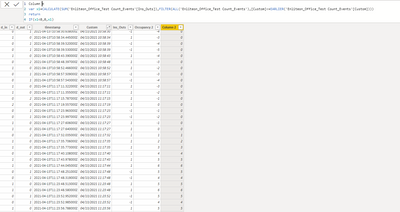
Column =
VAR x1 =
    CALCULATE (
        SUM ( 'Enliteon_Office_Test Count_Events'[Ins_Outs] ),
        FILTER (
            ALL ( 'Enliteon_Office_Test Count_Events' ),
            [Custom] <= EARLIER ( 'Enliteon_Office_Test Count_Events'[Custom] )
        )
    )
RETURN
    IF ( x1 < 0, 0, x1 )
Hope that's what you were looking for.
Best Regards,
Yuna
If this post helps, then please consider Accept it as the solution to help the other members find it more quickly.
- Mark as New
- Bookmark
- Subscribe
- Mute
- Subscribe to RSS Feed
- Permalink
- Report Inappropriate Content
Hi,
Yes thats right, but how come it doesnt start counting from the beggining i.e. top row? Is there anyway to implement this? For example its counting some of the ins as 0
- Mark as New
- Bookmark
- Subscribe
- Mute
- Subscribe to RSS Feed
- Permalink
- Report Inappropriate Content
Hi @molzmad ,
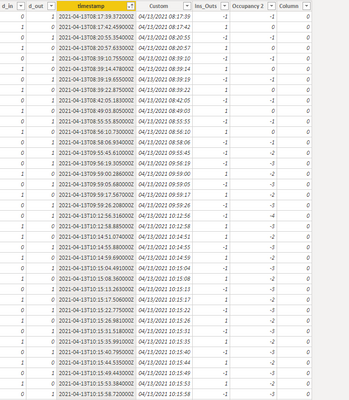
Thanks for your reply. I think it does count from the beginning. You can sort the "timestamp" column ascending.

Result:
Hope that's what you were looking for.
Best Regards,
Yuna
If this post helps, then please consider Accept it as the solution to help the other members find it more quickly.
- Mark as New
- Bookmark
- Subscribe
- Mute
- Subscribe to RSS Feed
- Permalink
- Report Inappropriate Content
Hi,
yeah it does seem to work but i mean for example you have put above, in the second row, the value for Ins_Outs = 1, so "column" should = 1 if that makes sense ?
- Mark as New
- Bookmark
- Subscribe
- Mute
- Subscribe to RSS Feed
- Permalink
- Report Inappropriate Content
Hi @molzmad ,
So you want to create a new column, where the negative value is zero and the positive value remains the same, right?
Best Regards,
Yuna
- Mark as New
- Bookmark
- Subscribe
- Mute
- Subscribe to RSS Feed
- Permalink
- Report Inappropriate Content
Yeah basically, i just want the accumulated column to count but not go below zero :),
Thanks :),
Molly
- Mark as New
- Bookmark
- Subscribe
- Mute
- Subscribe to RSS Feed
- Permalink
- Report Inappropriate Content
- Mark as New
- Bookmark
- Subscribe
- Mute
- Subscribe to RSS Feed
- Permalink
- Report Inappropriate Content
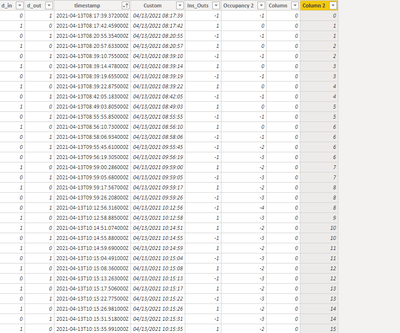
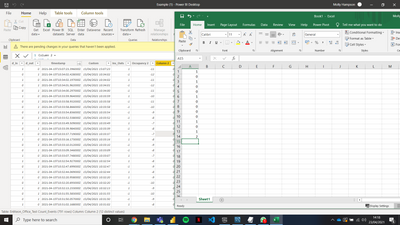
Hi 🙂 column two looks right but i just want it to count accumulatively i.e. column 2 would look like this :
- Mark as New
- Bookmark
- Subscribe
- Mute
- Subscribe to RSS Feed
- Permalink
- Report Inappropriate Content
Hi @molzmad ,
Based on your description, you can create two calculated columns as follows.
Rank =
RANKX ( ALL ( 'Enliteon_Office_Test Count_Events' ), [timestamp],, ASC )
Test_value =
VAR x1 =
    MAXX (
        FILTER (
            ALL ( 'Enliteon_Office_Test Count_Events' ),
            [Rank] <= EARLIER ( 'Enliteon_Office_Test Count_Events'[Rank] )
                && [Ins_Outs] < 0
        ),
        [Rank]
    )
RETURN
    [Rank] - x1
Result:

Hope that's what you were looking for.
Best Regards,
Yuna
If this post helps, then please consider Accept it as the solution to help the other members find it more quickly.
- Mark as New
- Bookmark
- Subscribe
- Mute
- Subscribe to RSS Feed
- Permalink
- Report Inappropriate Content
Hi almost, i just want the -1 to minus from the prior number i.e. 3,2,1 rather than the -1 equal zero if that makes sense, but just not allow the column to go below zero, like an accumulative sum that cant go below zero

Helpful resources

Power BI Monthly Update - November 2025
Check out the November 2025 Power BI update to learn about new features.

Fabric Data Days
Advance your Data & AI career with 50 days of live learning, contests, hands-on challenges, study groups & certifications and more!

FabCon Atlanta 2026
Join us at FabCon Atlanta, March 16-20, for the ultimate Fabric, Power BI, AI and SQL community-led event. Save $200 with code FABCOMM.


