Join us at FabCon Atlanta from March 16 - 20, 2026, for the ultimate Fabric, Power BI, AI and SQL community-led event. Save $200 with code FABCOMM.
Register now!The Power BI Data Visualization World Championships is back! Get ahead of the game and start preparing now! Learn more
Hi there,
I'm working with Power BI Desktop version 2.71.5523.821 and I'm not able to see in the visualization pane, the filters of drillthrought like in this image:
https://www.enhansoft.com/wp-content/uploads/2019/09/Drillthrough-Filters-Reset_thumb.jpg
So when I clicked in one shape, like could be a graph or a table, I can see the pane about page filters and report filters, but nothing about Drillthrough.
I'm doing something wrong?
Unfortunately, I'm not authorized to share the file.
Thank you and regards
Solved! Go to Solution.
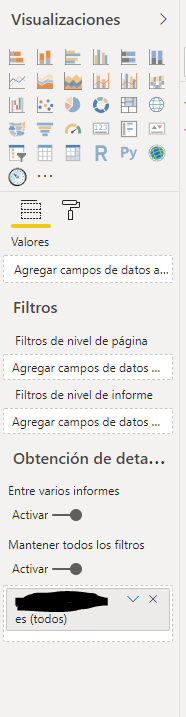
The "Obtencion de deta..." section appears to be the drillthrough area. If you place a data field into the box that you have blackened, then from another report page, you can drillthrough to this page.
You can only see the Drillthrough option when the report page (not a visualization like a graph or slicer) is selected. Click on the "whitespace" of the report to see the report page properties, then you should see Drillthrough.
Hi,
Thanks for your answer!
Unfortunately, I'm not able to see any option about Drillthrought selecting only the report. Is it neccesary to activate any option for that?
This is a screenshot about the options I get (it's in spanish)
Regards!
The "Obtencion de deta..." section appears to be the drillthrough area. If you place a data field into the box that you have blackened, then from another report page, you can drillthrough to this page.
Hello,
That was helpful, thank you very much!
The Power BI Data Visualization World Championships is back! Get ahead of the game and start preparing now!
| User | Count |
|---|---|
| 38 | |
| 36 | |
| 33 | |
| 31 | |
| 28 |
| User | Count |
|---|---|
| 129 | |
| 88 | |
| 79 | |
| 68 | |
| 63 |