cancel
Showing results for 
Search instead for 
Did you mean: 

Get Fabric Certified for FREE during Fabric Data Days. Don't miss your chance! Request now

Reply
Anonymous
Not applicable

Non-date fields (N/A, TBC) in column of data type date

I have a column titled "Approval Date" which contains both date (dd/MM/yyyy) and non-date (N/A, To Be Confirmed) fields.


I'd like to convert this column to data type "Date" in order to use associated power BI features in my visualisation like Date Hierarchy, calendar chart plugins, etc.


Problem is, these N/A and TBC fields give an error when converting as they're not date types, and using the Replace Error function only allows me to replace them with null or a date formatted value. Both of these options aren't ideal as they lose the ability to distinguish between N/A and TBC, and I'd prefer a more elegant, perhaps formula-based, solution than say replacing N/A with 1/1/1900 and TBC with 1/1/2999 which clutters the real data quite a bit. Thanks for your help and time in advance!

1 ACCEPTED SOLUTION
v-xuding-msft
Community Support
Community Support

Hi @Anonymous ,


The calculation in Power BI is for columns. It is not supported to use two or more data type in one column. So you only to change them to null or other date to use the default date hierarchy.

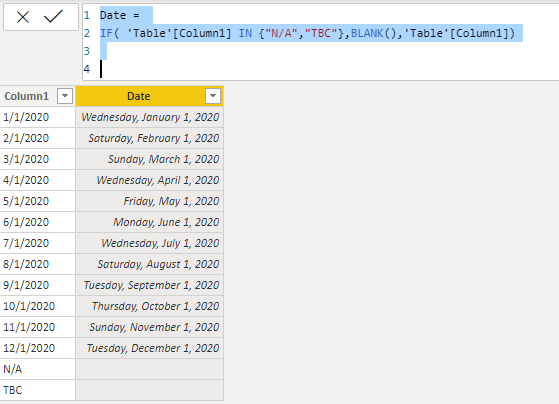
Or you could create a new date column as hierarchy slicer like below:

Date = 
IF( 'Table'[Column1] IN {"N/A","TBC"},BLANK(),'Table'[Column1])

It will return the text value.Then change it to date type.

4.PNG

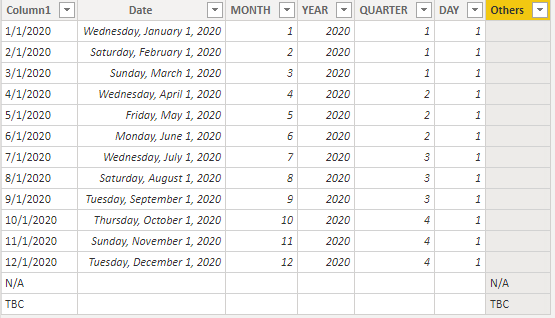
If you want to use the hierarchy that contains "N/A" and "BTC", you need to create the year column and month column etc. one by one and create a hierarchy manually to use it.

Note: For this case, the blank value can't be removed.

5.PNG


Best Regards,
Xue Ding
If this post helps, then please consider Accept it as the solution to help the other members find it more quickly.

View solution in original post

2 REPLIES 2
v-xuding-msft
Community Support
Community Support

Hi @Anonymous ,


The calculation in Power BI is for columns. It is not supported to use two or more data type in one column. So you only to change them to null or other date to use the default date hierarchy.

Or you could create a new date column as hierarchy slicer like below:

Date = 
IF( 'Table'[Column1] IN {"N/A","TBC"},BLANK(),'Table'[Column1])

It will return the text value.Then change it to date type.

4.PNG

If you want to use the hierarchy that contains "N/A" and "BTC", you need to create the year column and month column etc. one by one and create a hierarchy manually to use it.

Note: For this case, the blank value can't be removed.

5.PNG


Best Regards,
Xue Ding
If this post helps, then please consider Accept it as the solution to help the other members find it more quickly.
vanessafvg
Super User
Super User

hi you will need to assign dummy dates to those values, when you say they clutter the real data quite a bit, what do you mean exactly. You will obviously need a date field or null to manage this.


If I took the time to answer your question and I came up with a solution, please mark my post as a solution and /or give kudos freely for the effort 🙂 Thank you!

Proud to be a Super User!


Helpful resources

Announcements
November Power BI Update Carousel

Power BI Monthly Update - November 2025

Check out the November 2025 Power BI update to learn about new features.

Fabric Data Days Carousel

Fabric Data Days

Advance your Data & AI career with 50 days of live learning, contests, hands-on challenges, study groups & certifications and more!

FabCon Atlanta 2026 carousel

FabCon Atlanta 2026

Join us at FabCon Atlanta, March 16-20, for the ultimate Fabric, Power BI, AI and SQL community-led event. Save $200 with code FABCOMM.

Top Solution Authors
Top Kudoed Authors