FabCon is coming to Atlanta
Join us at FabCon Atlanta from March 16 - 20, 2026, for the ultimate Fabric, Power BI, AI and SQL community-led event. Save $200 with code FABCOMM.
Register now!- Power BI forums
- Get Help with Power BI
- Desktop
- Service
- Report Server
- Power Query
- Mobile Apps
- Developer
- DAX Commands and Tips
- Custom Visuals Development Discussion
- Health and Life Sciences
- Power BI Spanish forums
- Translated Spanish Desktop
- Training and Consulting
- Instructor Led Training
- Dashboard in a Day for Women, by Women
- Galleries
- Data Stories Gallery
- Themes Gallery
- Contests Gallery
- QuickViz Gallery
- Quick Measures Gallery
- Visual Calculations Gallery
- Notebook Gallery
- Translytical Task Flow Gallery
- TMDL Gallery
- R Script Showcase
- Webinars and Video Gallery
- Ideas
- Custom Visuals Ideas (read-only)
- Issues
- Issues
- Events
- Upcoming Events
The Power BI Data Visualization World Championships is back! Get ahead of the game and start preparing now! Learn more
- Power BI forums
- Forums
- Get Help with Power BI
- Desktop
- Re: New Table does not appear in the relationship ...
- Subscribe to RSS Feed
- Mark Topic as New
- Mark Topic as Read
- Float this Topic for Current User
- Bookmark
- Subscribe
- Printer Friendly Page

- Mark as New
- Bookmark
- Subscribe
- Mute
- Subscribe to RSS Feed
- Permalink
- Report Inappropriate Content
New Table does not appear in the relationship view
Hello,
I am just starting with PowerBi and perhaps somebody can help me in this issue.
I have created a new table in the Data Model View.

First question: Why is the symbol of the table different to the others? Does it mean "Calculated table" and the normal table can only be created in the Query Editor?
My main problem is, that this table does not appear in the relationsship view? neither on the board or in the field pane.
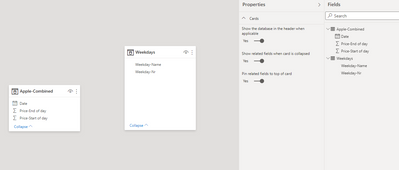
Does somebody know what I am doing wrong?
Best
Alex
Solved! Go to Solution.


- Mark as New
- Bookmark
- Subscribe
- Mute
- Subscribe to RSS Feed
- Permalink
- Report Inappropriate Content
Yes, that is the icon for a table created in DAX as opposed to Power Query.
I can't think of any reason for the table to not appear straight away.
You could try refreshing or save, close and reopen.
| Have I solved your problem? Please click Accept as Solution so I don't keep coming back to this post, oh yeah, others may find it useful also ;). |
| If you found this post helpful, please give Kudos. It gives me a sense of instant gratification and, if you give me Kudos enough times, magical unicorns will appear on your screen. If you find my signature vaguely amusing, please give Kudos. |

- Mark as New
- Bookmark
- Subscribe
- Mute
- Subscribe to RSS Feed
- Permalink
- Report Inappropriate Content
Is the calculated table hidden offscreen?
Try hitting these buttons in the bottom right corner of the Model view:

- Mark as New
- Bookmark
- Subscribe
- Mute
- Subscribe to RSS Feed
- Permalink
- Report Inappropriate Content
That's what I was thinking initially too, but he said it's not showing in the 'Fields Pane' either.
I've not come across this before.
| Have I solved your problem? Please click Accept as Solution so I don't keep coming back to this post, oh yeah, others may find it useful also ;). |
| If you found this post helpful, please give Kudos. It gives me a sense of instant gratification and, if you give me Kudos enough times, magical unicorns will appear on your screen. If you find my signature vaguely amusing, please give Kudos. |
- Mark as New
- Bookmark
- Subscribe
- Mute
- Subscribe to RSS Feed
- Permalink
- Report Inappropriate Content
Good point.
Saving and rebooting Power BI does indeed seem like the next thing to try then.

- Mark as New
- Bookmark
- Subscribe
- Mute
- Subscribe to RSS Feed
- Permalink
- Report Inappropriate Content
This is what exactly had to do when 2 of my new tables created through DAX and through uploading from a source didn't show up in the Relationship view.
- Mark as New
- Bookmark
- Subscribe
- Mute
- Subscribe to RSS Feed
- Permalink
- Report Inappropriate Content
Thanks for your help!
Rebooting helped indeed. Cannot say what the problem was.
- Mark as New
- Bookmark
- Subscribe
- Mute
- Subscribe to RSS Feed
- Permalink
- Report Inappropriate Content
Yes, that is the icon for a table created in DAX as opposed to Power Query.
I can't think of any reason for the table to not appear straight away.
You could try refreshing or save, close and reopen.
| Have I solved your problem? Please click Accept as Solution so I don't keep coming back to this post, oh yeah, others may find it useful also ;). |
| If you found this post helpful, please give Kudos. It gives me a sense of instant gratification and, if you give me Kudos enough times, magical unicorns will appear on your screen. If you find my signature vaguely amusing, please give Kudos. |
Helpful resources

Power BI Dataviz World Championships
The Power BI Data Visualization World Championships is back! Get ahead of the game and start preparing now!

Power BI Monthly Update - December 2025
Check out the December 2025 Power BI Holiday Recap!

FabCon Atlanta 2026
Join us at FabCon Atlanta, March 16-20, for the ultimate Fabric, Power BI, AI and SQL community-led event. Save $200 with code FABCOMM.

| User | Count |
|---|---|
| 41 | |
| 38 | |
| 36 | |
| 31 | |
| 28 |


| User | Count |
|---|---|
| 129 | |
| 88 | |
| 79 | |
| 68 | |
| 63 |


