Join us at FabCon Vienna from September 15-18, 2025
The ultimate Fabric, Power BI, SQL, and AI community-led learning event. Save €200 with code FABCOMM.
Get registered- Power BI forums
- Get Help with Power BI
- Desktop
- Service
- Report Server
- Power Query
- Mobile Apps
- Developer
- DAX Commands and Tips
- Custom Visuals Development Discussion
- Health and Life Sciences
- Power BI Spanish forums
- Translated Spanish Desktop
- Training and Consulting
- Instructor Led Training
- Dashboard in a Day for Women, by Women
- Galleries
- Data Stories Gallery
- Themes Gallery
- Contests Gallery
- Quick Measures Gallery
- Notebook Gallery
- Translytical Task Flow Gallery
- TMDL Gallery
- R Script Showcase
- Webinars and Video Gallery
- Ideas
- Custom Visuals Ideas (read-only)
- Issues
- Issues
- Events
- Upcoming Events
Enhance your career with this limited time 50% discount on Fabric and Power BI exams. Ends August 31st. Request your voucher.
- Power BI forums
- Forums
- Get Help with Power BI
- Desktop
- Need to show 'week number' without changing aggreg...
- Subscribe to RSS Feed
- Mark Topic as New
- Mark Topic as Read
- Float this Topic for Current User
- Bookmark
- Subscribe
- Printer Friendly Page


- Mark as New
- Bookmark
- Subscribe
- Mute
- Subscribe to RSS Feed
- Permalink
- Report Inappropriate Content
Need to show 'week number' without changing aggregation.
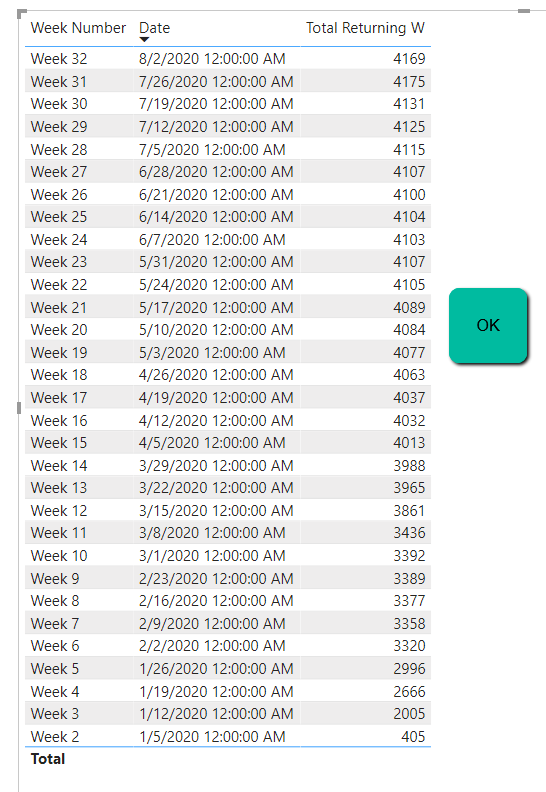
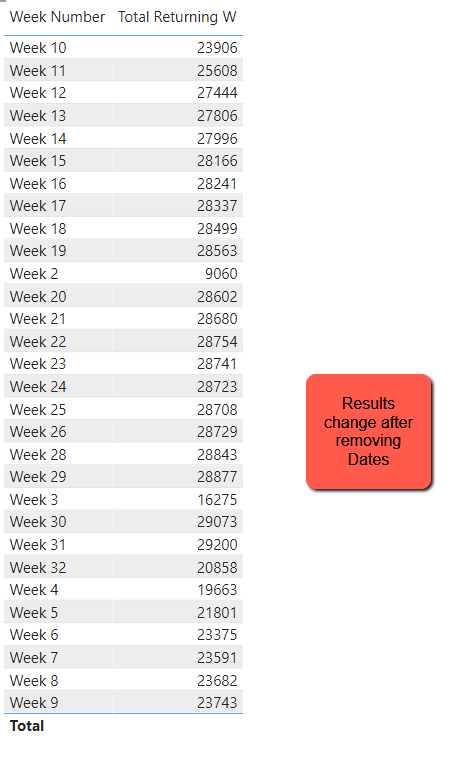
The goal is to show week number in the visualization next to the weekly Total Returning trend. However, when 'Date' is removed from the visual the Total Returning aggregation changes. See screenshots below. What am I missing?
Solved! Go to Solution.


- Mark as New
- Bookmark
- Subscribe
- Mute
- Subscribe to RSS Feed
- Permalink
- Report Inappropriate Content
The problem is the measure. It evaluates if the min of the week is Sunday. At the day level that returns just Sundays in the visual. When just the Week is present, it is still true but it then uses all the days of that week in the calculation. Please use this expression which gets same results whether Date is there or not.
Total Returning W =
VAR thismin =
MIN ( 'Dates Adj'[Date] )
RETURN
IF (
WEEKDAY ( MIN ( 'Dates Adj'[Date] ) ) = 1,
CALCULATE ( SUM ( [COMMITMENTS] ), 'Dates Adj'[Date] = thismin )
)
If this works for you, please mark it as the solution. Kudos are appreciated too. Please let me know if not.
Regards,
Pat
Did I answer your question? Mark my post as a solution! Kudos are also appreciated!
To learn more about Power BI, follow me on Twitter or subscribe on YouTube.
@mahoneypa HoosierBI on YouTube
- Mark as New
- Bookmark
- Subscribe
- Mute
- Subscribe to RSS Feed
- Permalink
- Report Inappropriate Content
The problem is the measure. It evaluates if the min of the week is Sunday. At the day level that returns just Sundays in the visual. When just the Week is present, it is still true but it then uses all the days of that week in the calculation. Please use this expression which gets same results whether Date is there or not.
Total Returning W =
VAR thismin =
MIN ( 'Dates Adj'[Date] )
RETURN
IF (
WEEKDAY ( MIN ( 'Dates Adj'[Date] ) ) = 1,
CALCULATE ( SUM ( [COMMITMENTS] ), 'Dates Adj'[Date] = thismin )
)
If this works for you, please mark it as the solution. Kudos are appreciated too. Please let me know if not.
Regards,
Pat
Did I answer your question? Mark my post as a solution! Kudos are also appreciated!
To learn more about Power BI, follow me on Twitter or subscribe on YouTube.
@mahoneypa HoosierBI on YouTube
- Mark as New
- Bookmark
- Subscribe
- Mute
- Subscribe to RSS Feed
- Permalink
- Report Inappropriate Content
Thanks @mahoneypat! Can you help me understand what this calculation does? I applied to the sample dataset and it worked. On the real dataset is not working yet, the only difference I am aware is that the real dataset has other dimensions such as AcademicYear and GradeLevel. I do not why see that would be an issue, and as of now cannot identify any other difference. Can you think of anything for me to check? Thanks again.
- Mark as New
- Bookmark
- Subscribe
- Mute
- Subscribe to RSS Feed
- Permalink
- Report Inappropriate Content
The measure first takes the min date value in the context. When the Date column is in the visual, that is the result. When it is just week, since the default min value of any week is Sunday (Weekday =1), it still works. The change is that it now uses that min value to filter the date table before calculating the result. Any other columns in the visual that affect the Date table would also affect the result.
When you say it is not working, what do you mean? Is it blank? Wrong numbers? Either way, provide more details on the other columns in the visual. You can try removing them one by one to figure out which one is throwing it off.
Regards,
Pat
Did I answer your question? Mark my post as a solution! Kudos are also appreciated!
To learn more about Power BI, follow me on Twitter or subscribe on YouTube.
@mahoneypa HoosierBI on YouTube


- Mark as New
- Bookmark
- Subscribe
- Mute
- Subscribe to RSS Feed
- Permalink
- Report Inappropriate Content
@diogobraga2 , It may be because you have data across years and it is summing up that.
Have week year and try
refer
https://medium.com/@amitchandak.1978/power-bi-wtd-questions-time-intelligence-4-5-98c30fab69d3
https://community.powerbi.com/t5/Community-Blog/Week-Is-Not-So-Weak-WTD-Last-WTD-and-This-Week-vs-La...
- Mark as New
- Bookmark
- Subscribe
- Mute
- Subscribe to RSS Feed
- Permalink
- Report Inappropriate Content
Hi @amitchandak! Adding years did not change the result. Any other suggestion? Thank you.

Helpful resources

Power BI Monthly Update - August 2025
Check out the August 2025 Power BI update to learn about new features.

Fabric Community Update - August 2025
Find out what's new and trending in the Fabric community.


| User | Count |
|---|---|
| 78 | |
| 71 | |
| 52 | |
| 48 | |
| 44 |


