

cancel
Showing results for 
Search instead for 
Did you mean: 

Learn from the best! Meet the four finalists headed to the FINALS of the Power BI Dataviz World Championships! Register now

Reply
arun2001mjl
Helper II
Helper II

Need to divide 2 table columns filtering Location. 1st Table in Number and 2nd Table in Text Format

Hello All,


Need help on below.

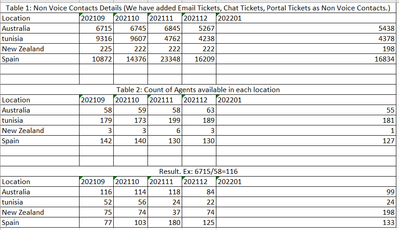
Table 1: Non voice contact details which is in Number format has sum of Non voice contacts as Email tickets, Chat tickets and Portal Tickets.

Table 2: Count of No of Agents.

Month is in Columns


Result: I need to divide Non voice contact details & Count of No of Agents. In Excel, iam getting correct result, but in PowerBI it is showing differently.


Attached Screenshot.

arun2001mjl_0-1649075843102.png


1 ACCEPTED SOLUTION
Icey
Community Support
Community Support

Hi @arun2001mjl ,


Based on your scenario, it is suggested to merge your two tables into one. Detailed steps:


1. I add one Index column in Table 1 to sort the Location column later.

Icey_1-1649296301342.png

Icey_2-1649296320272.png


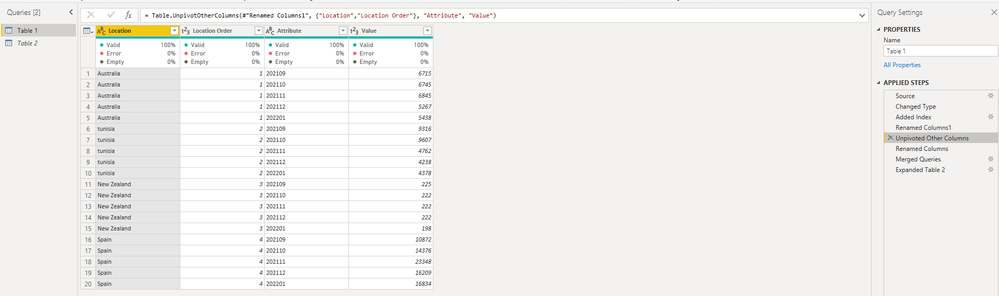
2. UnPivot other columns both in Table 1 and Table 2.

Icey_3-1649296359721.png

Icey_4-1649296428960.png


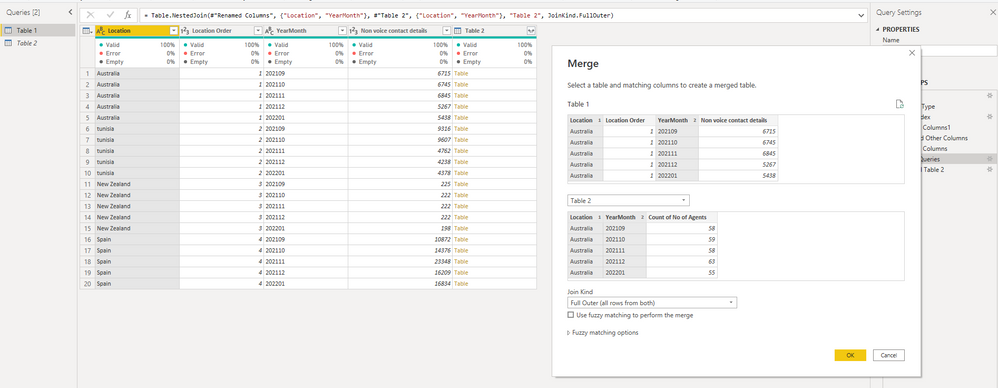
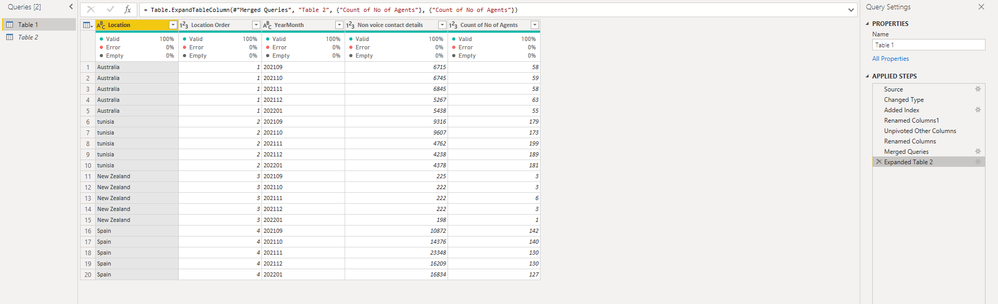
3. Change column names based on your requirements and merge queries.

Icey_5-1649296488390.png

Icey_6-1649296580786.png


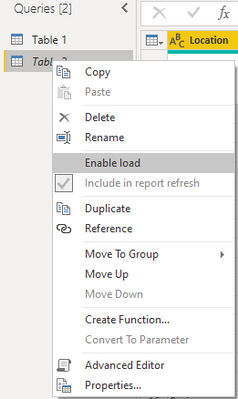
4. Uncheck "Enable load" of Table 2.

Icey_7-1649296612525.png


5. Close and Apply.


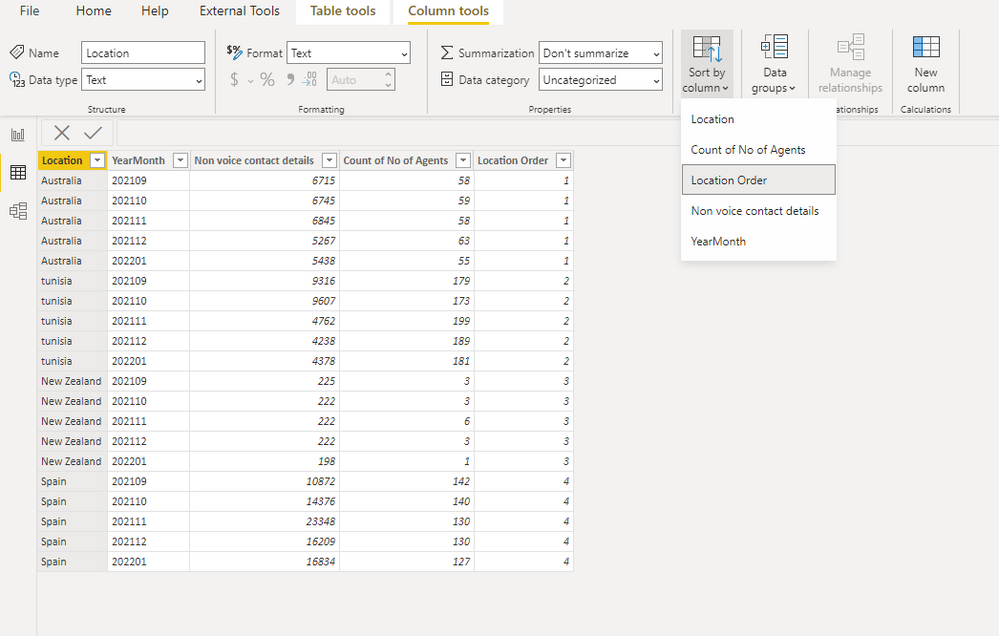
6. Sort Location column by Location Order column.

Icey_8-1649296723002.png


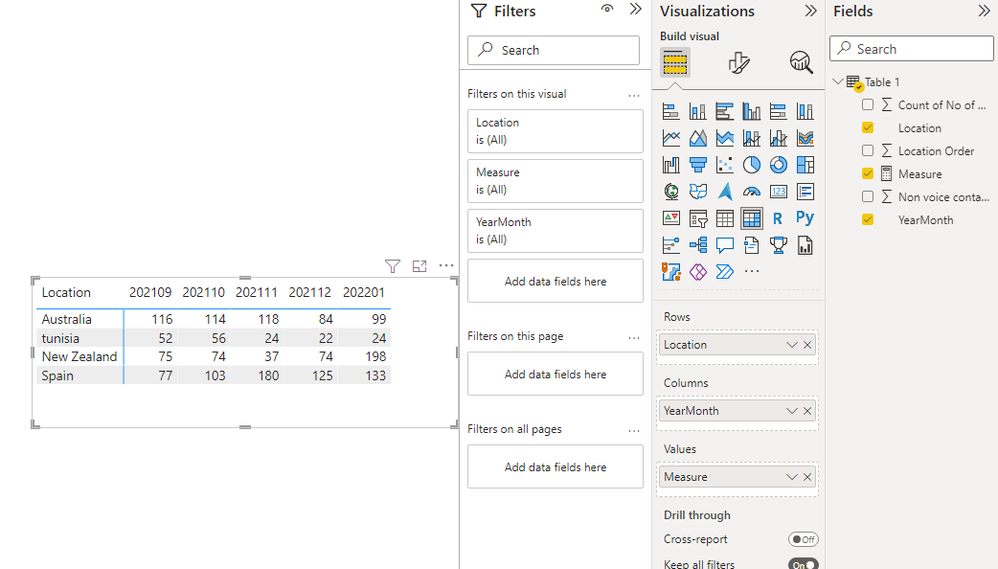
7. Create a measure.

Measure = 
DIVIDE (
    SUM ( 'Table 1'[Non voice contact details] ),
    SUM ( 'Table 1'[Count of No of Agents] )
)

Icey_0-1649296173474.png


Best Regards,

Icey


If this post helps, then please consider Accept it as the solution to help the other members find it more quickly.

View solution in original post

2 REPLIES 2
arun2001mjl
Helper II
Helper II

In Table 1 & 2, i have multiple columns other than Delivery Location, Date, count of agents, non-voice contact details. If i Unpivot columns Table 1 & 2, it will disturb other visuals too. In this case, how to proceed further?

Icey
Community Support
Community Support

Hi @arun2001mjl ,


Based on your scenario, it is suggested to merge your two tables into one. Detailed steps:


1. I add one Index column in Table 1 to sort the Location column later.

Icey_1-1649296301342.png

Icey_2-1649296320272.png


2. UnPivot other columns both in Table 1 and Table 2.

Icey_3-1649296359721.png

Icey_4-1649296428960.png


3. Change column names based on your requirements and merge queries.

Icey_5-1649296488390.png

Icey_6-1649296580786.png


4. Uncheck "Enable load" of Table 2.

Icey_7-1649296612525.png


5. Close and Apply.


6. Sort Location column by Location Order column.

Icey_8-1649296723002.png


7. Create a measure.

Measure = 
DIVIDE (
    SUM ( 'Table 1'[Non voice contact details] ),
    SUM ( 'Table 1'[Count of No of Agents] )
)

Icey_0-1649296173474.png


Best Regards,

Icey


If this post helps, then please consider Accept it as the solution to help the other members find it more quickly.

Helpful resources

Announcements
Join our Fabric User Panel

Join our Fabric User Panel

Share feedback directly with Fabric product managers, participate in targeted research studies and influence the Fabric roadmap.

February Power BI Update Carousel

Power BI Monthly Update - February 2026

Check out the February 2026 Power BI update to learn about new features.

FabCon Atlanta 2026 carousel

FabCon Atlanta 2026

Join us at FabCon Atlanta, March 16-20, for the ultimate Fabric, Power BI, AI and SQL community-led event. Save $200 with code FABCOMM.