Join us at FabCon Atlanta from March 16 - 20, 2026, for the ultimate Fabric, Power BI, AI and SQL community-led event. Save $200 with code FABCOMM.
Register now!Get Fabric Certified for FREE during Fabric Data Days. Don't miss your chance! Request now
Hello Community,
Can you please review below and provide your suggestion? I am not sure how to deal with below requirements.
Thanks
| RAW DATA | ||
| ID | Province | Budget |
| A | Ontario | |
| A | 2000 | |
| A | ||
| B | ||
| B | Nova Scotia | |
| B | ||
| B | 1500 | |
| C | Alberta | 2000 |
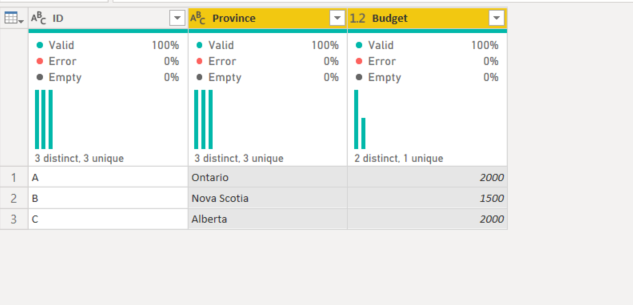
| Final Result | ||
| ID | Province | Budget |
| A | Ontario | 2000 |
| B | Nova Scotia | 1500 |
| C | Alberta | 2000 |
Solved! Go to Solution.
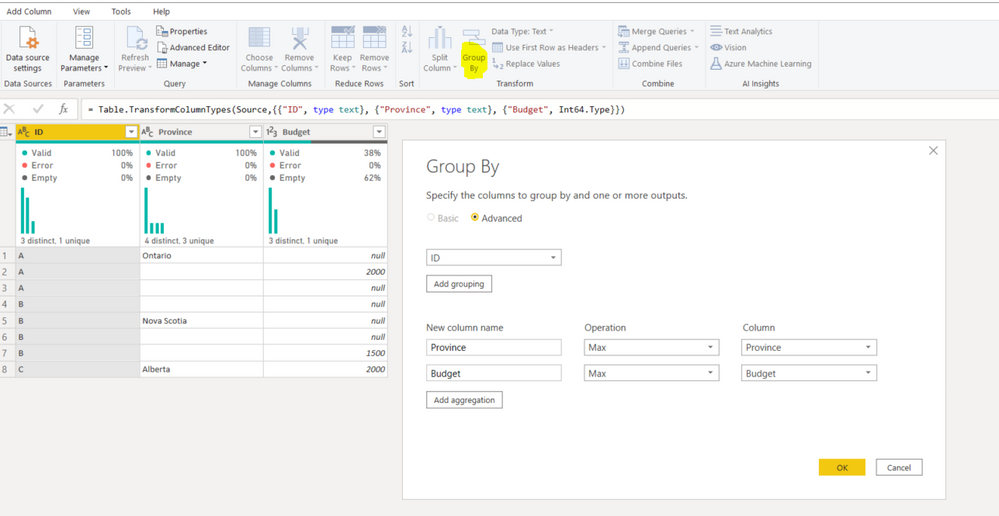
Try using Group By option inside Power Query.
Select column ID > choose Group by option > add these rules:
If you need the result in a visual.
Create two measures
_province = MAX([province]
_budget = MAX([budget]and ID in the columns section of metrix
annd above created function in values.
Try using Group By option inside Power Query.
Select column ID > choose Group by option > add these rules:
Check out the November 2025 Power BI update to learn about new features.
Advance your Data & AI career with 50 days of live learning, contests, hands-on challenges, study groups & certifications and more!