- Power BI forums
- Updates
- News & Announcements
- Get Help with Power BI
- Desktop
- Service
- Report Server
- Power Query
- Mobile Apps
- Developer
- DAX Commands and Tips
- Custom Visuals Development Discussion
- Health and Life Sciences
- Power BI Spanish forums
- Translated Spanish Desktop
- Power Platform Integration - Better Together!
- Power Platform Integrations (Read-only)
- Power Platform and Dynamics 365 Integrations (Read-only)
- Training and Consulting
- Instructor Led Training
- Dashboard in a Day for Women, by Women
- Galleries
- Community Connections & How-To Videos
- COVID-19 Data Stories Gallery
- Themes Gallery
- Data Stories Gallery
- R Script Showcase
- Webinars and Video Gallery
- Quick Measures Gallery
- 2021 MSBizAppsSummit Gallery
- 2020 MSBizAppsSummit Gallery
- 2019 MSBizAppsSummit Gallery
- Events
- Ideas
- Custom Visuals Ideas
- Issues
- Issues
- Events
- Upcoming Events
- Community Blog
- Power BI Community Blog
- Custom Visuals Community Blog
- Community Support
- Community Accounts & Registration
- Using the Community
- Community Feedback
Register now to learn Fabric in free live sessions led by the best Microsoft experts. From Apr 16 to May 9, in English and Spanish.
- Power BI forums
- Forums
- Get Help with Power BI
- Desktop
- Re: Need help setting up a logistics visual
- Subscribe to RSS Feed
- Mark Topic as New
- Mark Topic as Read
- Float this Topic for Current User
- Bookmark
- Subscribe
- Printer Friendly Page

- Mark as New
- Bookmark
- Subscribe
- Mute
- Subscribe to RSS Feed
- Permalink
- Report Inappropriate Content
Need help setting up a logistics visual
I need to make a dashboard that shows what items that sells good in different warehouses.
so if warehouse L10 sells a certain item as item class code vk2 (the bad class) then i whant it
to show if there are any other warehouses that sells it in item class code vk1.
So
if warehouse and item equals vk2 then show what warehouses and item equals vk1
It would be great if i could choose a warehouse number from a filter
then i shows a list of items we have in vk2, then show in another list what warehouses
has that item in vk1.
Any surgestions on how im gona set this up? im still new to power bi and eager to learn.
Columns names "Warehouse number" "Item" "Item class"
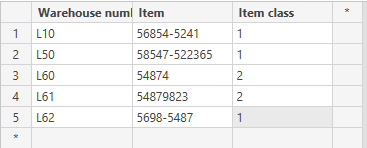
Solved! Go to Solution.


- Mark as New
- Bookmark
- Subscribe
- Mute
- Subscribe to RSS Feed
- Permalink
- Report Inappropriate Content
@Anonymous
Hi Robin,
That's OK. I found a solution. Please reference this file: https://1drv.ms/u/s!ArTqPk2pu-BkgRhSiy4U2C9zaXVG
1. Create a new table "WH".
WH =
VALUES ( 'Table1'[WareHouse Number] )
2. Establish relationship.
3. Create a measure.
FinalMeasure =
VAR selectedWH =
    IF (
        HASONEVALUE ( WH[WareHouse Number] ),
        VALUES ( WH[WareHouse Number] ),
        BLANK ()
    )
VAR selectedWHvk2 =
    CALCULATETABLE (
        VALUES ( Table1[Item] ),
        FILTER (
            ALL ( 'Table1' ),
            'Table1'[Item Class] = 2
                && 'Table1'[WareHouse Number] = selectedWH
        )
    )
RETURN
    CALCULATE (
        IF (
            MIN ( 'Table1'[Item] ) IN selectedWHvk2
                && MIN ( 'Table1'[Item Class] ) = 1,
            1,
            0
        ),
        ALL ( WH )
    )
4. Create several visuals.
5. Filter the result. (Visual level filter)
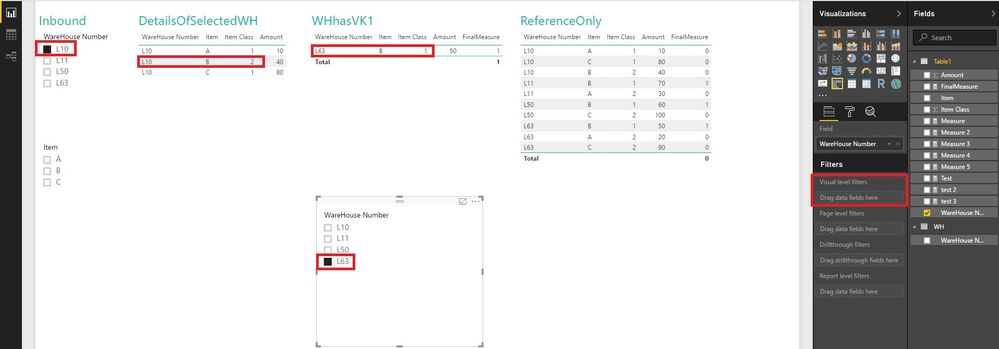
Note: 1. The slicers are from different tables. Don't mix up.
2. All the columns are needed in the visual as the picture showed.
Best Regards!
Dale
If this post helps, then please consider Accept it as the solution to help the other members find it more quickly.
- Mark as New
- Bookmark
- Subscribe
- Mute
- Subscribe to RSS Feed
- Permalink
- Report Inappropriate Content
Hi @Anonymous,
After a lot of test, I have some questions here.
1. The vk2 and vk1 aren't in the sample. I am a little confused.
2. If L10 sells 56854-5241 as class 1, you want to find out the warehouses that sells 56854-5241 but the class is 2. Am I right?
3. Are the vk2 (2) and vk1 (1) static? Or you want to change them dynamically?
Best Regards!
Dale
If this post helps, then please consider Accept it as the solution to help the other members find it more quickly.
- Mark as New
- Bookmark
- Subscribe
- Mute
- Subscribe to RSS Feed
- Permalink
- Report Inappropriate Content
Hi Dale and thank you very mutch for the assistance!
1: Sorry i dide not call it VK1 and VK2 in the sample, i just wrote 1 and 2
it should be Item class then either VK1 or VK2
2: Its the oposite. If L10 sells the item in VK2 that means it dosent sell good. so then i whanto know what other warehouse sells the same item in VK1 witch is very good. its an overview so that a warehouse that dosent sell some items well in his region can send it to a region were it sells good
VK1 Good
VK2 baaad
🙂
3: Im not sure what you mean here. The item classification is set in store for different warehouses unless changed if sales is on the rise
- Robin
- Mark as New
- Bookmark
- Subscribe
- Mute
- Subscribe to RSS Feed
- Permalink
- Report Inappropriate Content
@Anonymous,
Hi Robin,
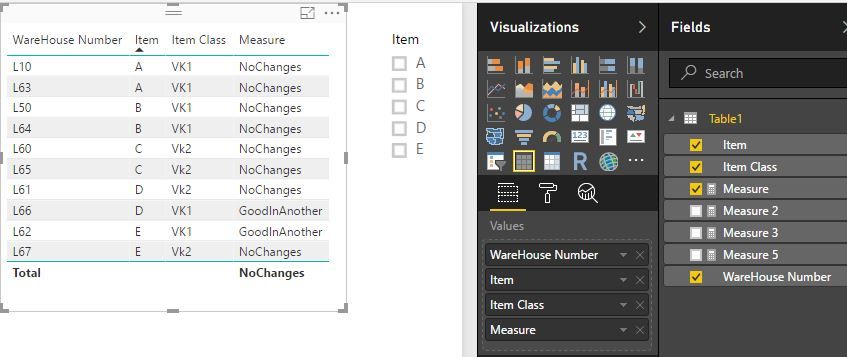
You can try this measure.
Measure =
VAR allSoldBad =
    CALCULATETABLE (
        VALUES ( Table1[Item] ),
        FILTER ( ALL ( Table1 ), 'Table1'[Item Class] = "vk2" )
    )
RETURN
    IF (
        MIN ( 'Table1'[Item] ) IN allSoldBad
            && MIN ( 'Table1'[Item Class] ) = "vk1",
        "GoodInAnother",
        "NoChanges"
    )
Best Regards!
Dale
If this post helps, then please consider Accept it as the solution to help the other members find it more quickly.
- Mark as New
- Bookmark
- Subscribe
- Mute
- Subscribe to RSS Feed
- Permalink
- Report Inappropriate Content
Yes it dose work, but is it possible to make it show what warehouse number its good at?
The example i made is just a few rows. but the actual data is 10 of thousands of item numbers
- Mark as New
- Bookmark
- Subscribe
- Mute
- Subscribe to RSS Feed
- Permalink
- Report Inappropriate Content
Hi @Anonymous,
In the sample, we can use this measure to list the warehouses in one row. One precondition: one item only has one class in a special warehouse.
Measure 2 =
VAR allSoldBad =
    CALCULATETABLE (
        VALUES ( Table1[Item] ),
        FILTER ( ALL ( Table1 ), 'Table1'[Item Class] = "vk2" )
    )
RETURN
    CONCATENATEX (
        FILTER (
            SUMMARIZE (
                'Table1',
                'Table1'[WareHouse Number],
                'Table1'[Item],
                "IfGood", IF (
                    MIN ( 'Table1'[Item] ) IN allSoldBad
                        && MIN ( 'Table1'[Item Class] ) = "vk1",
                    1,
                    0
                )
            ),
            [IfGood] = 1
        ),
        [WareHouse Number],
        "-"
    )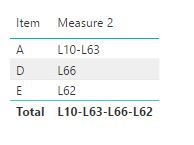
Or use the visual level filters.
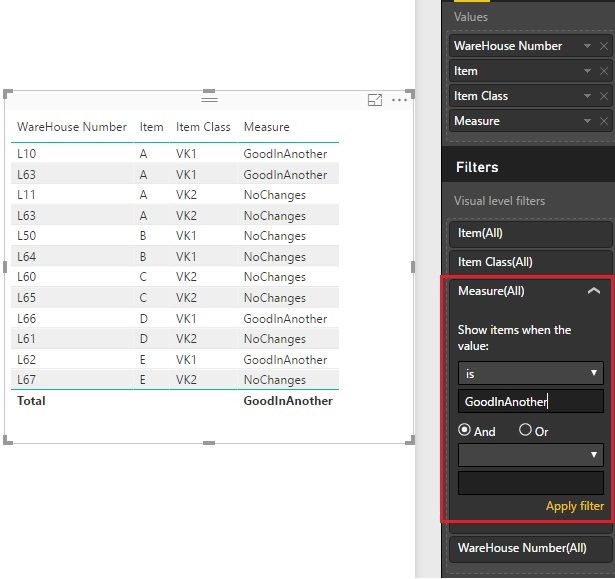
Best Regards!
Dale
If this post helps, then please consider Accept it as the solution to help the other members find it more quickly.
- Mark as New
- Bookmark
- Subscribe
- Mute
- Subscribe to RSS Feed
- Permalink
- Report Inappropriate Content
Hi Dale
I think we are missunderstanding each other, this dosent seam to work for me =/
I have made a pivot so far, and got a very clunky list over item numbers with item classification.
Here we can see all the warehouse number sorted by item classification 1 - 2
and we can see what item is in item class 1 in 1 warehouse and item class 2 in the other.
So my question to you is,
Can we filter this somehow? so we only see the item numbers that are actualy in stock at 2 different warehouses with 2 different classifications?
I am very sorry if im explanin this poorly, english is not my first language
- Robin

- Mark as New
- Bookmark
- Subscribe
- Mute
- Subscribe to RSS Feed
- Permalink
- Report Inappropriate Content
@Anonymous,
Hi Robin,
We can add a calculated column to the table. Then we can use this column in the slicer.
Status =
VAR statuss =
    CALCULATE (
        DISTINCTCOUNT ( [Item Class] ),
        FILTER (
            ALLEXCEPT ( 'Table1', Table1[Item] ),
            'Table1'[Item Class] IN { 1, 2 }
        )
    )
RETURN
    IF ( statuss = 2, 1, 0 )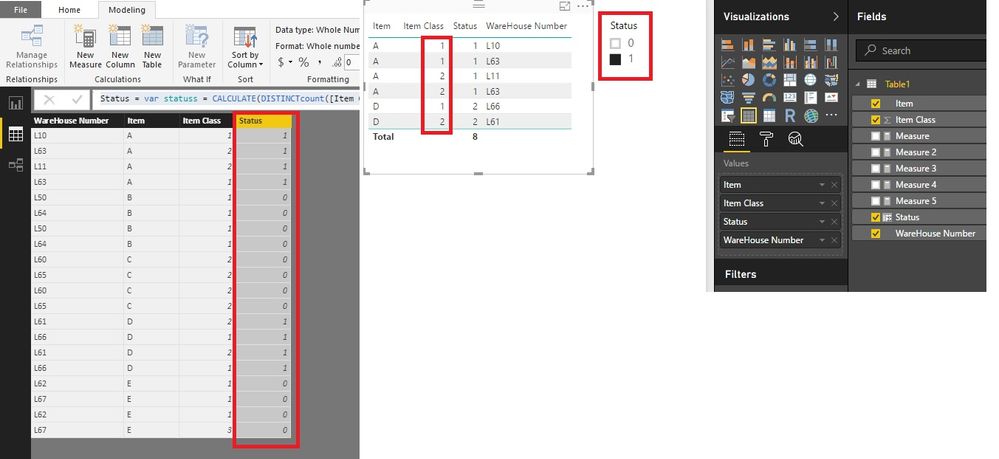
You can check the file here: https://1drv.ms/u/s!ArTqPk2pu-BkgRhSiy4U2C9zaXVG
Best Regards!
Dale
If this post helps, then please consider Accept it as the solution to help the other members find it more quickly.
- Mark as New
- Bookmark
- Subscribe
- Mute
- Subscribe to RSS Feed
- Permalink
- Report Inappropriate Content
Very nice! We are getting closer and closer.
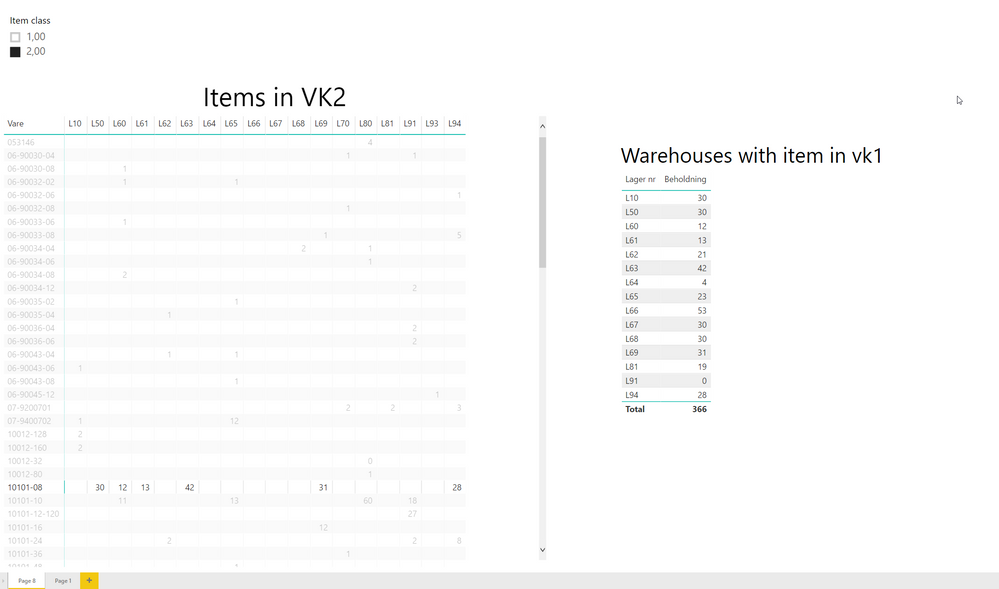
As shown in the picture, this is as far i have gotten. Youre latest post is nice but i think again it might be a missunderstanding =/ i dose look like you put a great deal of work into it. I apologise for my poor explanation.
As you can see on the image, there is an overview of items in item class vk2 and what warehouses currently have it in VK2.
I limited the slicer to only effect that matrix
The other matrix is filtered to only VK1 so when you click an item(vare) it shows what warehouses has that item in vk1.
The only problem now, is that i need a way for a warehouse to figure out if a specifik warehouse has their items in vk1.
If they have a transport already going from lets say L10 to L60 i want them to be able to see if they can send enny vk2 items over to them if they have it in VK1.
Thank you Dale!
-Robi
- Mark as New
- Bookmark
- Subscribe
- Mute
- Subscribe to RSS Feed
- Permalink
- Report Inappropriate Content
Hi @Anonymous,
I think you have added more conditions to this question. For example, L10 has "A" of "vk2", L60 has "A" of "vk1". So there is a truck transports some A to L60. You want to know if "B" of "vk2" in L60 are "vk1" in the L10, then you can transport "B" BACK to L10 with the same truck. Right?
Best Regards!
Dale
If this post helps, then please consider Accept it as the solution to help the other members find it more quickly.
- Mark as New
- Bookmark
- Subscribe
- Mute
- Subscribe to RSS Feed
- Permalink
- Report Inappropriate Content
Yes that is exactly corrent sir.
I do appologise Dale, my head got abit messy with figuring out how to explane this, and yes, i dide add more conditions as i was trying to figure out the best way to use the data.
I should probably have mentioned that to
- Mark as New
- Bookmark
- Subscribe
- Mute
- Subscribe to RSS Feed
- Permalink
- Report Inappropriate Content
@Anonymous
Hi Robin,
That's OK. I found a solution. Please reference this file: https://1drv.ms/u/s!ArTqPk2pu-BkgRhSiy4U2C9zaXVG
1. Create a new table "WH".
WH =
VALUES ( 'Table1'[WareHouse Number] )
2. Establish relationship.
3. Create a measure.
FinalMeasure =
VAR selectedWH =
    IF (
        HASONEVALUE ( WH[WareHouse Number] ),
        VALUES ( WH[WareHouse Number] ),
        BLANK ()
    )
VAR selectedWHvk2 =
    CALCULATETABLE (
        VALUES ( Table1[Item] ),
        FILTER (
            ALL ( 'Table1' ),
            'Table1'[Item Class] = 2
                && 'Table1'[WareHouse Number] = selectedWH
        )
    )
RETURN
    CALCULATE (
        IF (
            MIN ( 'Table1'[Item] ) IN selectedWHvk2
                && MIN ( 'Table1'[Item Class] ) = 1,
            1,
            0
        ),
        ALL ( WH )
    )
4. Create several visuals.
5. Filter the result. (Visual level filter)
Note: 1. The slicers are from different tables. Don't mix up.
2. All the columns are needed in the visual as the picture showed.
Best Regards!
Dale
If this post helps, then please consider Accept it as the solution to help the other members find it more quickly.
- Mark as New
- Bookmark
- Subscribe
- Mute
- Subscribe to RSS Feed
- Permalink
- Report Inappropriate Content
Well done sir, well done!
Thank you very mutch Dale!
- Mark as New
- Bookmark
- Subscribe
- Mute
- Subscribe to RSS Feed
- Permalink
- Report Inappropriate Content
My pleasure.
Best Regards!
Dale
If this post helps, then please consider Accept it as the solution to help the other members find it more quickly.
Helpful resources

Microsoft Fabric Learn Together
Covering the world! 9:00-10:30 AM Sydney, 4:00-5:30 PM CET (Paris/Berlin), 7:00-8:30 PM Mexico City

Power BI Monthly Update - April 2024
Check out the April 2024 Power BI update to learn about new features.

Fabric Community Update - April 2024
Find out what's new and trending in the Fabric Community.

| User | Count |
|---|---|
| 95 | |
| 94 | |
| 80 | |
| 71 | |
| 64 |


| User | Count |
|---|---|
| 120 | |
| 105 | |
| 99 | |
| 81 | |
| 72 |