cancel
Showing results for 
Search instead for 
Did you mean: 

The Power BI Data Visualization World Championships is back! Get ahead of the game and start preparing now! Learn more

Reply
ResearchDev
Helper II
Helper II

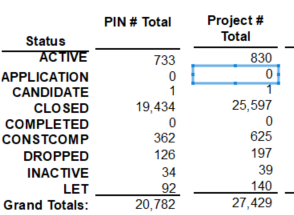
Need advise on how to recreate this

ResearchDev_0-1654872462243.png     

ResearchDev_1-1654872619435.png


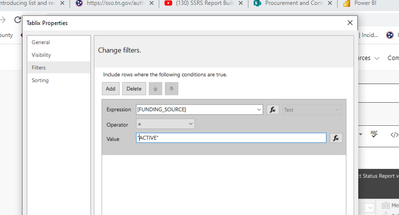
The list Project # Total is quite a bit more to the right but I showed only a small subset. This is what I did: I create a list > add datasource and then do a sum or then CountDistinct on some of the rows across while some are SUM and others but I had to add a filter to the tablix (see above). The problem is I tried to add a row below on the same table within the tablix and just add another filter in the tablix properties like above, the data comes out incorrect. Do I really need to add this slow approach then Like this: Add list > Add table > add filter in tablix for each and every ROW? Thanks


1 ACCEPTED SOLUTION
ResearchDev
Helper II
Helper II

Never mind I think I figured it out by doing something similar to the above. Have a big list > add separate tables with their own Filters and it works. 

View solution in original post

1 REPLY 1
ResearchDev
Helper II
Helper II

Never mind I think I figured it out by doing something similar to the above. Have a big list > add separate tables with their own Filters and it works. 

Helpful resources

Announcements
November Power BI Update Carousel

Power BI Monthly Update - November 2025

Check out the November 2025 Power BI update to learn about new features.

Fabric Data Days Carousel

Fabric Data Days

Advance your Data & AI career with 50 days of live learning, contests, hands-on challenges, study groups & certifications and more!

FabCon Atlanta 2026 carousel

FabCon Atlanta 2026

Join us at FabCon Atlanta, March 16-20, for the ultimate Fabric, Power BI, AI and SQL community-led event. Save $200 with code FABCOMM.

Top Solution Authors
Top Kudoed Authors