Join us at FabCon Atlanta from March 16 - 20, 2026, for the ultimate Fabric, Power BI, AI and SQL community-led event. Save $200 with code FABCOMM.
Register now!View all the Fabric Data Days sessions on demand. View schedule
Solved! Go to Solution.
Hi @kumar27,
You can make the visual smaller as per your requirement.
Yes, it does NOT give the exact result you want, but its a workaround.
Proud to be a Super User!
Hi @kumar27,
I doubt that you can do that.
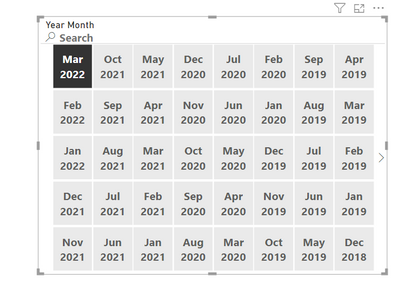
An alternative would be to use the year month column from your calendar table and make the slicer values to be shown as a grid of the size that you choose, like this.
You can do this by selecting the slicer and then under the formatting pane of the visual go to Slicer Settings > Options > Style
Hope this helps!
Proud to be a Super User!
Thanks @visheshjain for you reply . the problem with this is the amunt of space it will take
Hi @kumar27,
You can make the visual smaller as per your requirement.
Yes, it does NOT give the exact result you want, but its a workaround.
Proud to be a Super User!
Check out the November 2025 Power BI update to learn about new features.
Advance your Data & AI career with 50 days of live learning, contests, hands-on challenges, study groups & certifications and more!