
This time we’re going bigger than ever. Fabric, Power BI, SQL, AI and more. We're covering it all. You won't want to miss it.
Learn moreDid you hear? There's a new SQL AI Developer certification (DP-800). Start preparing now and be one of the first to get certified. Register now
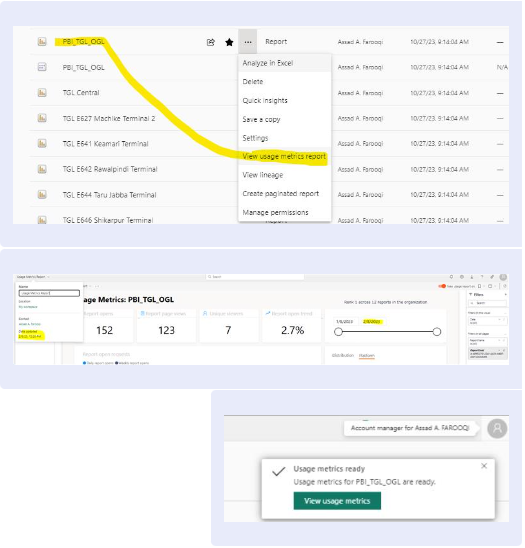
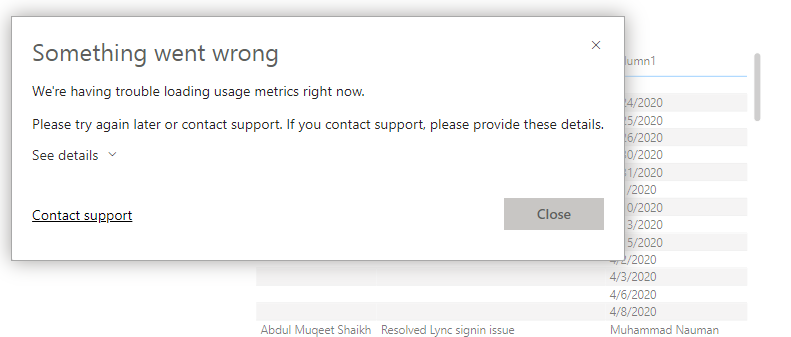
One user is facing the subjected issue on Power BI report, Previously the feature was working smoothly. If anyone have the solution then please share
Solved! Go to Solution.
Hi @rpk00193 ,
Thanks for reaching out to us about your problem. Base on your description, it seems that you are trying to view Usage Metrics Report get the error message even though you can view it normally before. Am I right? This can be caused by the fact that you don't have sufficient permissions now. Please check if you fulfill the following prerequisites:
Monitor usage metrics in the workspaces (preview)
Best Regards
Hi, thank you for your response.
in Power BI Services there is one report which was working fine earlier.
but now when we select the option "View Usage Metrics Report" it's not working.
Hi @rpk00193 ,
Thanks for reaching out to us about your problem. Base on your description, it seems that you are trying to view Usage Metrics Report get the error message even though you can view it normally before. Am I right? This can be caused by the fact that you don't have sufficient permissions now. Please check if you fulfill the following prerequisites:
Monitor usage metrics in the workspaces (preview)
Best Regards
Hi @rpk00193
The image is not clear, please share more details about the issue you are facing.
Proud to be a Super User! | |
Check out the April 2026 Power BI update to learn about new features.
Sign up to receive a private message when registration opens and key events begin.
If you have recently started exploring Fabric, we'd love to hear how it's going. Your feedback can help with product improvements.
| User | Count |
|---|---|
| 34 | |
| 31 | |
| 30 | |
| 21 | |
| 16 |
| User | Count |
|---|---|
| 62 | |
| 51 | |
| 31 | |
| 23 | |
| 23 |