Join us at FabCon Atlanta from March 16 - 20, 2026, for the ultimate Fabric, Power BI, AI and SQL community-led event. Save $200 with code FABCOMM.
Register now!Vote for your favorite vizzies from the Power BI Dataviz World Championship submissions. Vote now!
1. Automated Invoice ID Generator FOr eg :
| LOL-BOB201800040 |
and so on LOL-BOB201800041...................
2.I want to turn number into words
555.55
Solution
Five Hundred Fifty Five Dollars and fifty five cents
Hi @qwaiti27231,
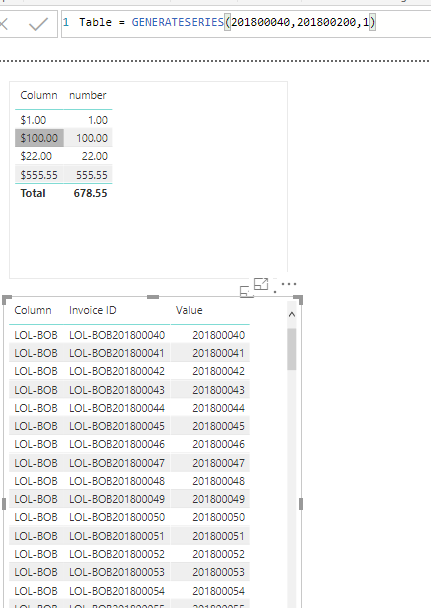
For the 1st question, we can create calculated table and columns as below.
Table = GENERATESERIES(201800040,201800200,1)
Column = "LOL-BOB"
Invoice ID = CONCATENATE('Table'[Column],'Table'[Value])
Or using the formula to create a calculated column is another close way.
Column = FORMAT(Table1[number],"Currency")
For more details ,please check the pbix as attached.
Regards,
Frank
For that 2nd question can u show me how to do it python ???
Vote for your favorite vizzies from the Power BI World Championship submissions!
If you love stickers, then you will definitely want to check out our Community Sticker Challenge!
Check out the January 2026 Power BI update to learn about new features.
| User | Count |
|---|---|
| 63 | |
| 50 | |
| 41 | |
| 23 | |
| 18 |
| User | Count |
|---|---|
| 134 | |
| 111 | |
| 50 | |
| 31 | |
| 29 |