Forum Discussion
Need Flag for every unique value
- Anonymous8 years ago
Hi
1. Add a index column starting 0( You can do this in Query Editor -> Add columns tab -> index column-> from 0)
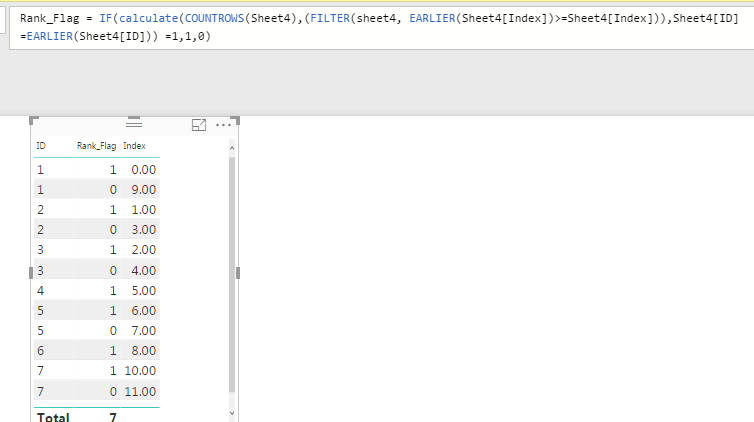
2. Create Rank_Flag column with the below formula:
Rank_Flag = IF(calculate(COUNTROWS(Table1),(FILTER(Table1, EARLIER(Table1[Index])>=Sheet4[Table1])),Table1[ID]=EARLIER(Table1[ID])) =1,1,0)
This will flag the first occurance of the ID . Hope this helps you.
Thanks
Raj
Hi
1. Add a index column starting 0( You can do this in Query Editor -> Add columns tab -> index column-> from 0)
2. Create Rank_Flag column with the below formula:
Rank_Flag = IF(calculate(COUNTROWS(Table1),(FILTER(Table1, EARLIER(Table1[Index])>=Sheet4[Table1])),Table1[ID]=EARLIER(Table1[ID])) =1,1,0)
This will flag the first occurance of the ID . Hope this helps you.
Thanks
Raj
Hi Anonymous,
Thanks for your reply.
Is there a way I can do the second step in query editor also.
Regards
Abhijit
- Anonymous8 years agoNot applicable
DAX measure is much faster and the calculations happens inmemoy. Is there any specific reason why you want to do this Query Editor?
Thanks
Raj